DJI Osmo Action 4
User Manual
12
©
2023 DJI All Rights Reserved.
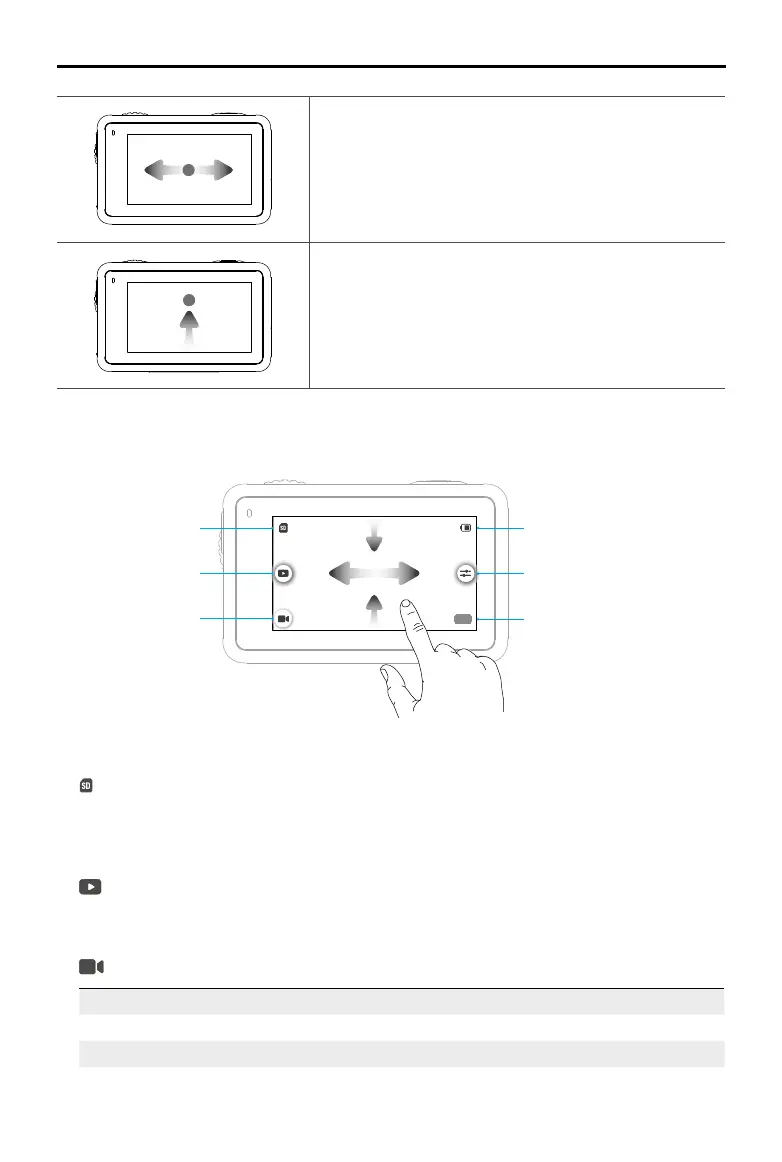
Swipe Left or Right
Switches between video, photo, and other shooting
modes.
Swipe Up from the Bottom of the Screen
Sets the shooting parameters such as Aspect Ratio,
Countdown Timer, and Resolution.
Camera View
20m22s
1
4
5
6
2
3
1. Storage Capacity Information
: the icon displays either the storage capacity, the remaining number of photos or
the video duration that can be taken or recorded according to the current shooting mode.
The icon is displayed only when a microSD card is inserted.
2. Playback
: tap to preview the last photo or video captured or played back. Swipe from the right to
exit playback and go back to liveview.
3. Shooting Modes
: tap the icon and swipe to select the shooting mode.
Shooting Modes Description
Take a photo Take a photo or countdown photo.
Video Record a video.



 To Next Page