16
©
2016 DJI All Rights Reserved.
OSMO+ User Manual
*GZPVBSFVTJOHUIF0TNPGPSUIFmSTUUJNFGPMMPXUIFPOTDSFFOJOTUSVDUJPOTUPBDUJWBUFJU
You will need to log in to your DJI account through an Internet connection. Re-connect to
the Osmo+ Wi-Fi network after the activation is complete.
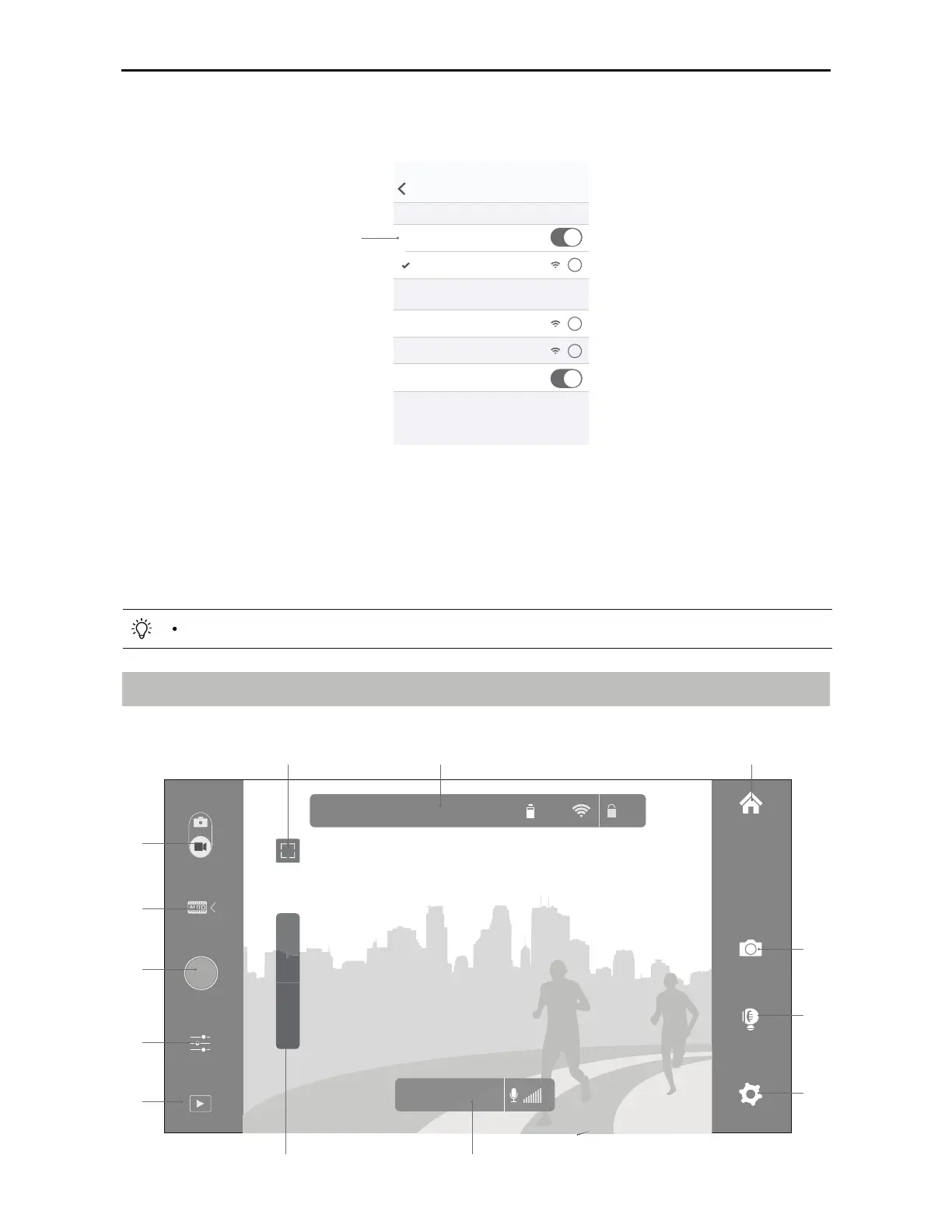
4. Enter Camera View. You will see what the camera captures in real time if it is connected
successfully.
2. On your mobile device, connect to the ‘OSMO_XXXXXX’ Wi-Fi network and enter the
default password 12341234. Then launch the DJI GO app.
Key Pages
1. Equipment
>
Camera
8J'J
4FUUJOHT
8J'J
CHOOSE A NETWORK...
OSMO_XXXXXX
J
J
J
Other...
Ask to Join Networks...
Known networks will be joined automatically. If no
known networks are available, you will have to manually
select a network.
&OBCMF8J'J
There will be a tutorial on how to use your Osmo+ after entering the camera view.
00:00:00 | 01:25:45
ISO:100 1/25 f:2.8 EV:0 JPEG 453 89%
AE
T
W
<>
<>
<>
<>
<>
<>
<>
<>
<>
<><>
<><>



 To Next Page