DJI RS 3 Mini
User Manual
25
©
2023 DJI All Rights Reserved.
Create
Virtual Joystick
6
3
2
4
5
1
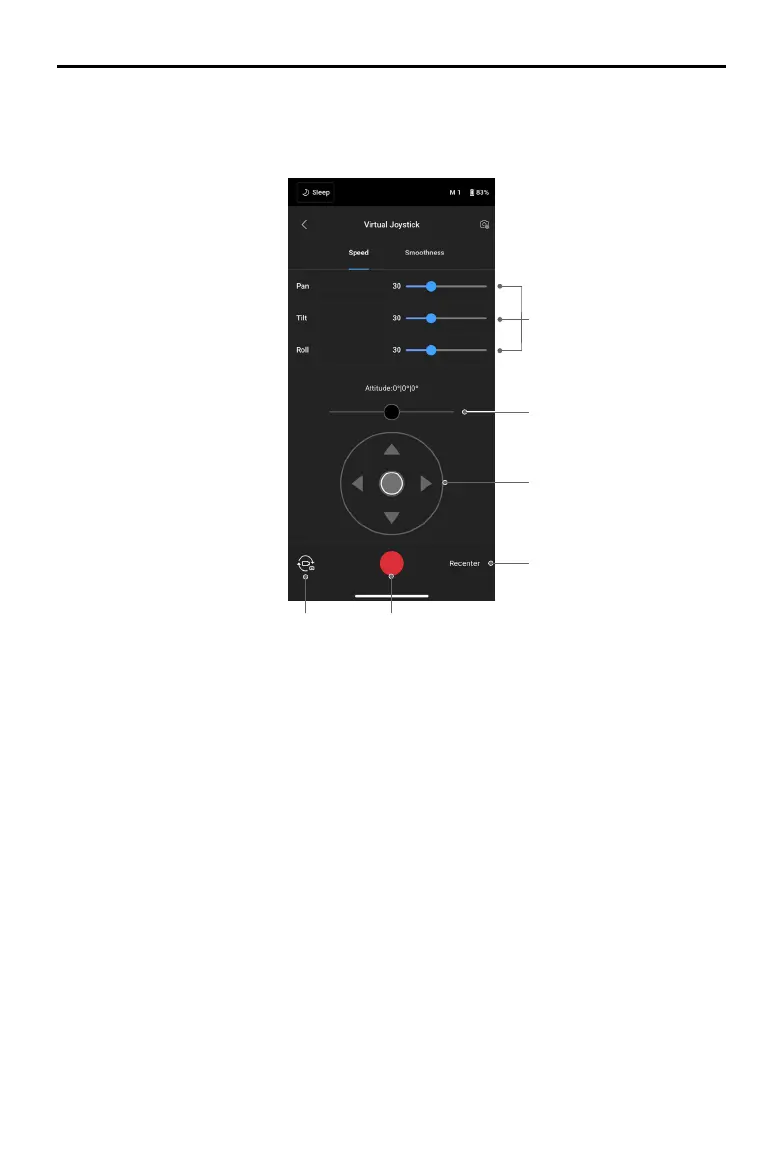
Use the virtual joystick in the app to control the movement of the gimbal and to capture images
or record video.
1. Control Bar: control the speed and smoothness of the gimbal by adjusting the control bar.
Speed allows users to adjust the remote-controlled rotational speed. Smoothness allows
users to adjust the sensitivity of the gimbal. The lower the smoothness value, the more
sensitive the movement of the gimbal.
2. Roll Stick: control the roll axis movement of the gimbal using the virtual joystick.
3. Pan/Tilt Stick: control the pan and tilt axis movement of the gimbal using the virtual
joystick.
4. Recenter: tap to recenter the gimbal.
5. Shoot/Record Button: tap to take photos or record videos.
6. Photo/Video Toggle: tap to switch between photo and video modes. Make sure the mode is
the same as the settings on the camera.


 To Next Page