General Operation
Switching the radio on / off
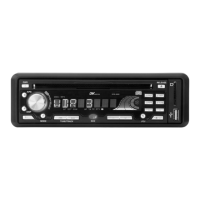
Press the PWR button with the car ignition turned on to switch on the device. The buttons
now light up in blue and you can read Welcome in the display, which quickly disappears.
Then the radio frequency is displayed. Push the button again to switch off the device.
Controlling the volume
Turn the VOL knob clockwise to increase the volume. In the display you can read a value
between 0 and 47. Turn the knob anticlockwise to reduce the volume.
Tone control
Bass
When you press the PUSH SELECT button twice, BAS appears in the display for five
seconds. Now turn the VOL knob to lower or raise deep frequencies. The respective value
from -7 to+7isshown in the display.
Treble
When you press the PUSH SELECT button three times, TRE appears in the display for five
seconds. Now turn the VOL knob to lower or raise high frequencies. The respective value
from -7 to+7isshown in the display.
Balance
When you push the PUSH SELECT button four times, BAL appears in the display for five
seconds. Now turn the VOL knob to adjust the volume ratio between right and left
loudspeakers. The respective value between 10L (left side only) and 0 (centred) to 10R
(right side only) is shown in the display.
Fader
When you push the PUSH SELECT button five times, FAD appears in the display for five
seconds. Now turn the VOL knob to adjust the volume ratio between front and rear
loudspeakers. The respective value between 10R (rear loudspeakers only) and 0 (centred)
to 10F (front loudspeakers only) is shown in the display.
Other settings
Press the PUSH SELECT button for two seconds. When you press the PUSH SELECT button
again for a short period of time, you can now set many parameters for the operating modes
of the device:
1. TA ALARM / TA SEEK
The display now shows TA ALARM or TA SEEK for approx. 10 seconds. This means:
• TA ALARM - If you activate the TA function (page 14) only for listening to radio channels,
which broadcast traffic reports as well and you select a radio channel, which does not
broadcast traffic reports, the device will notify you of that fact by a regular “beep” sound
and by displaying “NO TP,TA”.
• TA SEEK - If you activate the TA function and you select a radio channel, which does not
broadcast traffic reports, the device will automatically seek a radio channel, which
11


 To Next Page