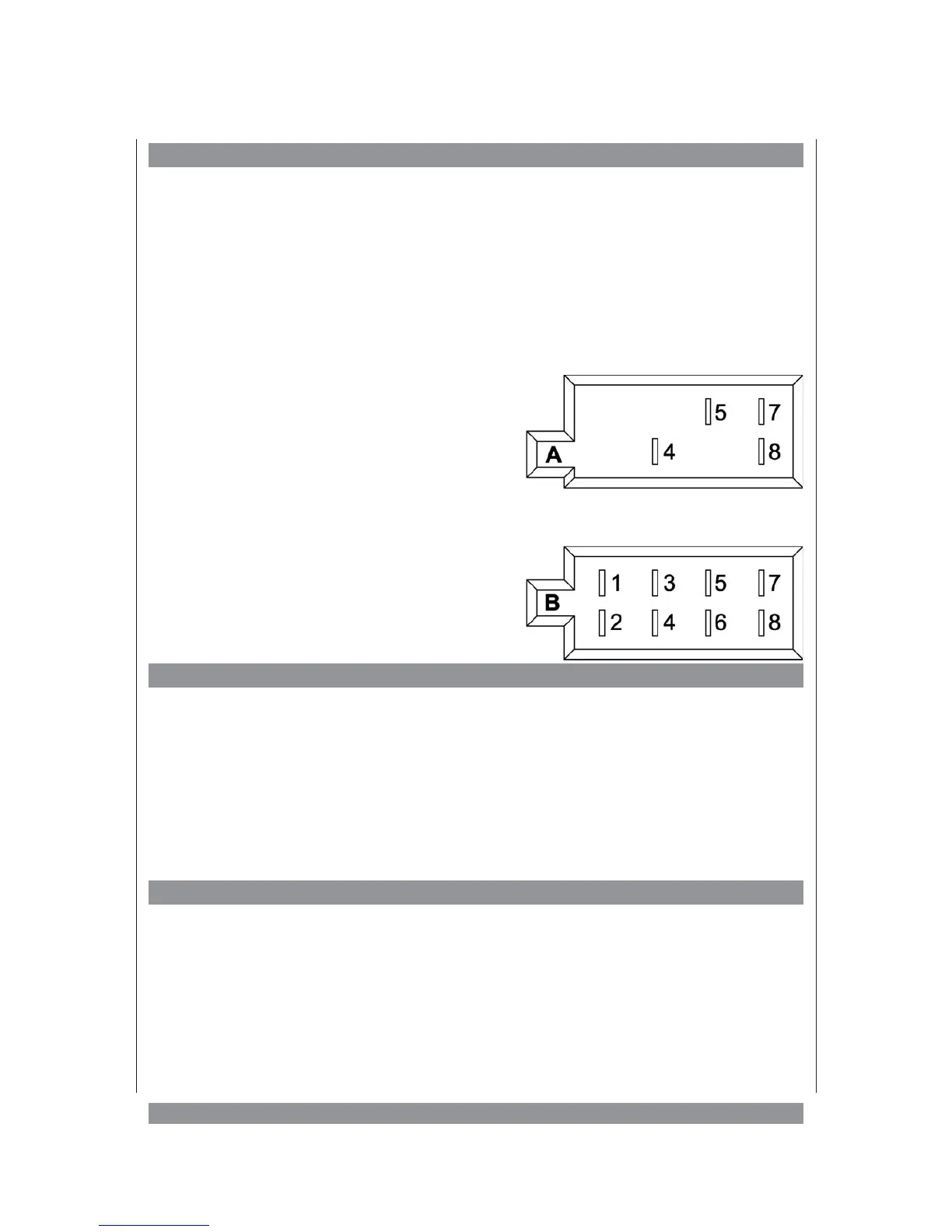
ISO connection
The car radio is fitted with an ISO connection. Please check before installation if the
necessary electrical connections in the dashboard are provided by a corresponding ISO
plug. If that is not the case, you can purchase such a plug in a car accessories store. The
wiring of the plug is printed on the respective cable sections. Connect the cables of the ISO
plug with the cables in the dashboard of your car.
For your orientation, please find the wiring listed below:
Connection A
1. 2. 3. 6.: unused
4. +12 Volt (Memory retention)
5. +12 Volt control output for car aerial or
power amplifier
7. +12 Volt operating voltage, switched by
ignition lock
8. ground
Connection B
1. + Loudspeaker rear right
2. — Loudspeaker rear right
3. + Loudspeaker front right
4. — Loudspeaker front right
5. + Loudspeaker front left
6. — Loudspeaker front left
7. + Loudspeaker rear left
8. — Loudspeaker rear left
Replacing the fuse
The main fuse is situated next to the ISO connection. If you cannot switch on the device in
spite of correct installation and power supply, this fuse might be blown. In this case please
replace the fuse with one of the same type. If the replaced fuse blows as well, it might be
due to a malfunction in the device. In this case please contact your dealer or the office
specified in the guarantee.
Warning: Always replace a damaged fuse with a new fuse of the same type.
”Patching up“ fuses or using a fuse allowing a higher current might destroy the device. In
addition all warranty claims will become void.
Bluetooth control
Connect the Bluetooth control handset to the corresponding socket on the rear panel of the
car radio. During installation, make sure to insert the Bluetooth control through the
dashboard opening first. Then lay the cable accordingly.
6


 To Next Page