Scheduling your Heating
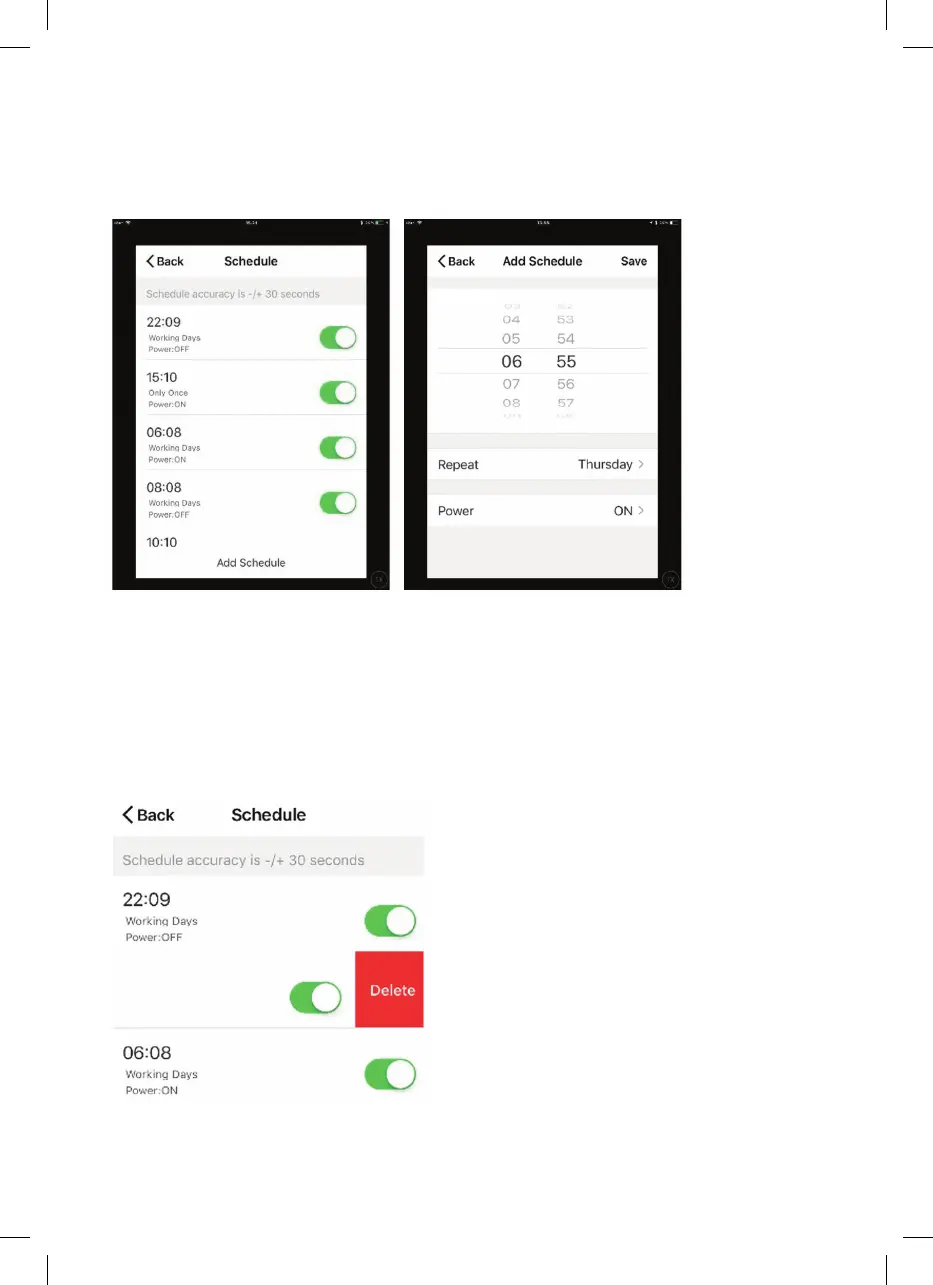
You can programme your heating by creating a schedule of “events”, where the heater
switches on or off. These events can be temporary, like setting a timer, or they can
be recurring, so the heater switches on at the same time every week. You can set an
unlimited number of events, switching the heater on and off across the week.
For every event, you must set a start time. Then, choose whether you want it to repeat.
Select “Only Once” if you just want to set a timer for now. If you want the event to repeat,
select which days you want it to occur. Finally, choose whether you want the heater to
switch on or off. Make sure you confirm your settings at every stage and press save to
save the event.
Each event will appear on your schedule. You can activate and deactivate events using
the toggle. You can also delete events by swiping left and tapping Delete.
The heater will beep when it begins a new heating event. The heater will heat at whatever
mode it was last set to; you cannot schedule mode changes. Note that if you change the
heater’s setting during an event—i.e., turning it on when it is scheduled to be off—the
heater will remain as it is until the next scheduled event.


 To Next Page