19
2.
For best treatment results asufficiently dry working
area is critical. Therefore, appropriate measures like
rubber dam or liquid dam must be taken. Please fol
-
low the manufacturer’s specifications and instruc-
tions. Ensure that the treated lesion is complete-
ly accessible.
Uncovering the lesion body
For best treatment results the hyper mineralized sur-
face layer must be removed.
3. Screw the Smooth Surface-Tip onto the Icon-Etch
syringe.
4.
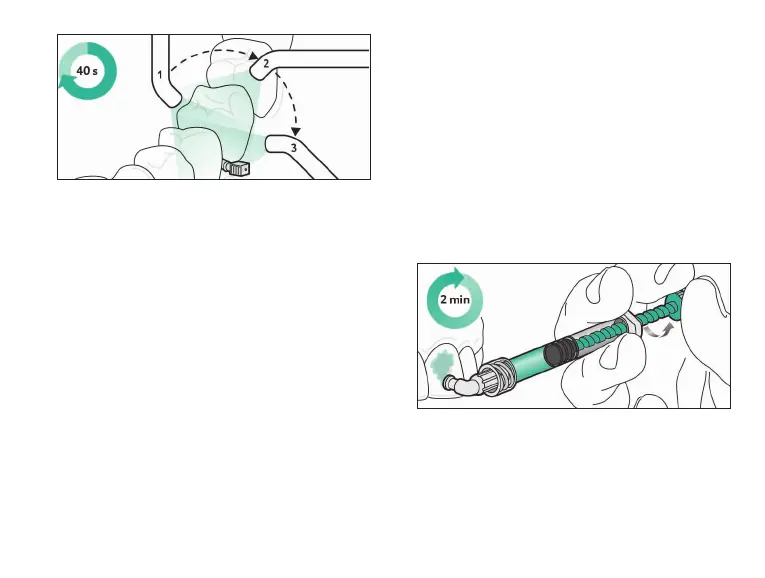
Apply an ample amount of Icon-Etch onto the lesion
site by turning the syringe shaft carefully, allow to
set for 2 minutes and activate it by moving. Remove
excess material with acotton wad.
12.
Light-cure Icon-Infiltrant from all sides for at least
40 s(total).
13.
Screw anew Proximal-Tip onto the Icon-Infiltrant
syringe, repeat the application, and allow to set for
1 minute. Remove the application tip from the inter-
dentium. Remove excess material with dental floss.
Then light-cure from all sides for at least 40 s(total).
14. If asecond lesion needs to be treated repeat steps
1 through 13 for the affected site.
15. Remove the wedge and rubber dam. Use polishing
strips for the surface finish.
Smooth surface treatment with Icon Caries
Infiltrant – Smooth Surface
Preparation
1.
Before the start of treatment, clean the affected
tooth and adjacent teeth. Remove any cleaning res-
idue with water spray.


 To Next Page