Intrusion | Fire | Access | Network | Cellular
Intrusion | Fire | Access | Network | Cellular
SPEC SHEET
Keypad display FuncTion
Enduserscaneasilysetscreenbrightness,
tone(frequency)andvolumeofkeypad
touches.Aftertappingthedesiredfunction,
theycantapthebargraphtoincreaseor
decreaseeachofthesettings,fortone,
volumeandbrightness.
cusTomiZe your display
InsertastandardmicroSDcardinthe
keypad slot to transfer your dealer logo
and dealer profile information to display on
thekeypad.Whenpressed,itprovidesyour
dealer contact information.
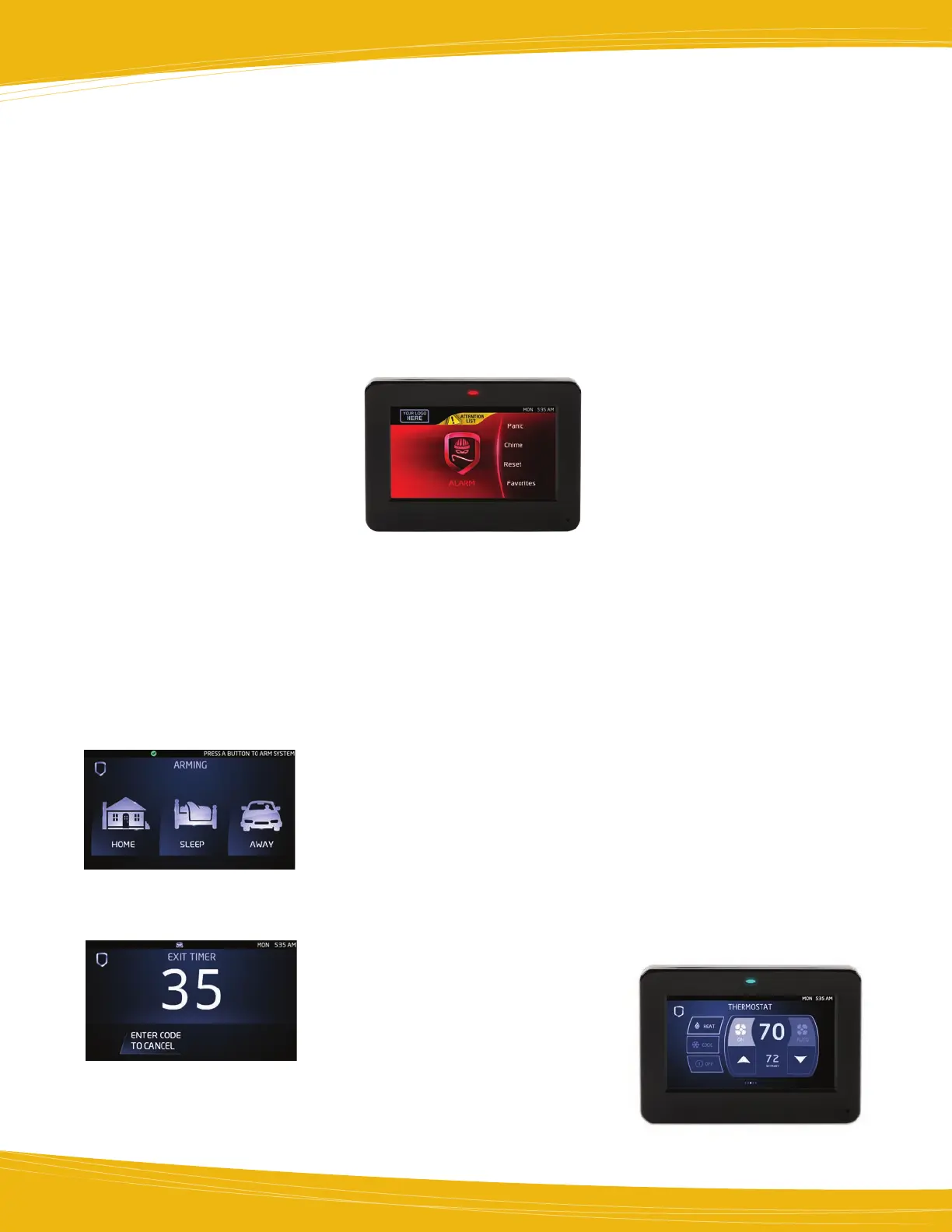
shield display
Basicarminganddisarminghasnever
beeneasierwiththeinteractiveshieldicon
displayedinthecenterofthekeypad.The
shield icon has three main functions. It
shows the arming status of the system at
aglance.Theshield'sanimatedborderwill
beasolidbluewhenarmedandtheinterior
willdisplaythetypeofarming:all,perimeter,
home,sleeporaway. Areamode also
supported.Whendisarmedtheareawillbe
transparentwiththeexceptionofanoutline
ofthe shield. Theshieldallows for quick
arming,sotheusercanpressandholdthe
shield down for 2 seconds and the system
quickarmsAwayandbeginstheexitdelay.
Theshieldalsoprovidesalinktostandard
arming and disarming options.
WhenthepanelisprogrammedinHome/
Sleep/Away,the user will first tap on the
interactiveshieldtodisplayarmingoptions.
Whenarming, the exit timer providesa
countdown for the programmed amount of
timetheuserhastoexit.Thetimerprovides
bothavisualandaudiblenotificationtoexit.
Touchpad conTrol
Theendusercanchoosetohaveanaudio
confirmation tone each time a screen touch
occurs.
LEDindicators(BlueandRed)indicatepower
andarmed/disarmedstatus,including
conditionofthebattery.
red Keypad
Duringanalarmstate,theshieldonmain
screenturnsRed.Thechangeincolorallows
theusertoinstantly recognizean alarm
condition,evenifthesirenhassilenced.The
shieldremainsreduntilresetbytheuser.
carousel menu
Thecarouselmenuonthe main screen
offerscommon functions such as panic,
chime,check-in, user menu, firereset,
options,andeasyexit™.Panickeysarepart
ofthecarouselmenu,oncepressed,three
iconswill appearforPANIC,EMERGENCY,
andFIRE.EasyExitisonlyavailablewhile
thesystem is armed. TraditionalDMP
shortcut keys will also work in the keypad
screen.
aTTenTion lisT
Afterdisarming, if an alarm on any zone
orcommunication problemhasoccured
whilearmed,theMainScreenmaydisplay
a yellow attention list icon at the top of the
screen.Whentouched,theattentionlist
displayslistingthezoneandevent.
weaTher inFormaTion
Up-to-dateweatherinformationfortoday
andtomorrowwill bedisplayedonthe
bottomleftoftouchscreensthatareinstalled
withCellor Network connected panels.
Network connected panels will also display
the current temperature. If the panel
isnotcapableor supporting weather,
thespacewillbeblank.Eighticonsare
availabletoindicatetheweather:SUNNY,
CLEAR,P-CLOUDY,CLOUDY,RAINY,SNOWY,
STORMY,andFOGGY.
VersaTile superVised and
unsuperVised operaTion
Whenprogrammedforsupervisedoperation,
thekeypadoccupiesitsownuniquedevice
addressonthekeypaddatabus.
Unsupervisedoperationallows youto
installanunlimitednumberof keypads
settothesamedeviceaddress.Increasing
thenumberofkeypadsallows maximum
systemoperatingflexibility.
“is This a False alarm?” and
cancel/VeriFy™
InaHome/Sleep/AwayorAll/Perimeter
system,youcanCANCELaburglaryalarm
orVERIFY that a valid burglar alarm has
occurred or similarly answer whether it
isafalsealarmwithYESorNO.Selecting
VERIFYorYESmanuallyverifiesthat
an alarm occurred and sends an alarm
verificationmessagetothecentralstation.
uniVersal proGramminG
Tool
The7800canbeusedforsysteminstallation
and programming.
Four expansion Zones
Zoneexpansionisavailable right on the
keypadwhereyouneeditthemost. The
fourexpansionzonesonthe7872and7873
modelsarefully programmableClass B
protectionzones that can be used for a
varietyof residentialfire,burglary, and
access control applications.
Z-waVe™ supporT
Addupto232Z-Wavedeviceswiththe738Z
moduleontheXTandXR150|XR350|XR550
SeriesPanels.Controlyourlights,locks,and
thermostatsallfromtheCarouselmenuon
theGraphicTouchscreen Keypad. Create
Favoritestoprogrammultipledevicesto
respondtoasinglecommandorpanelevent
like arming and disarming.
RedGraphicsscreenduringalarm
Z-WaveThermostatScreen



 To Next Page
 Loading...







