Dai Nippon Printing Co., Ltd.
[DP-DS620/DP-DS620 (A) Printer Driver] User’s Manual (For Windows XP)
C
C
h
h
a
a
p
p
t
t
e
e
r
r
1
1
I
I
n
n
s
s
t
t
a
a
l
l
l
l
a
a
t
t
i
i
o
o
n
n
1
1
.
.
1
1
P
P
r
r
e
e
p
p
a
a
r
r
e
e
t
t
h
h
e
e
p
p
r
r
i
i
n
n
t
t
e
e
r
r
a
a
n
n
d
d
c
c
o
o
m
m
p
p
u
u
t
t
e
e
r
r
Switch on the power of the DP-DS620 printer, and then use a USB cable to connect the printer and computer.
*For the connection, see the user’s manual of the DP-DS620.
If the Found New Hardware Wizard appears after connection, carry out the installation by following the procedure of “1.2
Found New Hardware Wizard”. If the Found New Hardware Wizard does not appear, carry out the installation by
following “1.3 Install using “Add a Printer””.
1
1
.
.
2
2
F
F
o
o
u
u
n
n
d
d
N
N
e
e
w
w
H
H
a
a
r
r
d
d
w
w
a
a
r
r
e
e
W
W
i
i
z
z
a
a
r
r
d
d
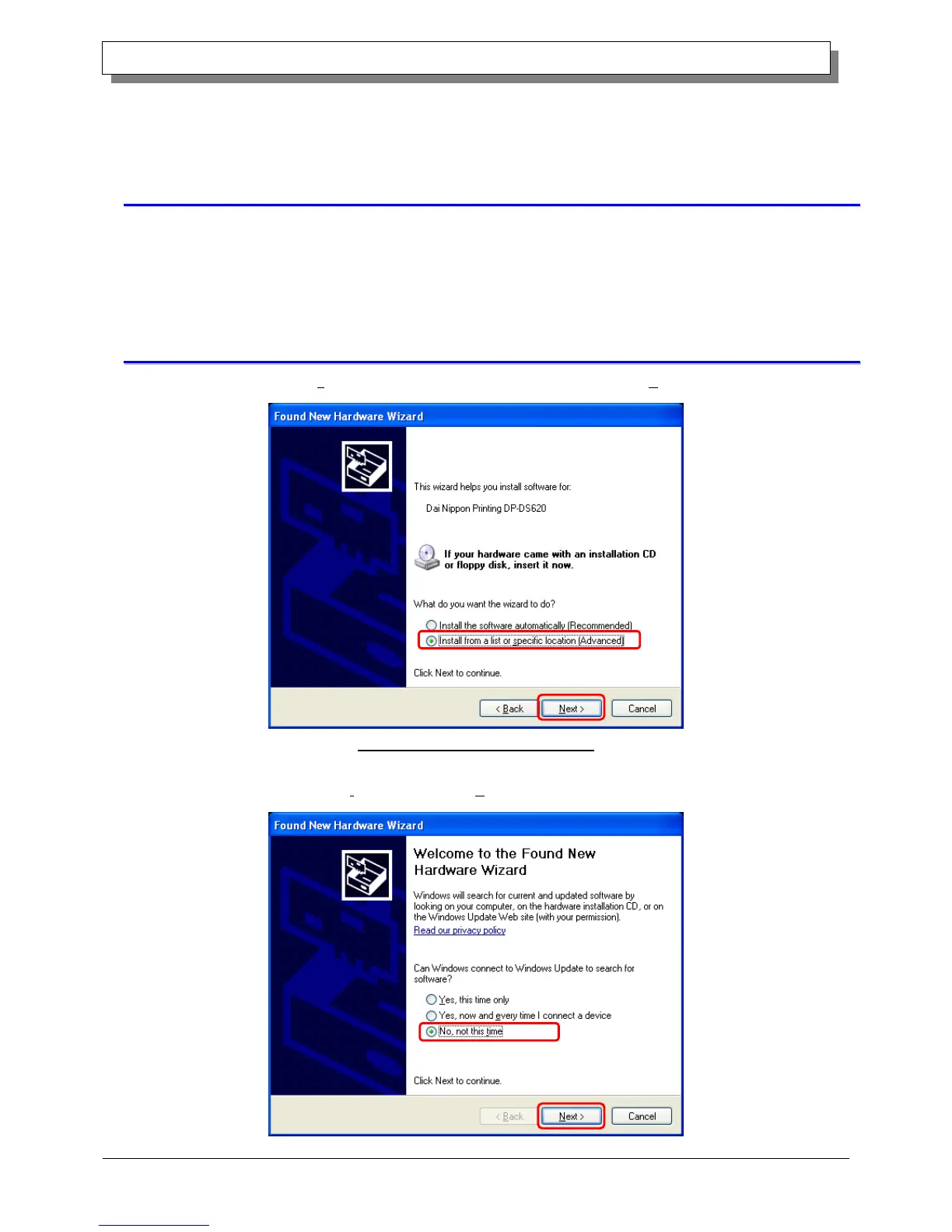
Confirm that "Install from a list or specific location (Advanced)" is selected, and then click "Next".
Figure 1.1 Found New Hardware Wizard
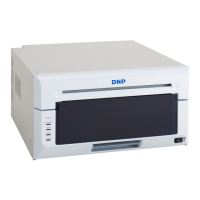
Note) If you are using Windows XP Service Pack 2 or later, and the following screen appears when the new search
wizard starts, select “No, not this time”, and then click "Next".



 To Next Page