12
Camera Modes
When the camera is not recording video, you can switch between three modes by pressing the [ ]:
1. Video Recording 2. Photo 3. Video Playback
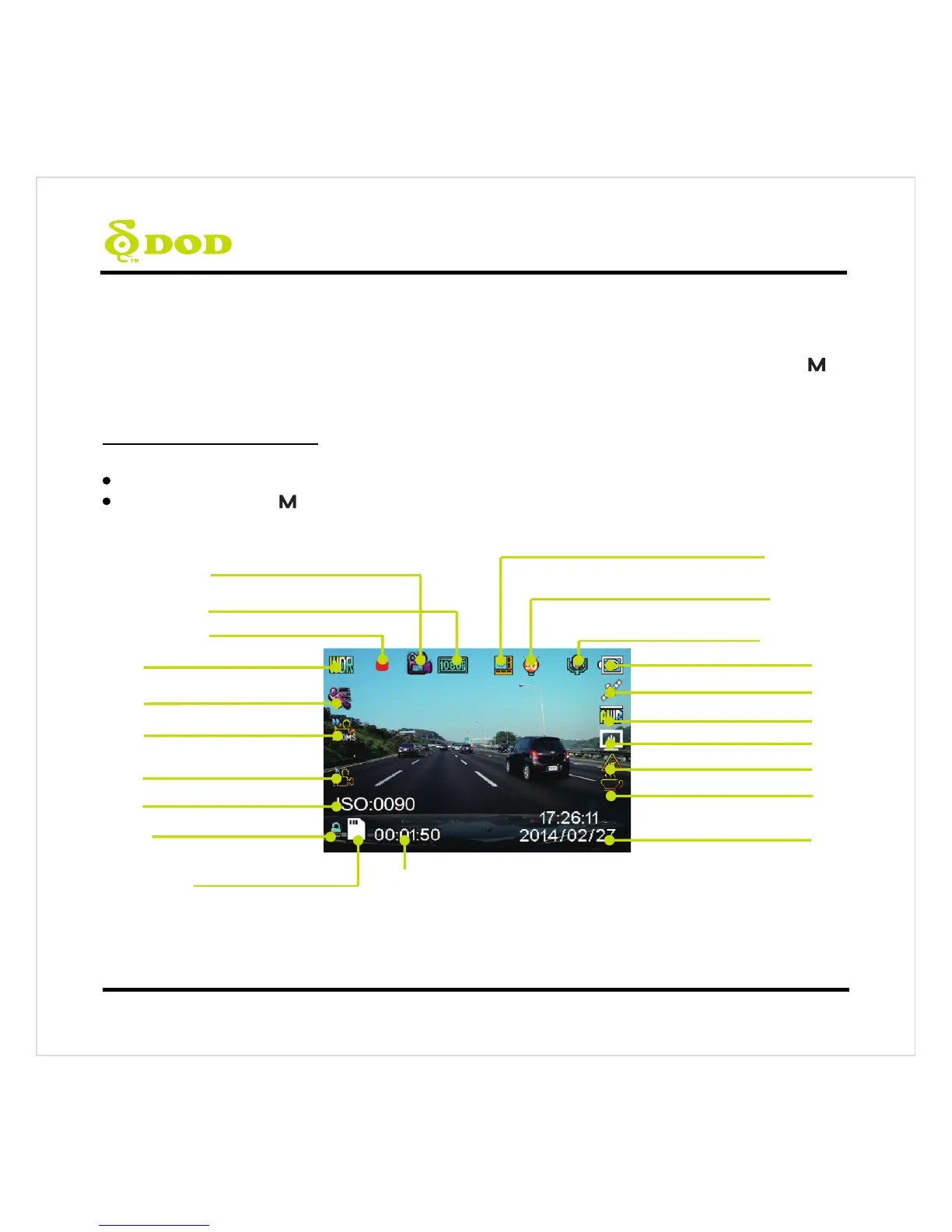
1. Video Recording Mode
The camera defaults to video recording when the camera is first turned on.
Recording Mode: Press[●]to stop recording.
Standby Mode: Press[ ] to access two Modes: Photo Mode and Playback Mode.
Note: GPS Icon keeps flashing when it has not received the GPS signal. HUD and Speed Warning only work when
received the GPS signals.
Record Audio (on)
White Balance (Auto)
Date/Time
GPS Status (on)
Exposure Value (Auto)
Loop Recording (3 Minutes)
WDR Enabled
Video Recording Mode
Video Resolution
Motion Detection
(Enable in parking mode)
Memory Card Inserted
Time Elapsed
Power Status
Time Lapse (200ms)
Head up Display
GPS Speed Warning
Driver Fatigue Warning
SOS Emergency Fi



 To Next Page