Bluetooth
®
Streaming Audio
•
If equipped with Uconnect™ Voice Command, your Bluetooth-equipped iPod
®
devices, cell phones or other media players, may also be able to stream music to your
vehicle's sound system. Your connected device must be Bluetooth-compatible, and
paired with your Uconnect Touch
®
system (see Uconnect™ Phone for pairing
instructions). You can access the music from your connected Bluetooth
®
device by
touching the Bluetooth
®
soft-key while in Media mode.
Uconnect™ 8.4A & 8.4AN Available Media Hubs
Uconnect™
8.4A &
8.4AN
Media Hub
(USB, AUX
Ports)
Media Hub
(SD, USB,
AUX Ports)
Remote USB
Port (Fully
Functional)
Remote USB
Port (Charg-
ing Only)
Dual Charg-
ing Ports
- SSOO
S = Standard Equipment
O = Optional Equipment
iPod
®
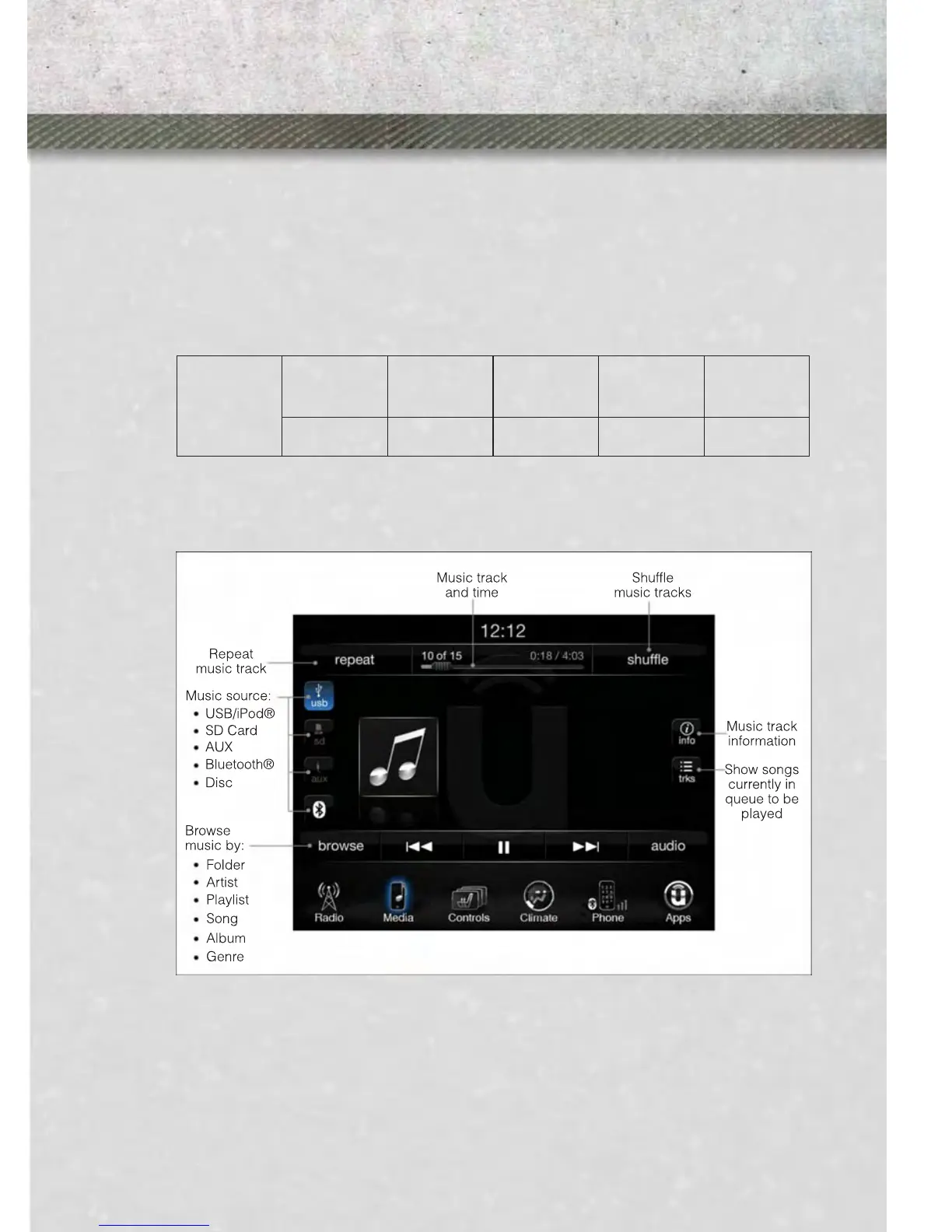
/CD/AUX CONTROLS
• The iPod
®
/CD/AUX controls are accessed by touching the desired soft-key dis-
played on the side of the screen and choose between Disc, AUX, iPod
®
, Bluetooth
or SD Card.
NOTE:
Uconnect™ Access will usually automatically switch to the appropriate mode when
something is first connected or inserted into the system.
ELECTRONICS
57










 To Next Page