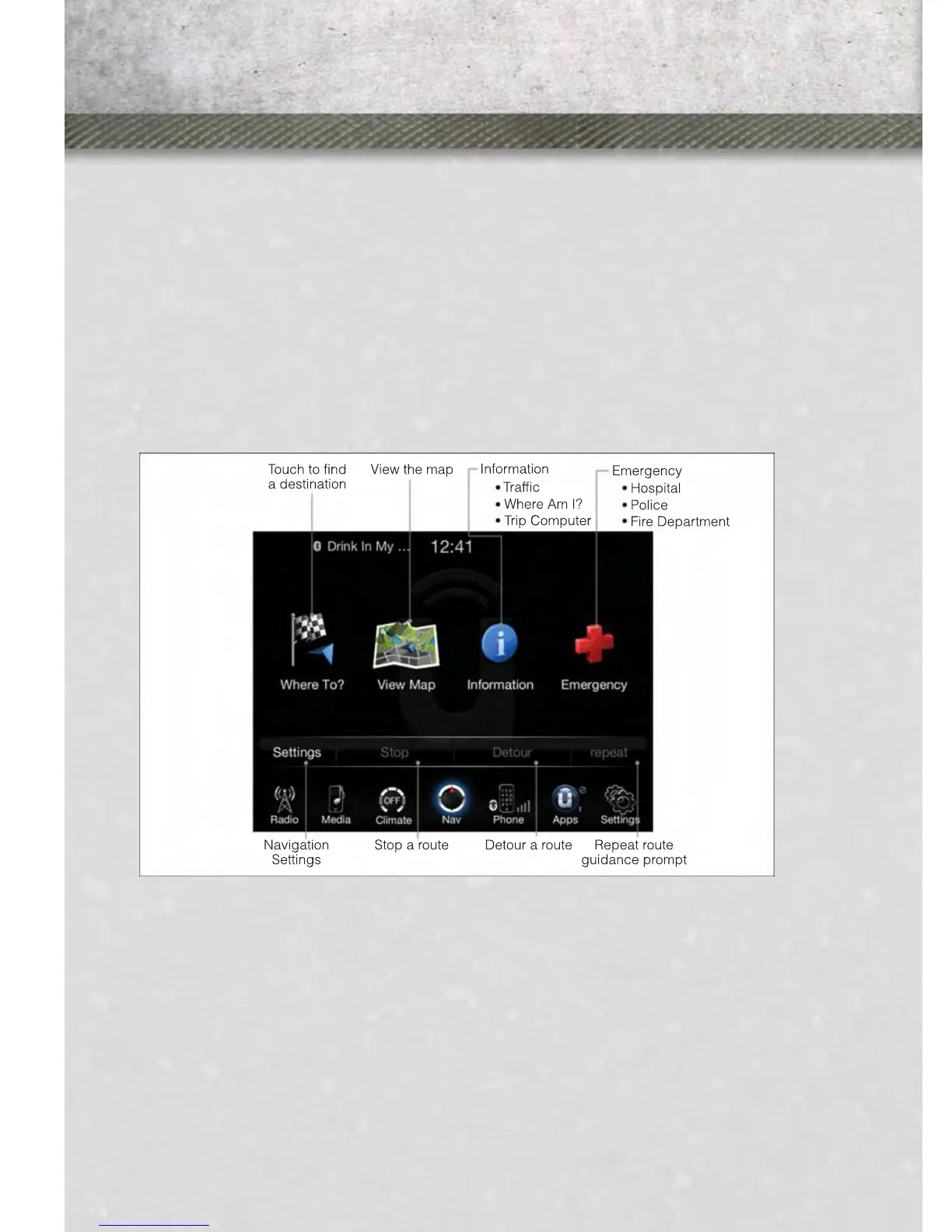
NAVIGATION (DEALER-INSTALLED OPTION)
• Your Uconnect™ 8.4A is “Navigation-Ready”, and can be equipped with Naviga-
tion at an extra cost. See your dealer for details.
• The information in this section is only applicable if the feature has been equipped.
If so equipped, you will see a Nav soft-key at the bottom of the touch-screen.
Changing the Navigation Voice Prompt Volume
1. Touch the View Map soft-key from the Nav Main Menu.
2. With the map displayed, touch the Settings soft-key in the lower right area of the
screen.
3. In the Settings menu, touch the Guidance soft-key.
4. In the Guidance menu, adjust the Nav Volume by touching the + or – soft-keys.
Finding Points of Interest
• From the main Navigation menu, touch Where To?, then touch Points of Interest.
• Select a Category and then a subcategory, if necessary.
• Select your destination and touch Yes.
Finding a Place by Spelling the Name
• From the Main Navigation Menu, touch Where to?, then touch Points of Interest
and then touch Spell Name.
• Enter the name of your destination.
ELECTRONICS
58












 To Next Page