• Touch Done.
• Select your destination and touch Yes.
Entering a Destination Address
• From the main Navigation menu, touch Where To?, then touch Address.
• Follow the on-screen prompts to enter the address and touch Yes.
Setting Your Home Location
• Touch the NAV soft-key in the menu bar to access the Navigation system and the
Main Navigation menu.
• Touch Where To?, then touch Go Home.
• You may enter your address directly, use your current location as your home
address, or choose from recently found locations.
• To delete your Home location (or other saved locations) so you can save a new
Home location, touch Where To? from the Main Navigation menu, then touch Go
Home, and in the Yes screen touch the Options soft-key. In the Options menu
touch Clear Home. Set a new Home location be following the previous instructions.
Go Home
• A Home location must be saved in the system. From the Main Navigation menu,
touch Where To?, then touch Go Home.
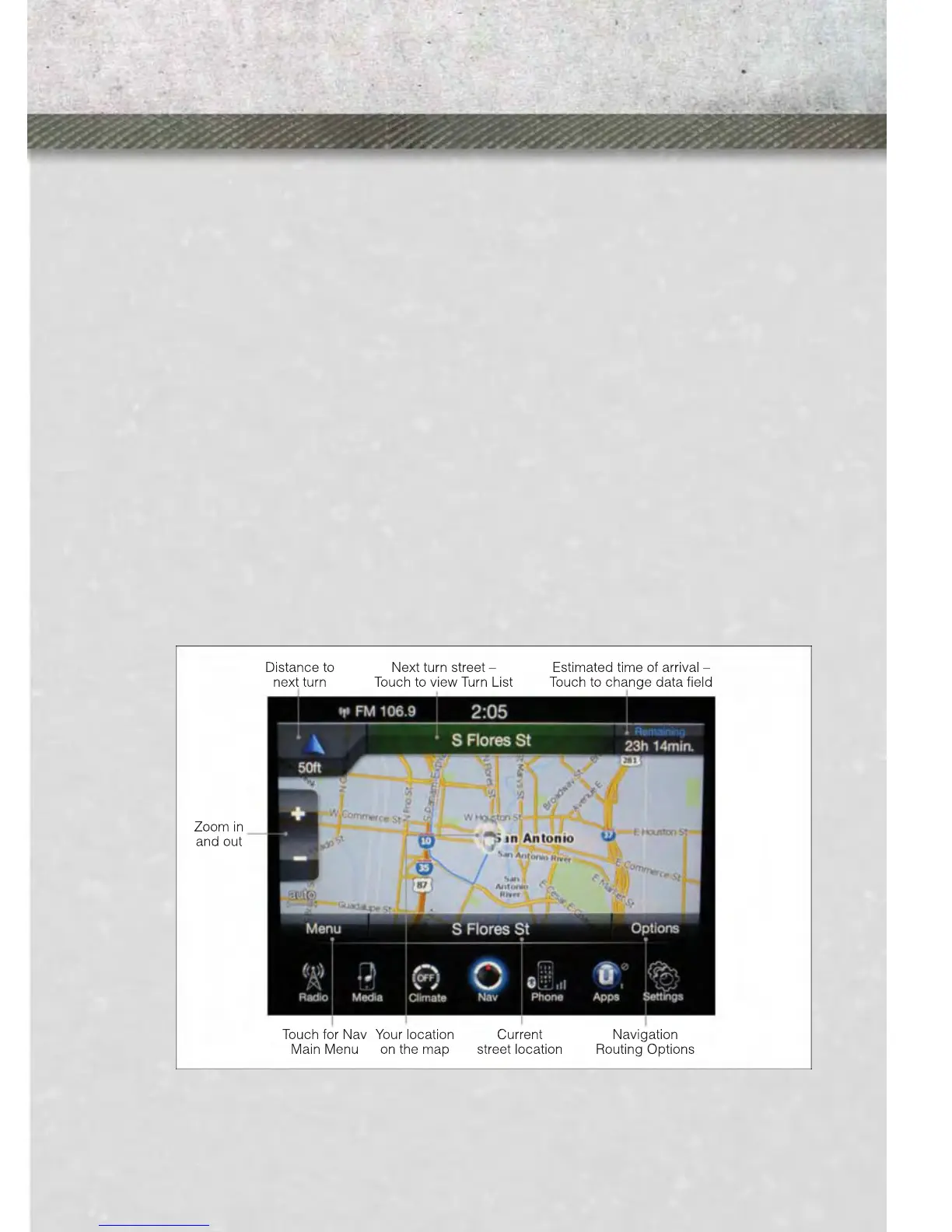
• Your route is marked with a blue line on the map. If you depart from the original
route, your route is recalculated. A speed limit icon could appear as you travel on
major roadways.
ELECTRONICS
59











 To Next Page