MULTIMEDIA 155
UCONNECT INTRODUCTION
SYSTEM OVERVIEW
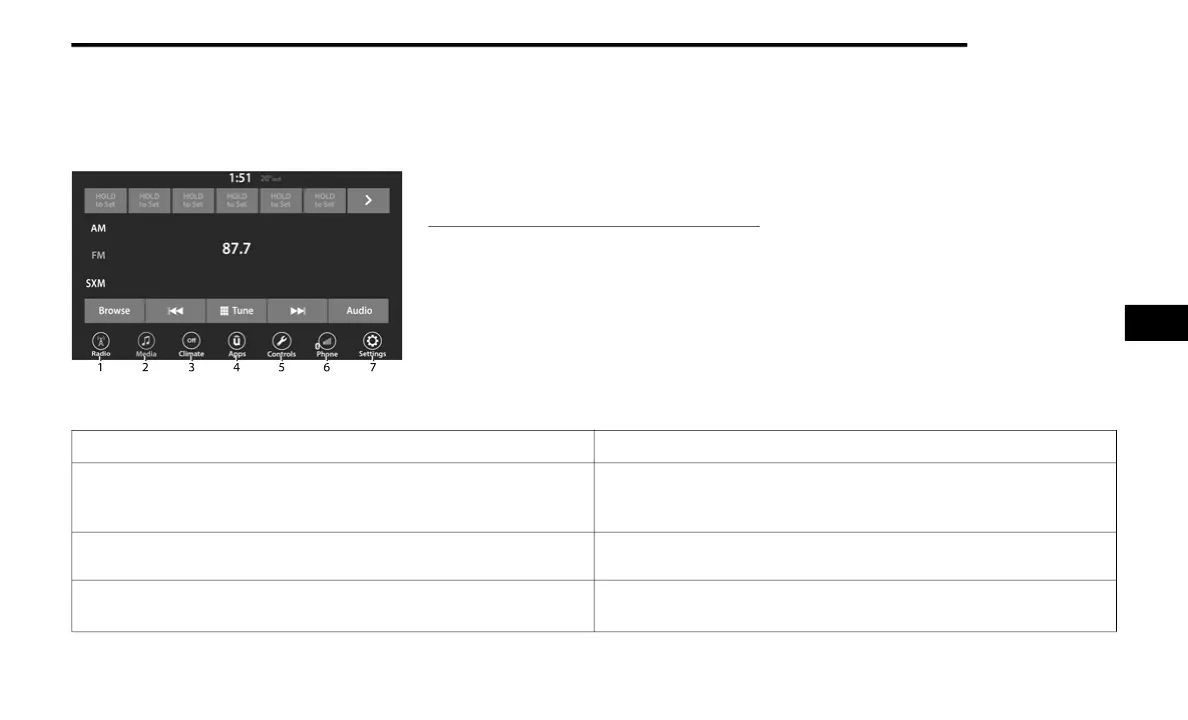
Uconnect 4 With 7-inch Display
NOTE:
Uconnect screen images are for illustration
purposes only and may not reflect exact soft-
ware for your vehicle.
1 — Radio Button
2 — Media Button
3 — Climate Button
4 — Apps Button
5 — Controls Button
6 — Phone Button
7 — Settings Button
Feature Description
Radio/Media
Press the Radio button or Media button to enter Radio Mode/Media
Mode and access the radio functions and external audio sources
Ú page 158.
Phone
Press the Phone button to enter Phone Mode and access the hands-free
phone system Ú page 172.
Settings
Press the Settings button to access the Uconnect Settings
Ú page 140.
5
21_LD_OM_EN_USC_t.book Page 155













 To Next Page