MULTIMEDIA 191
Gauge: G-Force
Gauge: Steering Angle
Gauge: Current Gear
Gauge: Current Speed
Timer: 0–60 mph (0–100 km/h)
Timer: 0–100 mph (0–160 km/h)
Timer: 60 ft (20 m)
Timer: 330 ft (100 m)
Timer: 1/8 Mile (200 m)
Timer: 1000 ft (300 m)
Timer: 1/4 Mile (400 m)
Timer: Brake Distance
Timer: Reaction Time
Historical Data
The Historical Data feature allows you to view
information about your vehicle such as the VIN,
miles on the odometer, longitude and latitude
coordinates, and more.
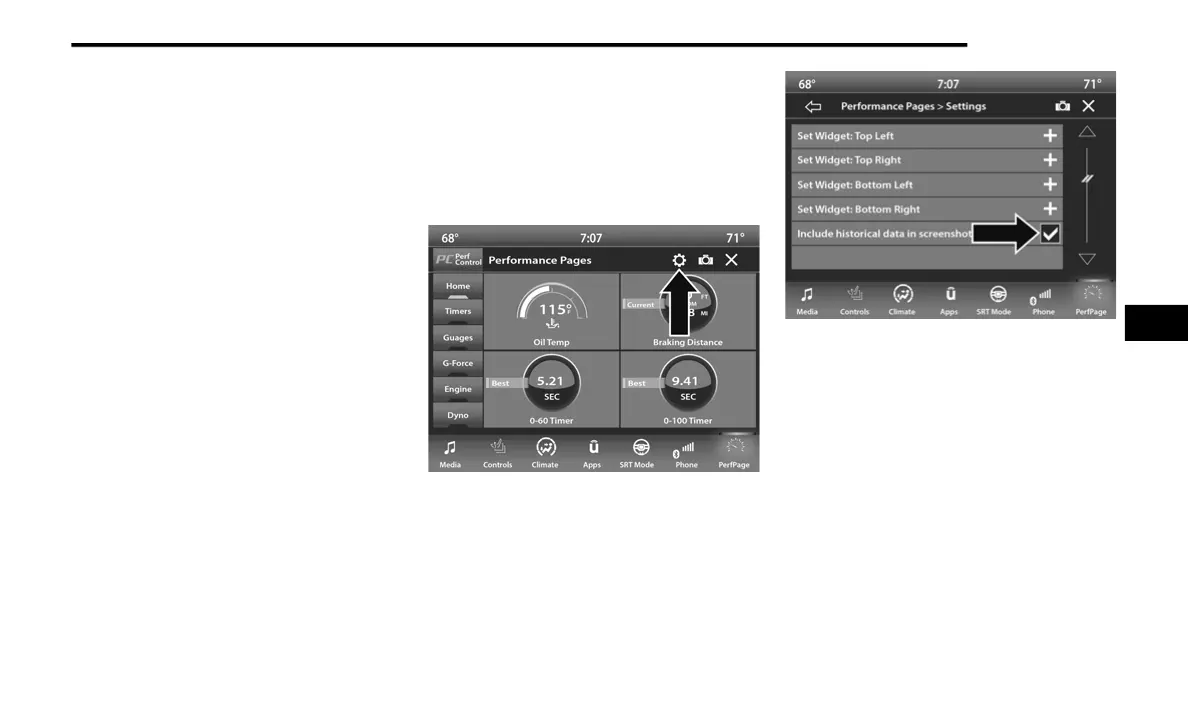
To activate the Historical Data feature on your
touchscreen, follow these steps:
1. Select the Home page tab within
Performance Pages. Then, press the
settings icon (gear icon) in the upper right
hand corner of the touchscreen.
2. Towards the bottom of the screen, a
checkbox will appear next to “Include
historical data in screenshot.” Click the box
to signify that this feature will be on.
Historical Data
NOTE:
Once the checkbox is selected, the bottom bar
of the screen will be replaced with the historical
data from your vehicle present at the time the
screenshot icon was pressed.
5
21_LD_OM_EN_USC_t.book Page 191















 To Next Page