Changing The Navigation Voice Prompt Volume
1. Press the “Settings” button on the touchscreen in the lower right area of the screen.
2. In the Settings menu, press the “Guidance” button on the touchscreen.
3. In the Guidance menu, adjust the Nav Volume by pressing the “+” or “–” buttons on
the touchscreen.
Finding Points Of Interest
• From the main Navigation menu, press the “Where To?” button on the touchscreen,
then press the “Points of Interest” button on the touchscreen.
• Select a category and then a subcategory, if necessary.
• Select your destination and press the “GO!” button on the touchscreen.
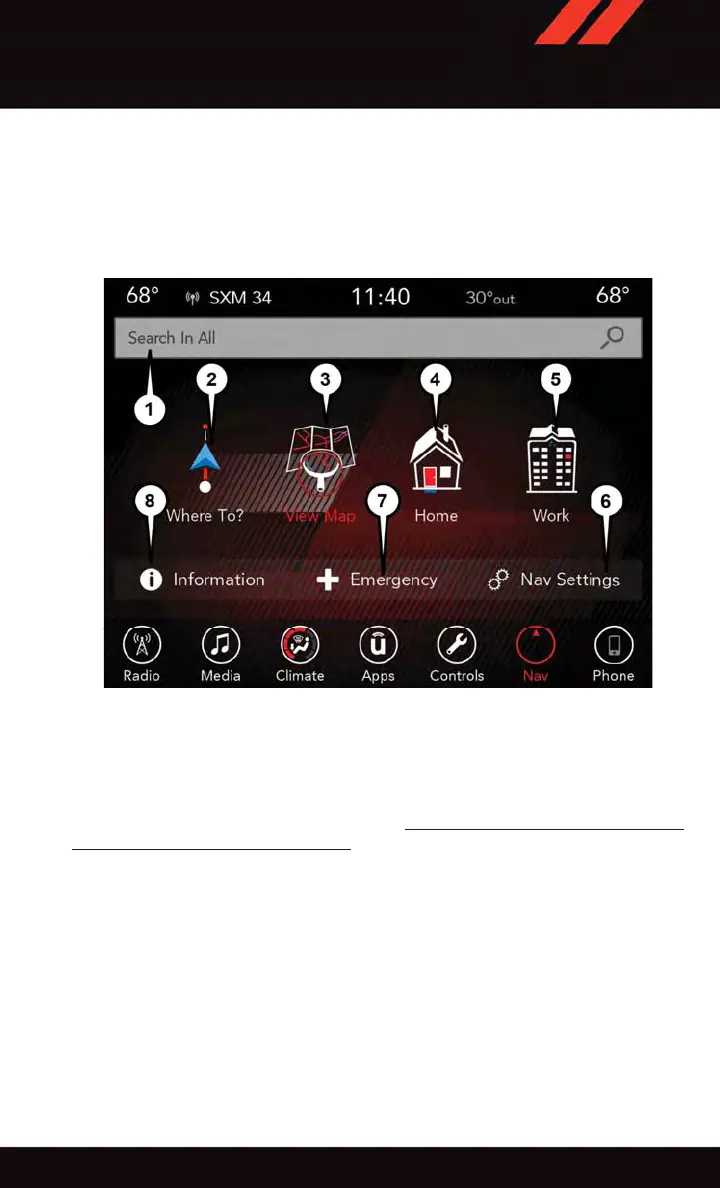
Uconnect 8.4 NAV Navigation
1 — Search For A Destination In All
Categories
2 — Find A Destination
3 — View Map
4 — Navigate To Saved Home Destina-
tion
5 — Navigate To Saved Work Destina-
tion
6 — Navigation Settings
7 — Emergency
8 — Information
ELECTRONICS
135














 To Next Page