SRT PERFORMANCE FEATURES
SRT Instrument Cluster Display
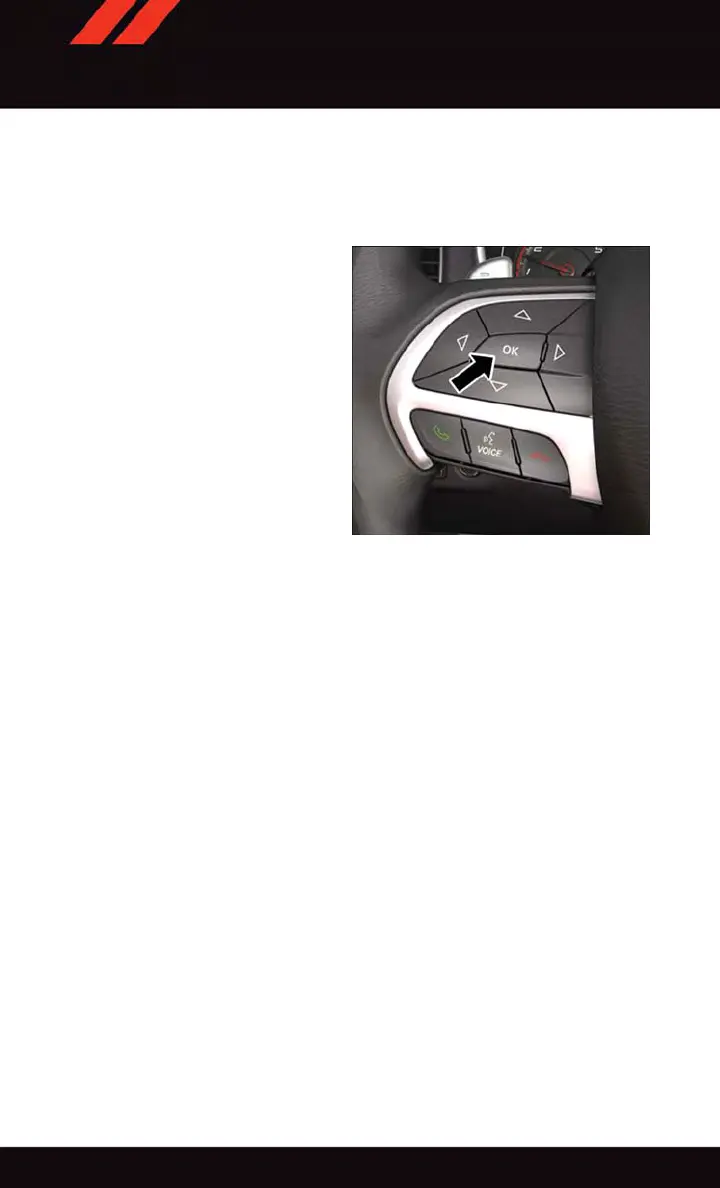
The instrument cluster display can be used
to view or change the following SRT Perfor -
mance Features. Push the up or down arrow
button until SR T Performance displays in
the instrument cluster display , then push
the right arrow button. Follow the prompts
to view and set your desired settings. Push
the left arrow button to scroll back to a
previous menu or sub menu.
SRT Performance Sub Menu Items
•
0-60 MPH (0-100 km/h) Timer
•
Current G-Force
•
0-100 MPH (0–161 km/h) Timer
•
Peak G-Force
•
1/8 Mile
•
Lap Timer
•
1/4 Mile
•
Lap History
•
Braking Distance
•
Top Speed
0-60 MPH (0-100 km/h)
• When selected, this screen displays the time it takes for the vehicle to go from 0 to
60 MPH (0 to 100 km/h) within 10 seconds.
0–100 MPH (0–161 km/h)
• When selected, this screen displays the time it takes for the vehicle to go from 0 to
100 MPH (0 to 161 km/h) within 15 seconds.
1/8 Mile, 1/4 Mile
• When selected, this screen displays the time it takes the vehicle to travel 1/8 mile
(15 sec) or 1/4 mile (25 sec) and the vehicle's speed when it reaches 1/8 mile
(1/4 mile).
Braking Distance
• When selected, this screen displays the vehicle's braking distance and the speed at
which the brake pedal was depressed.
SRT Instrument Cluster Display Controls
SRT
174











 To Next Page