EasyManua.ls Logo

Dokorder 7700 - Brake Mechanism

Default Icon
34 pages
Print Icon
To Next Page IconTo Next Page
To Previous Page IconTo Previous Page
Loading...
(2)
Set the
deck in
play
mode and
pull
the spring balance
gently
in the direction
indicated by the arrow
in
Fig.5-5
(B)
and check that the take-up
torque
is nearly 150
g
(450
g.cm).
N ote
(1)
The hold-back tension
in
both
the FF and
REW modes are
determined
by a
fixed wire-wound resistor;
therefore,
there is no
need
to
adjust,
but do check
that the
hold-back tension
is 90
g.
cm.
(2)
When the
adjustment
has
been completed,
paint-lock
the
Iock t.t.*
(E.
5.4
BRAKE
MECHANISM
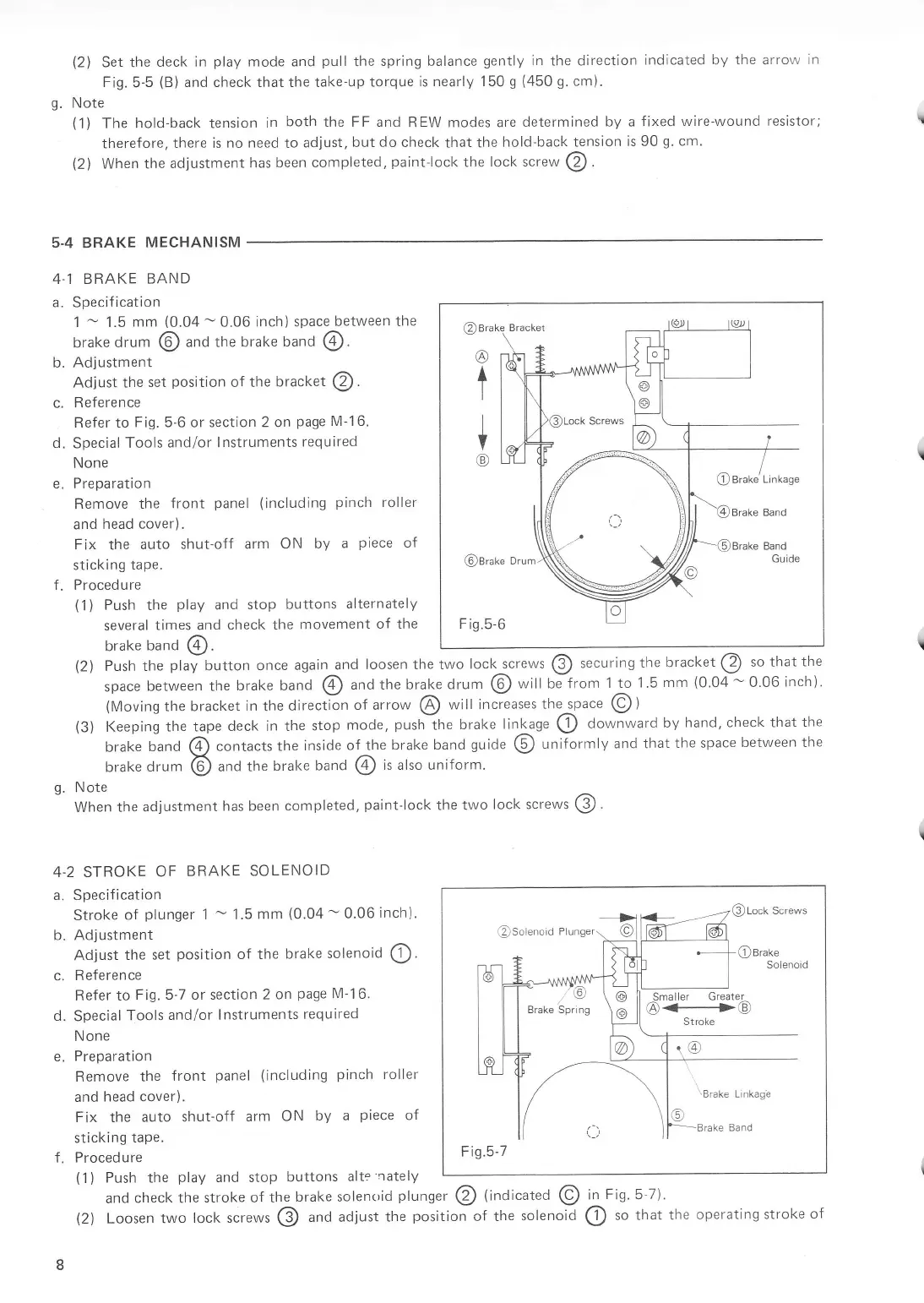
4 1 BRAKE
BAND
a. Specification
1
-
1.5
mm
(0.04
-
0.06
inch) space
between
the
brake
drum
@
and the brake
band
@.
b. Adjustment
Adjust the
set
position
of the
bracket
@.
f.
R eferen ce
Refer to
Fig.5-6 or section 2 on
page
M-16.
Special
Tools
and/or lnstruments
required
None
Pre
parati
on
Remove
the
front
panel
(including
pinch
roller
and
head cover).
F
ix the
auto shut-off
arm
ON by
a
piece
of
sticking
tape.
Proced u re
(1)
Push
the
play
and
stop buttons
alternately
several
times and
check the
movement
of the
brake
band
(4).
'!L
L
c-
d.
e.
?
(2\
(3)
Push the
play
button
once again
and
loosen the two
lock_screws
@
securing
the
bracket
@
to
that the
space
between rhe
brake band
@
and the
brake drum
@
will be from
1 to
1.5
mm
(0.04
-
0'06
inch).
(Moving
the bracket
in
the
directin
of arrow
@
will
increases
the space
@)
Keeping
the tape
deck in the
stop
mode,
push
the
brake
linkage ()
downward
by
hand, check
that the
brake
band
@
contacts the
inside
of the
brake band
guide
(5)
uniformly
and that
the space
between the
brake
drum
@
anO the
brake
band
@
is also uniform.
g.
Note
When the
adjustment
has been
completed,
paint-lock
the two
lock screws
@
4-2 STROKE
OF
BRAKE
SOLENOID
a. Specification
Stroke
of
plunger
1
-
1.5
mm
(0.04
-
0.06
inch).
b. Adjustment
Adjust
the set
position
of the
brake
solenoid
O.
c.
Reference
Refer to
Fig.5 7 or section
2 on
page
M-16.
d.
Special
Tools
and/or
lnstruments
required
N one
e.
Preparation
Remove
the
front
panel
(including
pinch
roller
and
head cover).
Fix the
auto shut-off
arm
ON
by a
piece
oi
sticking
tape.
f. Procedure
(1)
Push the
play
and stop
buttons
alte
nately
and
check the
stroke of the
brake solen.id
plunger
@
{indi"ut.O
@
in
Fig.5-7).
L
@Lock
Screws
F iq.5-7
@
t
+
@
@Brake
Drum
Fis.5
6
@
Brake'Linkage
(2)
Loosen
two
lock ,.r.*,
@
and adjust
the
position
of the
solenoiO
@
to that the
operating stroke
o{
L