EasyManua.ls Logo

Dokorder 7700 - 4 Removalof Parts; Outer Parts; Front Panel; Amp Panel

Default Icon
34 pages
Print Icon
To Next Page IconTo Next Page
To Previous Page IconTo Previous Page
Loading...
4. REMO\/AL
OF
OUTER
PARTS
'Y
U
v
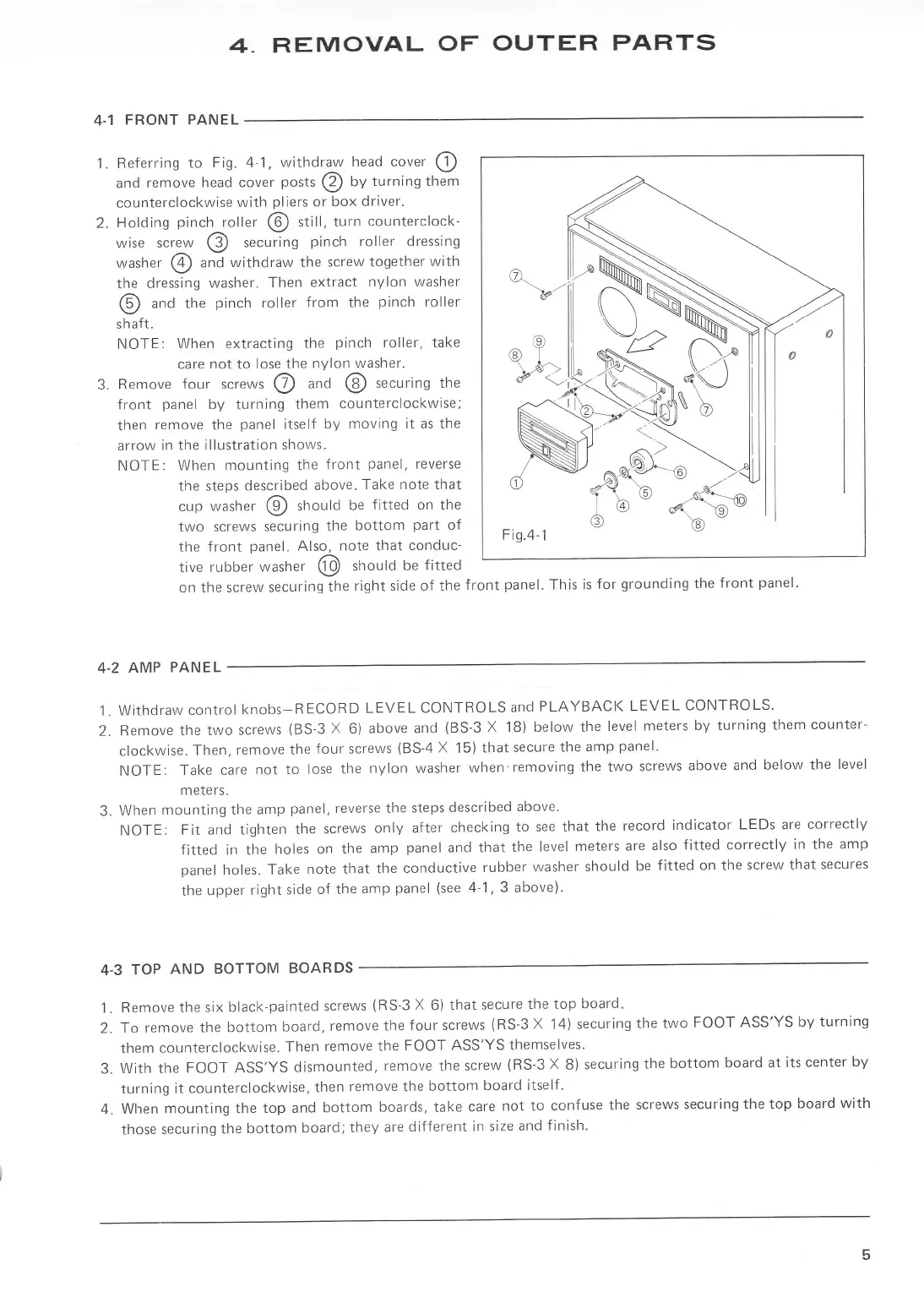
4.1 FRONT P
1.
Referring
to
Fig. 4-1.
withdraw
head cover
O
and
remove
head cover
posts
@
by
turning them
counterclockwise
with
pliers
or
box driver.
2.
Holding
pinch
roller
@
stitl,
turn
counterclock-
wise screw
@
securing
pinch
roller dressing
washer
@
and
withdraw the
screw together
with
the dressing
washer.
Then
extract
nylon
washer
@
anO
the
pinch
roller
from the
pinch
roller
s
h
aft.
NOTE:
When
extracting
the
pinch
roller,
take
care
not
to
lose
the
nYlon washer.
3.
Remove
four
screws
@
anA
@
securing the
front
panel
by
turning
them
counterclockwise;
then
remove the
panel
itself
by
moving it as the
arrow
in
the illustration
shows.
NOTE:
When mounting the
front
panel,
reverse
the steps
described
above.
Take note that
cup
washer
@
should
be
fitted on the
two screws
securing
the
bottom
part
of
the front
panel.
Also,
note that
conduc-
tive
rubber
washer
@
shoutO
be
f itted
on the screw securing
the
right side of the
front
panel.
This is
for
grounding
the
front
panel.
v
4-2
AMP
PANEL
1.
Withdraw
control
knobs-RECORD
LEVEL CONTROLS
and
PLAYBACK LEVEL
CONTROLS.
2.
Remove
the two
screws
(BS-3
X 6)
above and
(BS-3
X
18)
below the
level
meters
by
turning
them
counter-
clockwise.
Then,
remove the
four screws
(BS-4
X
15)
that
secure
the
amp
panel.
NOTE:
Take care
not
to lose
the
nylon
washer
when'removing
the
two
screws
above and
below
the
level
meters.
3.
When
mounting the
amp
panel,
reverse the
steps
described
above'
NOTE:
Fit and tighten
the
screws
only after
checking
to see that
the
record
indicator
LEDs are
correctly
fitted in the
holes on
the
amp
panel
and
that
the
level
meters
are also
fitted correctly
in
the amp
panel
holes. Take
note that
the
conductive
rubber
washer
should be
fitted
on the
screw that
secures
the
upper
right
side
of the
amp
panel
(see
4-1. 3 above)'
4.3
TOP
AND BOTTOM
BOARDS
1.
Remove
the six
black-painted
screws
(RS-3
X
6)
that secure
the top
board.
2.
To remove
the
botrom
board,
remove
the
four screws
{RS-3
X
i4)
securing
the two
FOOT ASS'YS
by
turning
them
counterclockwise.
Then
remove
the
FOOT ASS'YS
themselves'
3.
With the
FOOT ASS,YS
dismounted,
remove
the
screw
(RS-3
X
8)
securing
the
bottom
board
at its
center
by
turning
it counterclockwise,
then
remove the
bottom
board
itself'
4. When
mounting the
top and
bottom
boards, take
care
not to confuse
the
screws
securing
the top
board
with
those
securing
the
bottom
board;
they
are
different
in size
and
finish.
(e)
aI
F-a
Fig.4-1
v