EasyManua.ls Logo

Dokorder 7700 - 5 Adjustment; Auto Shut-Off Switch

Default Icon
34 pages
Print Icon
To Next Page IconTo Next Page
To Previous Page IconTo Previous Page
Loading...
5. ADJUSTMENT
-MEGHANICAL-
5.1
AUTO SHUT.OFF
SWITCH
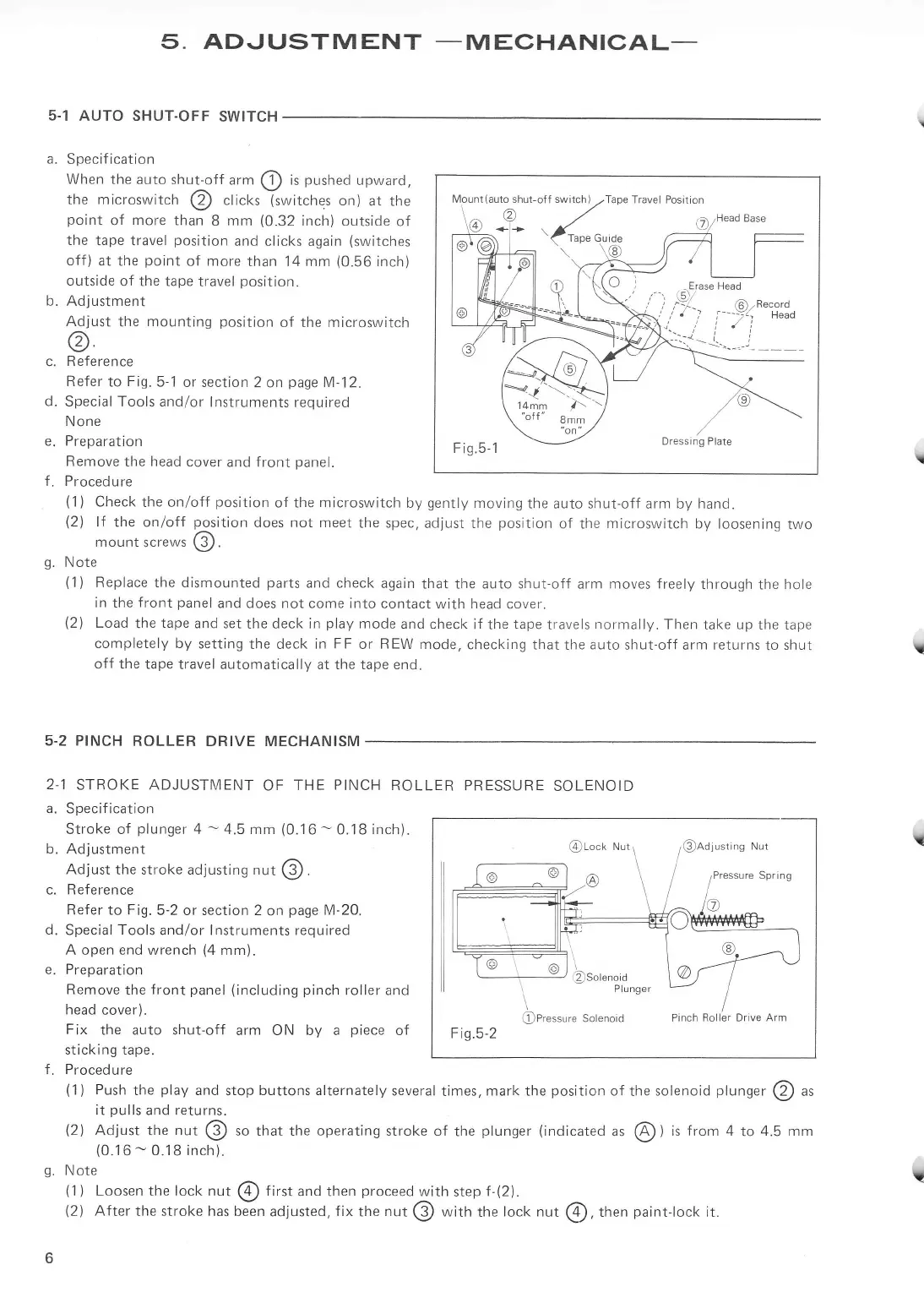
a.
Specification
When the
auto shut-off
urrn
@
is
pushed
upward,
the microswitch
@
clicks
lswitches
on)
at the
point
of more than
8
mm
(0.32
inch) outside
of
the
tape travel
position
and
clicks again
(switches
off)
at the
point
of more
than 14 mm
(0.56
inch)
outside
of the
tape travel
position.
b.
Adjustment
Adjust
the mounting
position
of the microswitch
@
c.
Reference
Refer
to
Fig.5
1
or section
2 on
page
M-12.
d.
Special Tools and/or
lnstruments
required
N one
e. Preparation
Remove
the head cover
and front
panel.
f. Procedure
(1)
Check
the on/off
position
of the microswitch
by
gently
moving
the auto shut-off
arm by hand.
(2)
lf
the on/off
position
does not meet
the spec,
adjust the
position
of the
microswitch
by loosening
two
mount
screws
@.
g.
Note
(1)
Replace the dismounted
parts
and
check
again
that the auto shut-off
arm
moves freely
through
the
hole
in
the
front
panel
and does not come into
contact with head
cover.
(2)
Load
the
tape
and set
the
deck in
play
mode
and check
if the
tape
travels
normally.
Then
take
up
the tape
completely by
setting
the deck
in FF
or
REW
mode,
checking that
the
auto
shut-off arm returns
to
shut
off the tape travel
automatically at the tape end.
5.2 PINCH
ROLLER
DRIVE MECHANISM
2.1
STROKE ADJUSTN/IENT
OF
THE
PINCH
ROLLER
PRESSURE
SOLENOID
a. Specification
Stroke of
plunger
4
-
4.5 mm
(0.16
-
0.18
inch).
b. Adjustment
Adjust
the stroke adjusting nut
@.
c. Reference
Refer to Fig.5-2
or section 2
on
page
M-20.
d.
Special
Tools
and/or lnstruments required
A open end wrench
(4
mm).
e. Preparation
Remove
the
front
panel (including
pinch
roller and
head
cover).
Fix
the auto shut-off
arm ON by a
piece
of
sticking tape.
f.
Procedure
(1)
Push
the
play
and
stop
buttons alternately
several
times,
mark the
position
of
the
solenoid
plunger
@
as
it
pulls
and returns.
(2)
Adjust
the
nut
@
ro that the
operating
stroke of
the
plunger
(indicated
ur
@
)
is
from
4
to
4.5 mm
(0.16
-
0.18 inch).
g.
Note
a
lvlount(auto shur-011 swirch2Tape
Travet Posrtion
\^@r/
61
;*
(up"cu,a"
=
qls
Dressing Plate
z
?,
a.
@roct<
lusting
Nut
Pressure Spring
@Pressure
Solenoid
Pinch
Roller Drive Arm
Fis.5-2
b
(i
)
Loosen
the
lock
nut
@
first
and then
proceed
with
step
f-(2).
(2)
After
the stroke has been
adjusted.
fix
the
nut
@
with
the
lock nut
@,
tt.'.n
paint-lock
it.
?