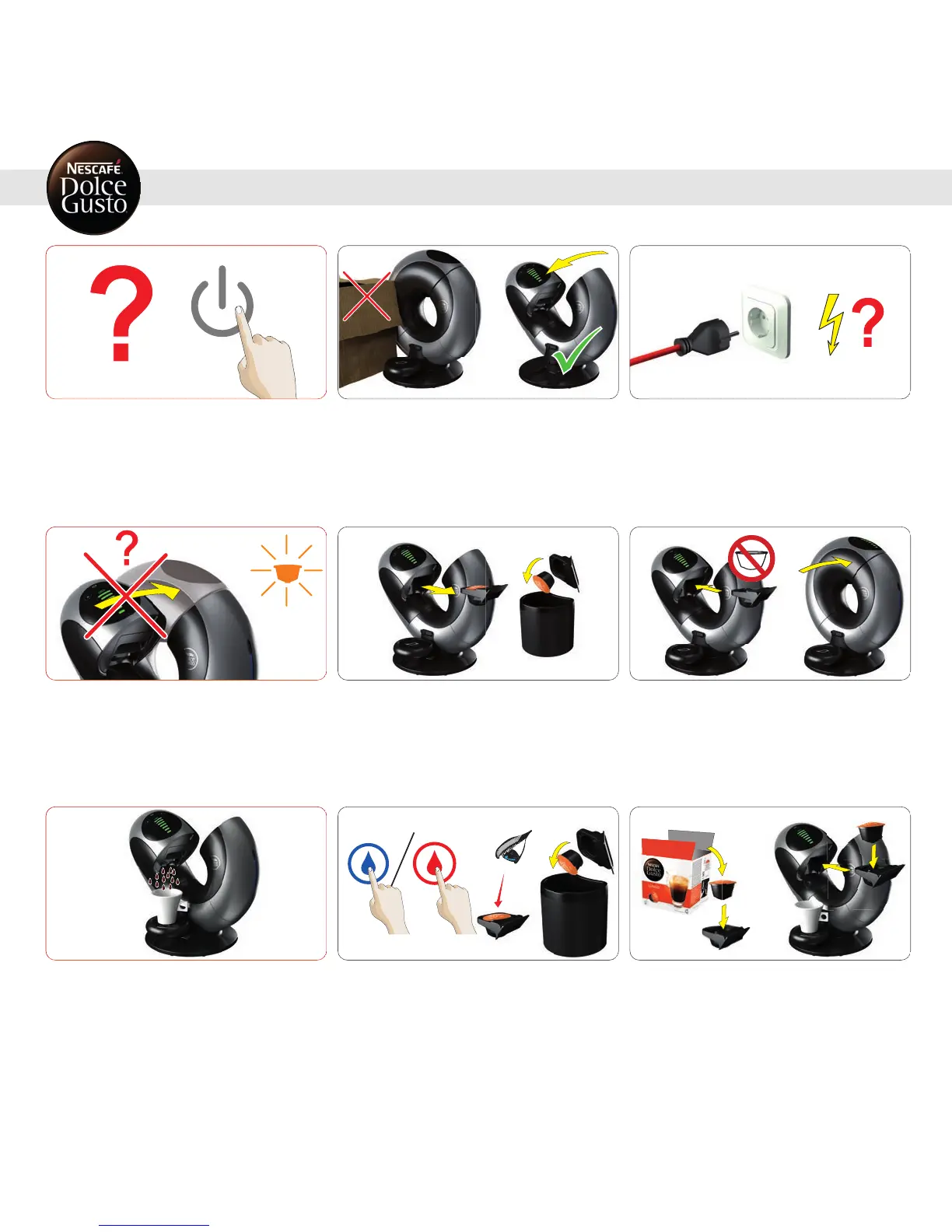
Machine cannot be switched on. No opening / closingof the
machine.
1
Makesure that the opening/ closing is notblockedby cable
orsurrounding objects.
2
Check ifthe powerplug is correctly pluggedinto a mains
powersocket. If yes, check your electricity supply. If
machine still cannot be switched on, call the
NESCAFÉ®DolceGusto® hotline. Forhotline numbers see
lastpage.
Machine does notstay closed. Used capsule icon blinks
orange until capsule is removed.
1
Pullout capsule holder. Throw awaythe capsule.
2
Insertempty capsule holder. Close machine manually.
Beverage is splashing out ofcoffee outlet.
1
To stop preparation, touchactive hot or cold water icon. Pull
out capsule holder. Check capsule. Throw away the capsule.
2
Insertanew capsule in capsule holder and insert it back
into machine.
18
9. TROUBLESHOOTING
9.3 VARIOUS


 To Next Page