4
EN
Installation CFX3 Protective Covers
q
r
w
e
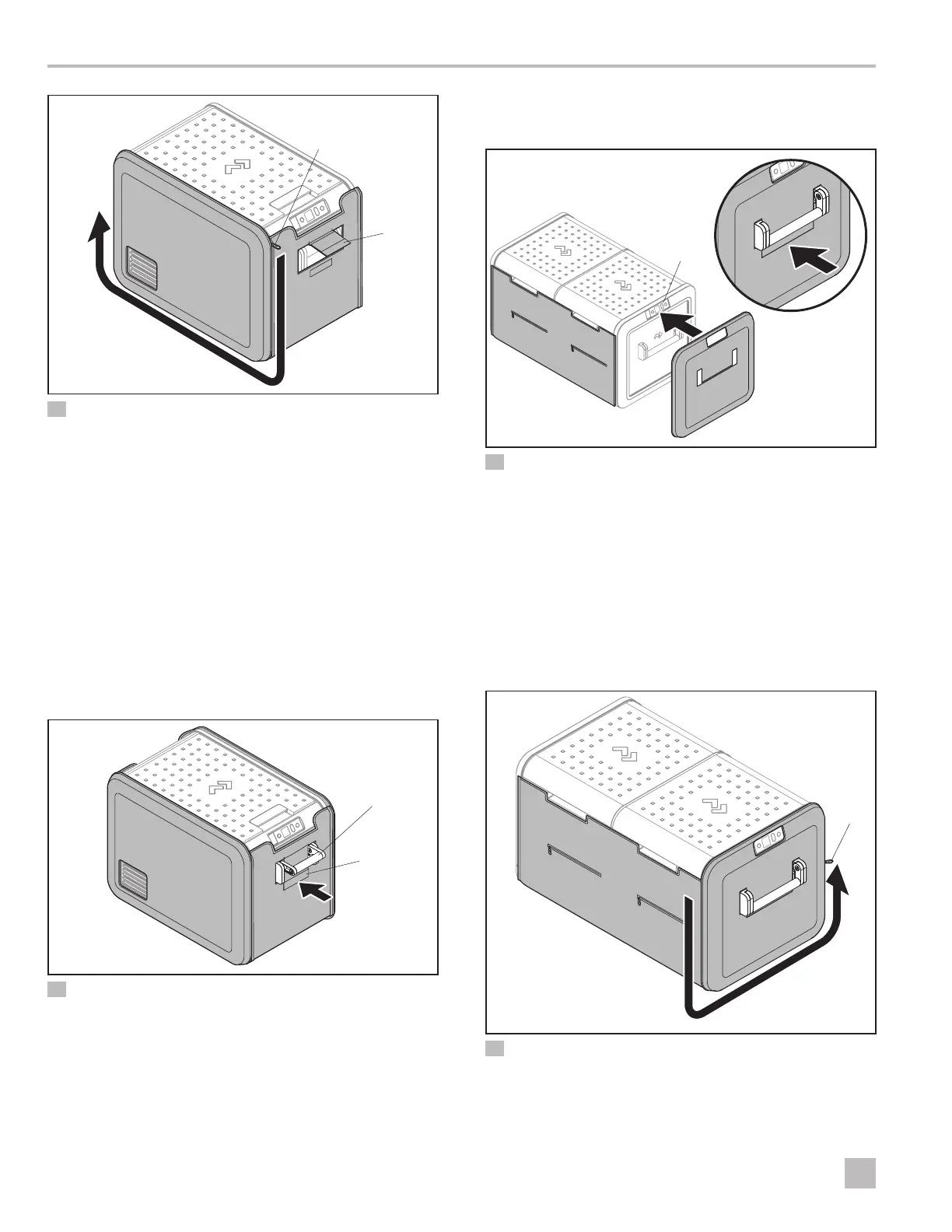
4 Attaching the So Cover to the Molded Panel
q
So Cover
e
Zipper
w
Handle Tab
r
Molded Panel
4. Position one end of the so cover.
5. Release the handle tab.
6. Attach the zipper between the so cover and the
molded panel on one side.
7. Pull the zipper down, across the bottom of the
cooler, and halfway up the opposite end.
8. Repeat steps 4–7 on the other side of the cooler.
9. Fully close both zippers.
w
q
5 Securing the Handle Tab
q
Handle Tab
w
Cooler Handle
10. Secure the handle tabs under the cooler handles.
3.2.2 For CFX3 55, CFX3 75, CFX3 95,
and CFX3 100 Coolers
e
w
r
q
6 Aligning the Molded Panel (CFX3 75 shown)
q
Molded Panel
e
Display
w
Cooler
r
Handle Tab
1. Align the molded panel with the display clearance
hole to the display on the cooler display end.
2. Keeping the zipper clear, fit the display end molded
panel to the cooler, starting at the bottom and
working up toward the top.
3. Secure the handle tab under the handle.
e
q
w
7 Attaching the So Cover to the Molded Panel
q
So Cover
e
Zipper
w
Molded Panel



 To Next Page
 Loading...