EasyManua.ls Logo

Dometic DOTR12CSIV - Page 32

Dometic DOTR12CSIV
46 pages
Print Icon
To Next Page IconTo Next Page
To Previous Page IconTo Previous Page
Loading...
7-20
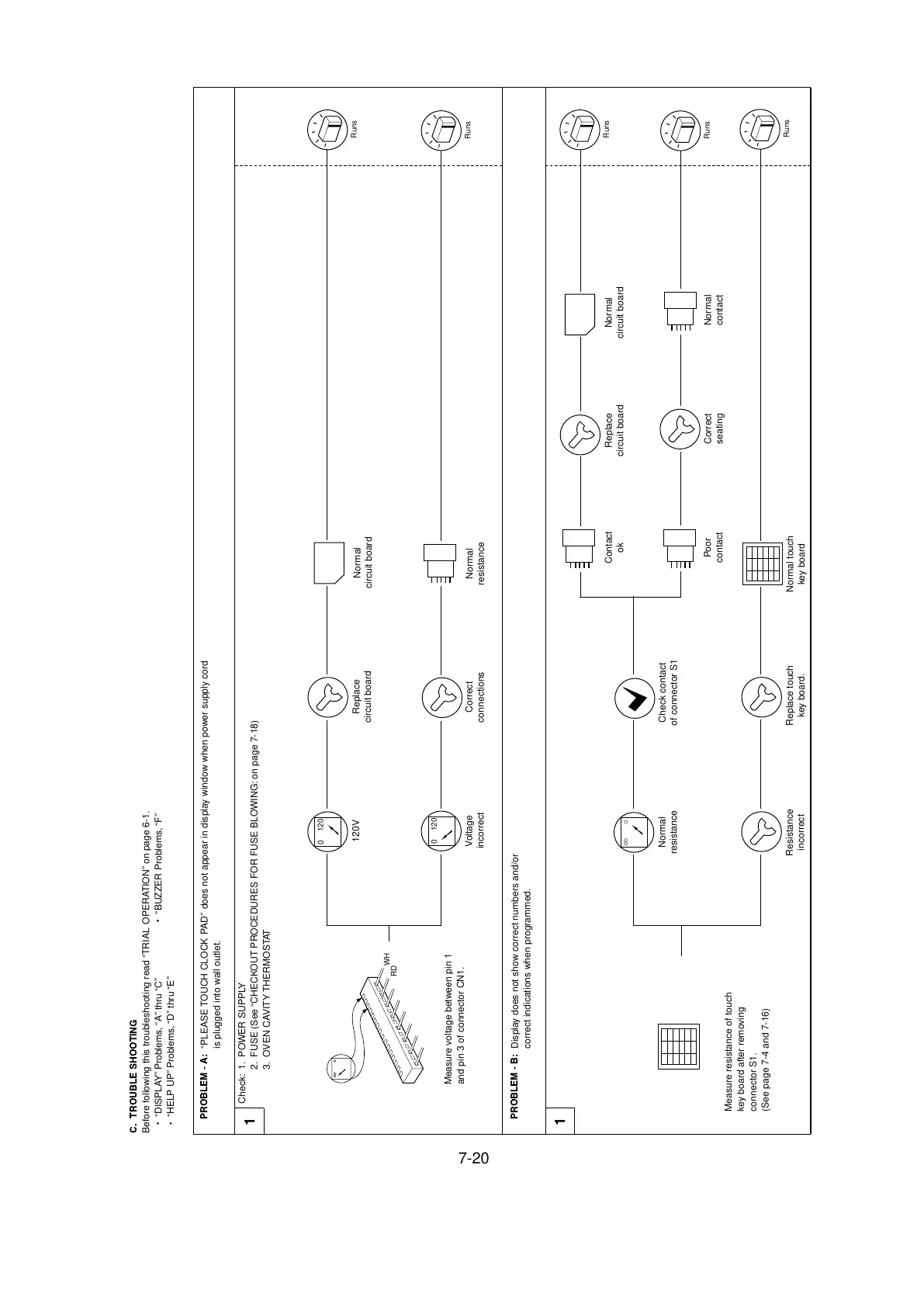
PROBLEM - A:
“PLEASE TOUCH CLOCK PAD” does not appear in display window when power supply cord
is plugged into wall outlet.
PROBLEM - B:
Display does not show correct numbers and/or
correct indications when programmed.
Check: 1. POWER SUPPLY
2. FUSE (See “CHECKOUT PROCEDURES FOR FUSE BLOWING: on page 7-18)
3. OVEN CAVITY THERMOSTAT
1
1
C. TROUBLE SHOOTING
Before following this troubleshooting read “TRIAL OPERATION” on page 6-1.
“DISPLAY” Problems, “A” thru “C” BUZZER Problems, “F”
“HELP UP” Problems, “D” thru “E”

WH
RD
Measure voltage between pin 1
and pin 3 of connector CN1.
Runs
Runs
Runs
Runs
Runs
0
120
Measure resistance of touch
key board after removing
connector S1.
(See page 7-4 and 7-16)
0
120
120V
Replace
circuit board
Normal
circuit board
Normal
resistance
Voltage
incorrect
Normal
resistance
Resistance
incorrect
Replace touch
key board.
Normal touch
key board
Poor
contact
Correct
seating
Contact
ok
Replace
circuit board
Normal
circuit board
Normal
contact
Check contact
of connector S1
Correct
connections

Related product manuals