TEC 30 8
user’s manual
GB
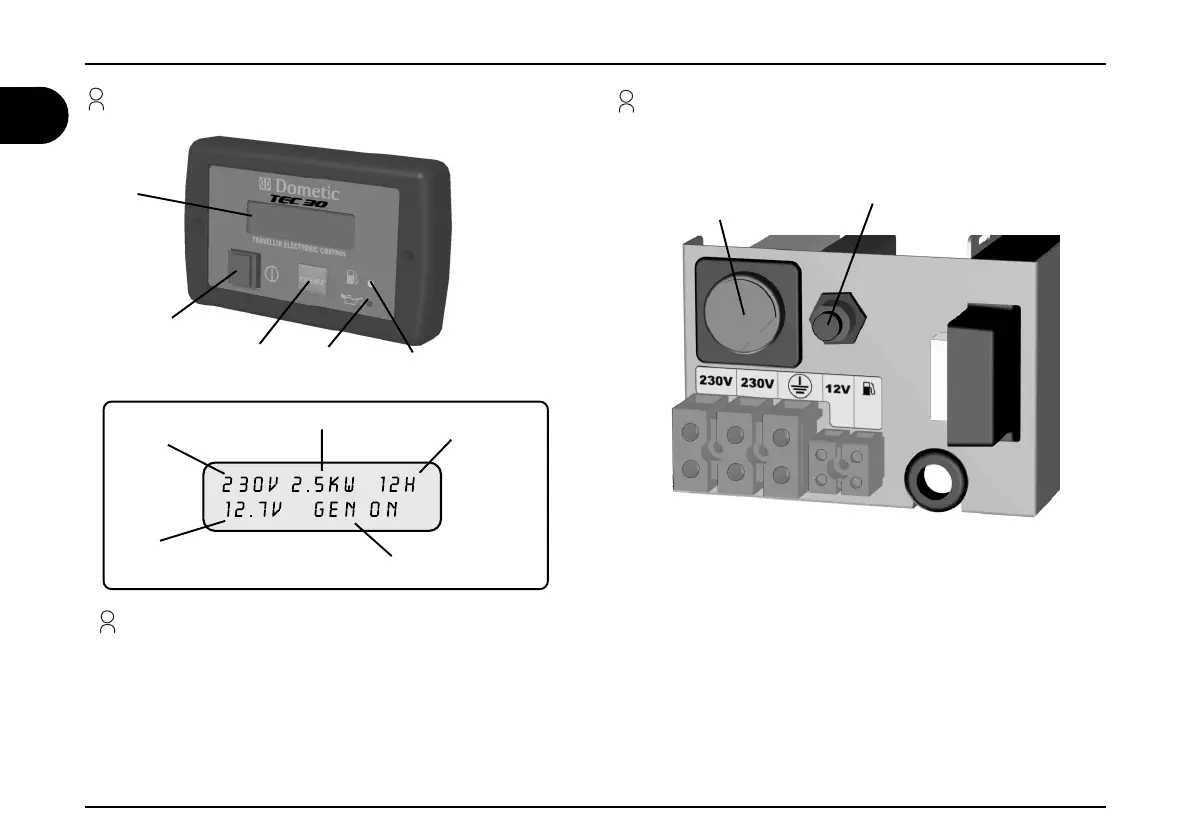
1.9 External control panel
1 General information
Operation description
MAIN SWITCH: turns the panel on/stops the generator
START BUTTON: starts the generator
PETROL INDICATOR: indicates that you are using the fuel reserve
OIL INDICATOR: indicates a low oil level and the engine automatically stops
EMERGENCY STOP SWITCH: stops the generator immediately in an emergency
CUT OUT SWITCH: continuous current thermal cut out protection
1.10 Internal control panel
EMERGENCY
STOP SWITCH
CUT OUT SWITCH
MAIN SWITCH
START
BUTTON
PETROL
INDICATOR
OIL
INDICATOR
DISPLAY
VOLTAGE
DELIVERED
BATTERY’S DC
VOLTAGE
POWER DELIVERED
WORKING HOURS
GENERATOR
STATUS




 To Next Page