11
OPERATING INSTRUCTIONS
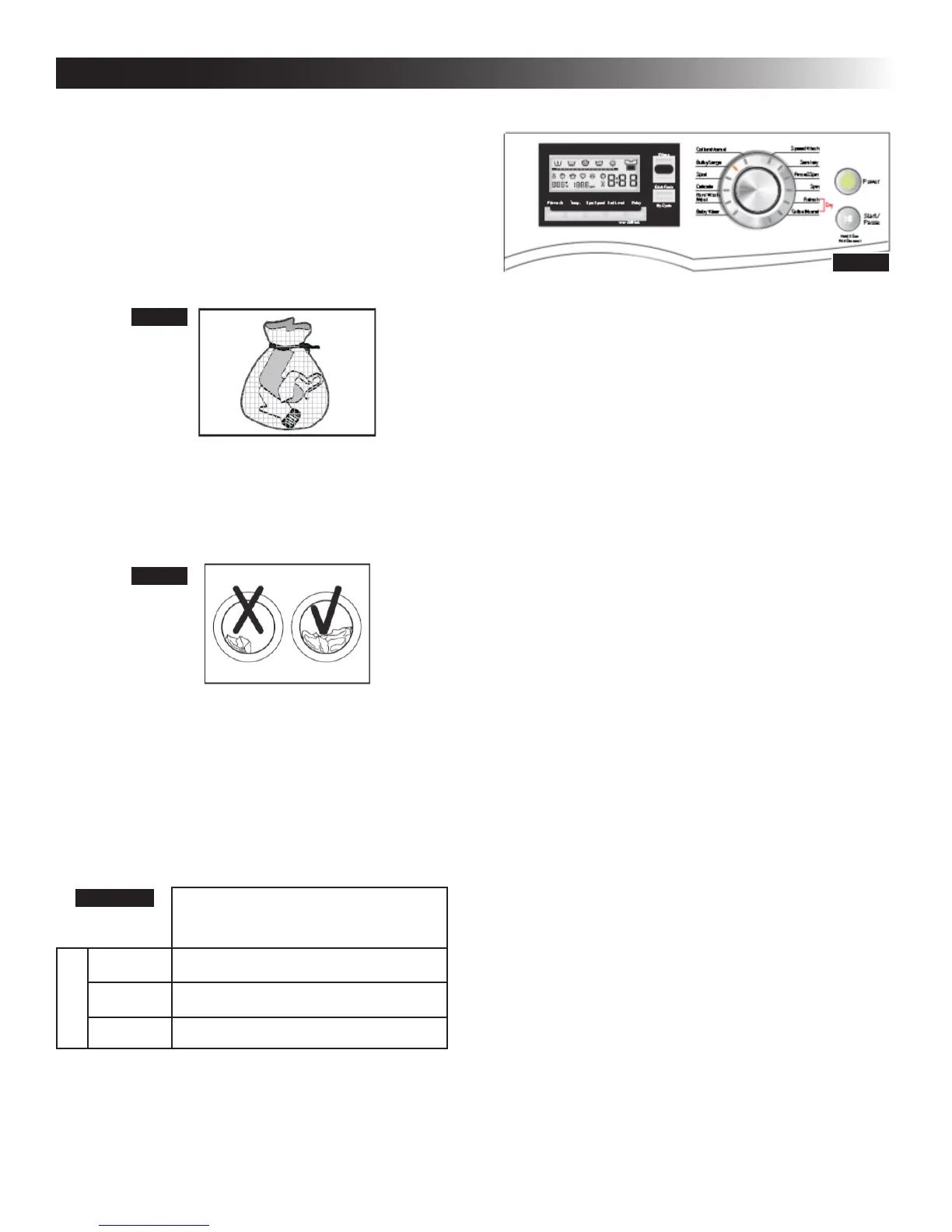
● Zippers should be zipped closed and buttons
or hooks should be secured.
● NOTE: Any type of garment with hook or wire
inserts should be washed within an enclosed
mesh bag. It is suggested to wash bras in a
pillow slip to prevent the steel wire from pro-
truding from the bra and potentially damaging
the appliance. Other delicate fabric, such
as stockings or handkerchiefs, should also
be washed within an enclosed mesh bag.
● Laundering large or heavy articles such as
towels, jackets, or bedding may cause a load
imbalance. Adding additional articles of fabric
should help to offset the imbalance. Do NOT
exceed the appliance loading capacities.
● Baby articles should be washed separately.
Increase the rinsing time of any baby articles
to ensure there is no residual detergent.
● Fabrics with tough stains should be pretreated
before placement in the appliance.
● Do NOT overload the appliance. Different fabrics
have different load restrictions. Refer to the table be-
lowforthemaximumloadcapacityoftheappliance:
MaximumLoadingCapacity
15.4 lbs (7.0 kg)
Fiber Types
Cotton 15.4 lbs (7.0 kg)
Synthetic 7.7 lbs (3.5 kg)
Wool 5.5 lbs (2.5 kg)
B. View of Control Panel and Functions
1. Power: Press to start the display. Pressing the
power button again will turn off the display and
put the appliance in standby mode.
2. Start/Pause: Press to start a wash or dry cycle.
If the appliance is running, pressing the button
once will temporarily pause the laundering pro-
cess. Press it again to restart the cycle. If the
cycle is not restarted within 10 minutes, it will be
cancelled.
3. Select cycles and options: Not all options are
available with all cycles. Cycles and options can
be changed any time before the Start/Pause
button is pressed.
4. To cancel a cycle:
● Press and hold the power button until the
unit shuts off. Press the power button once to
turn the unit back on. After turning on the unit,
wait 3-5 seconds for an audible click indicat-
ing the appliance door has unlocked. A new
wash/dry cycle may be selected at this time.
NOTE: Turning the unit off while it is running
will not save any of the information of the cur-
rent cycle.
5. To add a garment:
● Press and hold the Start/Pause button until
an audible beep is heard. Wait 3-5 seconds
and an audible click will indicate the appli-
ance door has unlocked. The user may add
additional garments to the load. To resume
the current cycle, press the Start/Pause but-
ton again. NOTE: A new cycle cannot be se-
lected when following the steps in this option.
6. To drain the appliance manually:
a. PressPowerforapproximately3seconds.
b. Select spin.
c. Press the Start/Pause button.
d. When the spin is complete, the door will un-
lock.
FIG. 15
FIG. 16
TABLE 1
FIG. 17


 To Next Page