12
OPERATING INSTRUCTIONS
7. Wash cycles:
NOTE: The LCD screen displays a preset run
time, but the run time is dependent on the ap-
pliance’s sensors. The length of operation is
based on fabric dryness and temperature. All
timesdisplayedforagivencycleareapproxi-
mate.
● Cotton/Normal: The Cotton/Normal wash cycle
runsforapproximately1hourand10minutes.
It comes with the option of Wash+Dry. When
dry is turned on, the Cotton/Normal cycle runs
forapproximately3hoursand10minutes.
● Bulky/Large: The Bulky/Large wash cycle runs
approximately1hourand30minutes.
● Sport: This cycle helps wash heavily soiled
fabric with higher prewash and main wash
temperatures(approximately104°For40°C).
● Delicate: This cycle is ideal for silk fabrics and
similar delicate materials.
● Hand Wash/Wool: This cycle is ideal for wool
fabrics labeled “Machine Wash”. Select the
proper temperature as indicated by the fabric’s
care label. NOTE: Proper detergent MUST be
used when laundering wool fabrics.
● Baby Wear: This cycle is ideal for laundering
baby garments and bedding. It comes with the
option of Wash+Dry.
● Speed Wash: This cycle is ideal for quickly
laundering small loads. It comes with the op-
tion of Wash+Dry.
● Sanitary (Self-Cleaning Function): NOTE: Do
NOT use this setting to wash fabrics. Do NOT
add detergent or fabric softener when using
this cycle. This cycle is specially designed to
clean the appliance’s drum and tubes. It uses
an extremely high temperature to sterilize
and maintain the proper functioning of the
appliance.Addingasmallamountofoxidizing
bleach to the cycle will increase the cleaning
effect. Use this cycle on a monthly basis to
keep the inside of the appliance clean.
● Rinse & Spin: Select this cycle to rinse and
spin a load separately from a regular cycle.
This can be helpful in preventing fresh stains
from setting into fabrics.
● Refresh: During this cycle, hot air is pumped
into the drum to remove wrinkles and restore
freshness to fabrics. It can be used to dry fab-
rics collectively weighing less than 1.1 lbs (0.5
kg), such as a damp shirt or a pair of shorts.
● Spin: This is a separate spin cycle. All water
will be drained before this cycle begins.
● Cotton/Normal Dry: This is the normal drying
cycle. Moisture content of the clothes after
drying will be less than 3% when the drying
load is NOT more than 7.7 lbs (3.5 kg).
NOTE: The drying time is based on the load
weight.
C. Option Buttons
Note: To select the desired option, press the button
until setting shows on the LCD screen.
● Drying: This option will add a drying cycle to
the selected cycle.
● ExtraRinse:Thisoptionwilladdanextrarinse
cycle to the selected cycle.
● MyCycle: Press and hold this button to load
the cycle you are currently using into the appli-
ance’s programmable memory. Pressing this
button again will load the cycle for quick future
use. Only one MyCycle can be stored at a time.
● Delay:Thedelaystartlightwillashtoindicate
the delay time. It will start the cycle after the
selected delay time has elapsed.
● Soil level: This option is divided into three
levels. Choosing the right soil level increases
theappliance’sefciency.
● Spin Speed: The appliance drum spins at up to
1200 rpm. This reduces drying time and saves
energy. Press the “Spin Speed” button until
the indicator light for the desired setting is lit.
Delicate fabrics require a slower spin speed.
● Temp.: Press this button to select the cycle’s
temperature. There are three temperatures
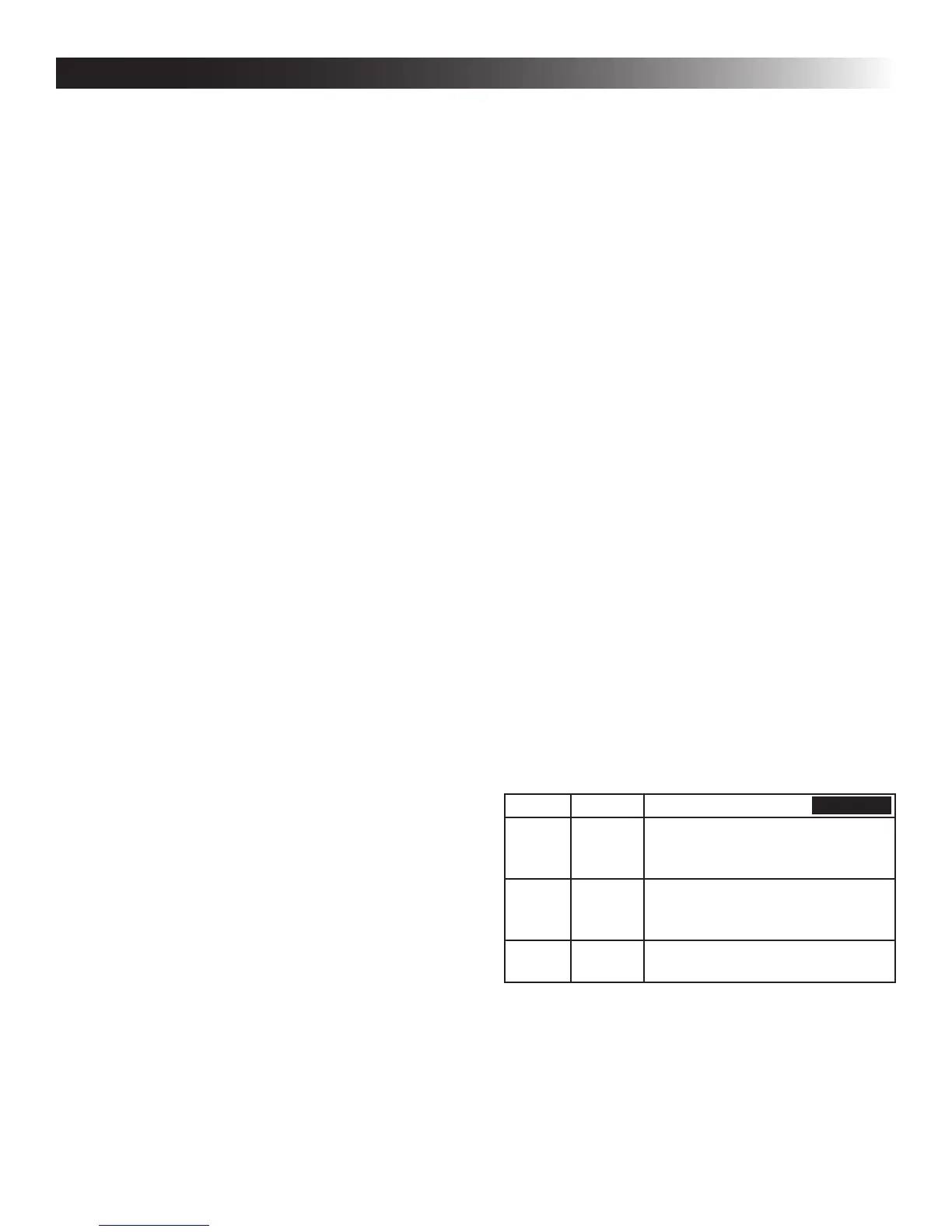
available (see Table 2).
Setting Display Uses
Hot 100°F Heavily soiled fabrics, pure white
cottonorax,towels,andbed-
sheets
Warm 90 °F Moderately soiled fabrics, colorful
ax,cotton,andsyntheticarticles
with certain color fade degree
Cold —— Lightly soiled fabrics, wool, and
synthetic articles
● Prewash: Select this option to add a prewash
and spin cycle to the chosen cycle. This setting
is useful for heavily soiled items.
● Child Lock: Press the “Soil Level” and “Delay”
buttons at the same time to lock/unlock the
control panel.
TABLE 2


 To Next Page