COMPRESSOR parameter adjustment
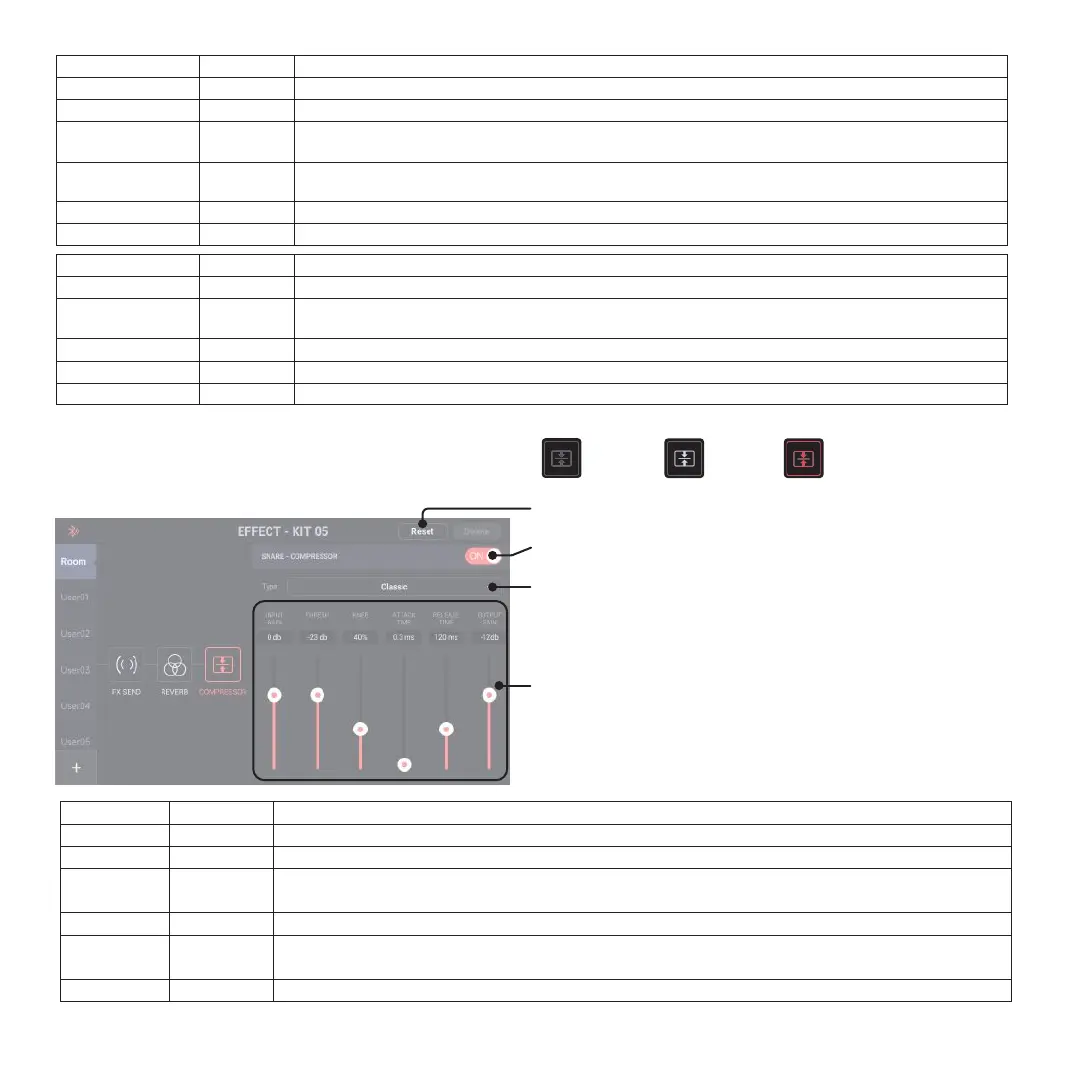
Click on the parameter drag option in this interface for selection, push the
fader within the option, or use the encoder to adjust the parameters.
Type:
Classic - compresses the input signal directly
Feedback - compresses by feeding a portion of the output back to the input;
slight variations in transient shaping and frequency response may occur.
Restore
Currently selected effect kit is restored to the default parameter
COMPRESSOR current channel switch
For COMPRESSOR parameter adjustment, the button must be “ON” for valid operation.
COMPRESSOR Type Selection
Click it to pop up type selection
Classic: Directly use input signals for compression
Feedback: Some outputs are sent to the input end for compression, while the
transitional shape and frequency response may have slight changes
COMPRESSOR Effect Buttons
Off On Parameter adjustment
❼
COMPRESSOR Parameter Adjustment (Full Set)
Type
Input Gain
Thresh
Knee
Attack Time
Release Time
Output Gain
Parameter
-60dB --10dB
-60dB --0dB
0%--100%
0.1ms --8ms
40ms --251ms
36dB --0dB
Description
--
The value determines the beginning input volume of the compressor
The value determines the flatness of compressed volume changes; the larger the value is, the more prominent the
sudden changes are.
The value determines the waiting time to be valid after the compressor receives input signals.
The value determines the waiting time for the compressor to stop operation after the signals attenuation is below the
Thresh.
--
Type
Reverb Time
Room Size
Color Damping
Diffusion/Softness
Pre-Delay
Output Mix
Parameter
0.5s--20.2s
0--100
0--50--100
0--100
0-250ms
0--100
Description
Reverb attenuation time: The larger the value is, the slower the reverb attenuation will be.
Analog room size: The larger the value is, the larger the room generating reverb will be.
Reverb color damping: The smaller the value is, the darker the color damping will be; the larger the value is, the
brighter the color damping will be.
The value determines the density of reflected sound in the room: The larger the value is, the denser the reverb
will be and the softer the hearing will be.
Adjust the delay time of reverb and direct sounds.
Adjust the mix of reverb wet sound.
Type
Decay
Color Lowshelf
Hi Damp
Pre-Delay
Output Mix
Parameter
0--100
0--100
0--100
0-250ms
0--100
Description
Reverb attenuation time: The larger the value is, the slower the attenuation will be.
Adjust the shelf filter of tone color: The smaller the value is, the darker the tone color will be; the larger the value
is, the brighter the tone color will be.
Restrain the high frequency in reverb: The larger the value is, the more the high frequency restrains will be.
Adjust the delay time of reverb and direct sounds.
Adjust the mix of reverb wet sound.
13


 To Next Page
 Loading...