FUNCTION INTRODUCTION
Operation Guide
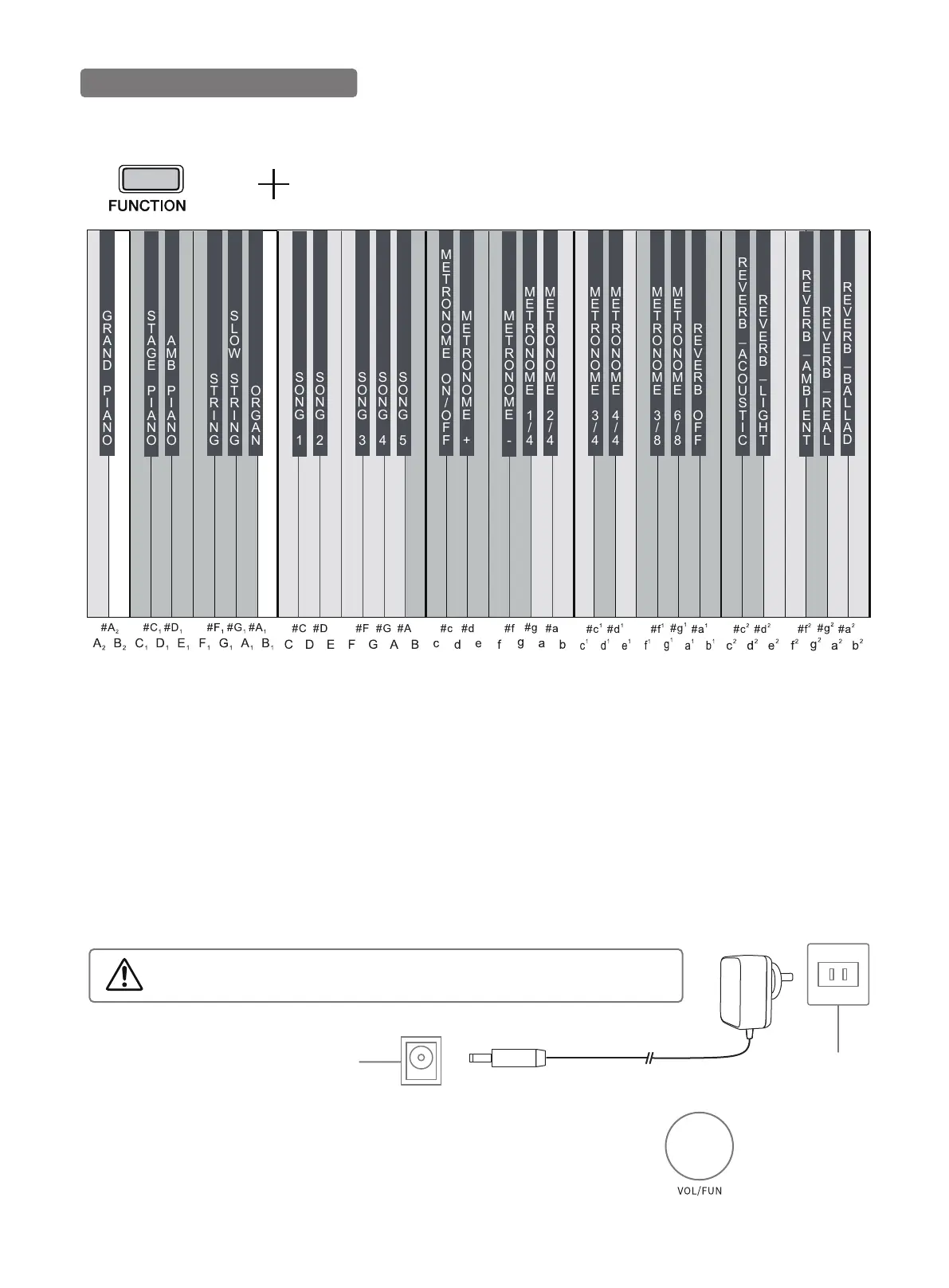
At the same time as the [FUNCTION] button above, click the corresponding key to set the function of this piano.
GRAND
PIANO
STAGE
PIANO
AMB
PIANO
STRING
SLOW
STRING
ORGAN
SONG
1
SONG
2
SONG
3
SONG
4
SONG
5
METRONOME
ON/OFF
METRONOME
+
METRONOME
-
METRONOME
1/4
METRONOME
2/4
METRONOME
3/4
METRONOME
4/4
METRONOME
3/8
METRONOME
6/8
REVERB
OFF
REVERB_
ACOUSTIC
REVERB_
LIGHT
REVERB_
AMBIENT
REVERB_
REAL
REVERB_
BALLAD
06
Turn On the Power
1. First, check if the power switch of the piano is turning off . If not, please turn off the power.
2. Connect the power, insert the plug into the power socket behind the piano first, and then plug the opposite
end of power adapter into the power socket.
3. Before turning on the power, turn down the volume controller to the minimum first.Press the switch button
and when the power button lights up, it indicates this piano is started.
4. Before turning off the power of digital piano, turn down the volume controller to the minimum first, and press
the button to turn it off.
Note:
Be sure the supply voltage is 12V, too high or too low will damage the piano.
Do not unplug the power cord from the power socket under the state of electrification.
NOTE
Please unplug the power plug when not in use or during a thunderstorm.
Backside of
Piano Body
AC Socket
100V-220V
Master Volume Setting
Adjust the volume knob on the control panel to turn up & down the volume.
1. Turn the knob right to increase the overall volume.
2. Turn the knob left to decrease the overall volume.



 To Next Page