PACKAGE INCLUDES
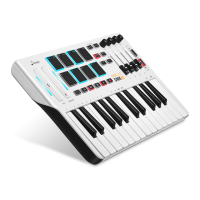
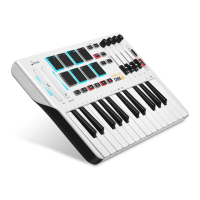
Ÿ DMK-25 midi keyboard
Ÿ
A standard USB cable
Ÿ Owner’s Manual
CONNECTABLE SOFTWARE
Ÿ
Cubase/Nuendo
Ÿ Cakewalk/Sonar
Ÿ
Fl stuido
Ÿ
audition
Ÿ
Pro tools
Ÿ
Garageband
FEATURE
1. PITCH/MODULATION
© Assignable Touch Bar, can be assigned to send Control Change message (hereinafter
called the ‘CC’) or Pitch Bend Change message (hereinafter called the ‘Pitch’).
©
The MIDI Channel is assignable for each of them . The range is 0~16 . 0 is the Global
channel, which will follow the Keyboard’s channel . 1~16 is the standard MIDI channel.
2. PAD
© Assignable PAD, can be assigned to send Note Change message (hereinafter called the
‘Note’) or Program Change message (hereinafter called the
‘PC’). © Use the [PAD Bank] to switch Bank A or Bank B.
© Use the [PROGRAM] to switch the pads to send Note or PC message.
©
The MIDI Channel is assignable for each of them . The range is 0~16 (the same as the
Touch Bar).
© 4 touch Curve, The range is 0~3.
3.
©
Assignable Buttons, can be assigned to send CC message.
© The MIDI Channel is assignable for each of them . The range is 0~16 (the same as the
Touch Bar).
©
The Buttons have 2 Modes, 0 for Toggle , 1 for Momentary.
F Toggle: The button “latches"; it sends its message continuously when it is first
pressed and stops sending it when it is pressed a second time.
F
Momentary: The button sends its message while being pressed and stops sending it
when it is released.
4. K1~K4
© Assignable Knobs, can be assigned to send CC message.
© Use the [K Bank] to switch Bank A or Bank B.
© The MIDI Channel is assignable for each of them . The range is 0~16 (the same as the
Touch Bar).


 To Next Page