The provided document is an "EDITOR USER GUIDE" for a device named "DONNER SPACLINE DMK25 mini." This guide details the functionality and operation of the DMK25 editor software, which allows users to customize the MIDI messages sent by the DMK25 mini's controls to a computer.
Function Description:
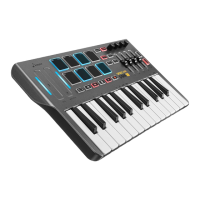
The Donner DMK25 mini is a MIDI controller, and its accompanying editor software provides a visual and intuitive interface for configuring its various controls. The primary function of the editor is to allow users to assign different MIDI messages to the pads, knobs, sliders, touch bar, transport buttons, pedal, and keyboard of the DMK25 mini. This customization enables the device to be tailored for different software applications, production workflows, or live performance scenarios.
The editor manages "Programs," which are preset files (.dmk25) containing all MIDI assignments. The DMK25 mini itself can store up to four Programs internally, while additional Programs can be saved on the user's computer and loaded onto the device via the editor. This system allows for flexible control configurations that can be swapped as needed.
Usage Features:
Software Installation and Connection:
- Windows: Installation involves double-clicking an .exe installer file and following on-screen instructions.
- Mac OS: Installation involves double-clicking a .pkg installer file and following on-screen instructions.
- Connection: To use the editor, the DMK25 mini can optionally be connected to the computer via a standard USB cable. While the editor can be used without a connected device, sending or getting Programs requires a connection. The connection process involves selecting "DMK25" as the MIDI device in the editor's device setup options. A successful connection is indicated by a light on the left side of the editor interface. It's crucial to ensure no other MIDI-related software (editor, MIDI debug, DAW) is open when using the DMK25 mini Editor.
Program and File Management:
- Programs: A Program is a complete set of MIDI assignments. The DMK25 mini can store four Programs, and more can be saved on the computer.
- Sending/Getting Programs: Users can send Program settings from the editor to the DMK25 mini's internal PROGRAM or RAM by clicking "SEND." Conversely, settings can be retrieved from the device by clicking "GET." RAM is the default setting upon startup.
- Factory Reset: A "FACTORY RESET" button is available to load the factory default settings into the editor.
- File Operations:
- Open: Load a .dmk25 Program file from the computer (File > Open).
- Save: Save the current Program to a .dmk25 file (File > Save).
- Save As: Save the current Program under a different name or to a new location (File > Save As).
Editing Controls:
-
Pads:
- Each pad can be assigned MIDI notes, CC messages, PC messages, and their respective Channel (Cn) messages.
- The MIDI channel for all pads can be set globally.
- MIDI Note Selection: Click the Note field and select a value from a pop-up piano roll (C1-G9) or type a MIDI note number (0-127).
- CC Message Selection: Click the CC field and type a CC number (0-127).
- Program Change Selection: Click the PC field and type a PC number (0-127).
- MIDI Channel Selection: Click the CN field and type a MIDI channel number (0-16).
- Pad Behavior: Pads can be set to "Toggle" (latches, sends continuously until pressed again) or "Momentary" (sends only while pressed).
- Pad Curves: Four different velocity curves (Curve 0, 1, 2, 3) are available, representing how the force of a press translates to output.
-
Knobs and Sliders:
- Each of the four knobs and sliders can be assigned CC (0-127) and CN (0-16) messages. The operation method for assignment is similar to that of the pads.
-
Touch Bar:
- Assignments for Pitch and Modulation, including CC (0-127) and CN (0-16) messages, can be configured. The operation method is the same as for pads.
-
Transport Buttons:
- Each of the six transport buttons can be assigned CC (0-127), CN (0-16) messages, and a Mode (Toggle or Momentary). The operation method is the same as for pads.
-
Pedal:
- The pedal can be assigned CC (0-127) and CN (0-16) messages. The operation method is the same as for pads.
-
Keyboard:
- Transpose: Adjust the keyboard's transposition from -12 to +12 semitones. A value of 0 means no transposition. The leftmost key displays its note value.
- Octave: Change the keyboard's octave from -4 to +4 octaves. A value of 0 is the center/default octave. The leftmost key displays its note value to indicate the octave shift.
- MIDI Channel: Select the MIDI channel (1-16) for the keyboard's messages.
- Keyboard Curves: Four different velocity curves (Curve 0, 1, 2, 3) are available, representing how the force of a key press translates to output.
Auto-Populate Feature:
- This feature allows users to quickly apply common "patterns" of assignments to pads, knobs, transports, and sliders, saving manual configuration time. It is accessed via Menu > Tools > Auto Populate.
- Auto-Populating Pads:
- Pads can be auto-populated with scales of MIDI note numbers (e.g., Chromatic Up/Down, Major, Minor, Dorian, etc.), a range of CC numbers, PC numbers, and CN numbers.
- Users can select a scale, a starting MIDI note, a starting CC/PC/CN number, and whether values should be ascending or descending.
- Assignments can be applied to Bank A, Bank B, or both (A&B).
- Caution: Auto-population cannot be undone.
- Auto-Populating Knobs and Sliders:
- Knobs and sliders can be auto-populated with ranges of CC and Cn numbers. The method is similar to auto-populating pads.
- Auto-Populating Transport:
- Transport buttons can be auto-populated with ranges of CC and Cn numbers.
- All transport buttons can also be set to Toggle or Momentary mode simultaneously.
Important Technical Specifications (Derived from context):
- MIDI Messages: Supports CC (Continuous Controller, 0-127), PC (Program Change, 0-127), and MIDI Channel (Cn, 0-16).
- Programs: Stores up to 4 Programs internally on the DMK25 mini; unlimited storage on computer.
- File Format: .dmk25 for Program files.
- Connectivity: USB for connection to computer.
- Operating System Compatibility: Windows and Mac OS (specific versions not detailed, but implied by installer types).
Maintenance Features:
- The document does not explicitly detail maintenance features for the hardware device itself. However, the software provides a "FACTORY RESET" option, which can be considered a maintenance feature for restoring the device's default software configuration. The ability to save and load Programs also serves as a form of configuration backup and restoration, which is a key aspect of software maintenance.

 Need help?
 General

 To Next Page