EasyManua.ls Logo

Donner Looper - User Manual

Donner Looper
2 pages
Print Icon
To Next Page IconTo Next Page
Loading...
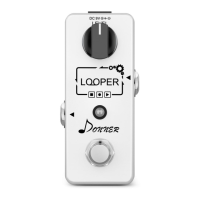
The Looper is a small and highly
intuitive single footswitch loop station
pedal providing you simple and fun
looping. Unlimited overdubs and
undo/redo function are very convenient
for creating musical inspirations.
Introduction
Overview
Owners Manual
Precautions
READ CAREFULLY BEFORE
PROCEEDING
Please keep this manual in a convenient
place for future reference.
Power Supply
Always use a DC 9V center negative AC
adapter. Use of an adapter other than
that specified could damage the unit or
cause malfunction and pose a safety
hazard.
Handling
Do not apply excessive force to the
switches and other controls, exposing
the unit to strong impacts, which could
cause it to break.
Do not put foreign objects or liquids into
the unit.
Never open the case or attempt to
modify the product in any way since this
can result in damage to the unit.
Clean only with a soft, dry cloth.
Easy Controls
The Looper provides you simple and
intuitive user experience. Single
footswitch provides you convenient
looping operations, making your music
creation more enjoyable.
CD Quality Recording/Playback
The Looper offers you CD quality
recording and playback that give you a
pure, uncompressed, lossless sound.
Undo/Redo And Overdubs
The Looper supports unlimited
overdubs. You can undo/redo your last
recording by holding the footswitch after
overdubbing.
Carefully Selected Components
The Looper is designed and built with
carefully selected components to ensure
best sound quality and road
performance. The solid Aluminum-alloy
chassis ensures touring reliability.
Always connect the AC adapter to an AC
outlet that supplies the rated voltage
required by the adapter.
Disconnect the AC adapter from the AC
outlet when during lightning storms or not
using the unit for an extended period.
Connections
Always turn off the power before
connecting or disconnecting. Make sure
to disconnect all cables and AC adapter
before moving the unit. This will help
prevent malfunction and damages.
Environment Considerations
Avoid using the unit in any of the
following conditions that could cause
malfunction:
Extremely hot or cold places
Under direct sunlight
Magnetic fields
Near heaters and other heat sources
Sandy or dusty places
Places that are extremely humid or
exposed to splashing water
Places with lots of vibrations
Electrical Interference
Devices that are very susceptible to
interference or that emits powerful
electromagnetic waves (e.g. radios and
TVs) should not be placed near this unit,
as interference could occur.
Electromagnetic interference could cause
malfunction and could corrupt or destroy
data.
Always operate this unit at a suitable
distance from these devices.
Question and Answer IconNeed help?

Do you have a question about the Donner Looper and is the answer not in the manual?

Summary

Introduction

Precautions and Safety

Power Supply Requirements

Specifies using a DC 9V center negative AC adapter to prevent damage, malfunction, or safety hazards.

Connection Safety

Turn off power before connecting/disconnecting cables and adapter to prevent malfunction and damages.

Environmental Use Conditions

Avoid use in extreme temperatures, direct sunlight, magnetic fields, dusty, humid, or vibrating environments.

Electrical Interference

Operate unit away from strong electromagnetic sources to prevent malfunction or data corruption.

Proper Handling

Avoid excessive force, impacts, foreign objects, liquids, and unauthorized modifications; clean with a soft, dry cloth.

Product Overview and Features

Intuitive Controls

Offers a simple, intuitive user experience with a single footswitch for convenient looping operations.

Audio Quality

Provides CD quality recording and playback for a pure, uncompressed, lossless sound experience.

Looping Functions

Supports unlimited overdubs and undo/redo of the last recording via footswitch operation.

Build Quality

Features carefully selected components and a solid Aluminum-alloy chassis for sound quality and road reliability.

Connections and Controls Diagram

Input and Output Jacks

Details the 1/4" mono audio jacks for connecting instruments, amps, or other devices.

DC 9 V Power Jack

Specifies the 9-volt DC jack for power supply using a regulated AC adapter with specific polarity.

Level Control Knob

Describes the function of the LEVEL knob for controlling the looper playback volume.

Features and Specifications

Key Features

Lists compact size, ease of use, CD quality, infinite overdubs, undo/redo, 10-min recording, and LED indicator.

Technical Specifications

Details max recording time, power requirement, current consumption, dimensions, weight, and material.

Operating Instructions

Power and Status Indicators

Explains LED status (None, Green, Red) for power on, empty, stop, record, play, and overdub states.

Footswitch Operations

Details footswitch actions for recording, overdubbing, playing, stopping, undo/redo, and clearing loops.

Recording Limits

Indicates recording around 10 minutes and storage nearing full status with specific LED indications.

Overview

The Donner Looper is a compact and highly intuitive single footswitch loop station pedal designed to provide simple and fun looping for musicians. It allows for unlimited overdubs and features an undo/redo function, making it a convenient tool for creating musical inspirations. The device is built with carefully selected components to ensure high sound quality and road performance, housed in a solid aluminum-alloy chassis for touring reliability.

Function Description:

The Looper's primary function is to record and play back audio loops. It offers CD quality recording and playback, ensuring a pure, uncompressed, and lossless sound. Users can record a base loop, then add an unlimited number of overdubs on top of it. The undo/redo function allows users to reverse or reapply their last recording, providing flexibility during the creative process. The maximum recording time is 10 minutes, offering ample space for various musical ideas.

Usage Features:

The Looper is designed for ease of use with its single footswitch operation, which controls all looping functions. The "LEVEL" knob allows users to adjust the playback volume of the looper. An LED indicator provides visual feedback on the device's working state, making it easy to understand the current operation.

The operating instructions detail the various functions triggered by the footswitch:

  • Power On (no loop): When the device is powered on without an active loop, the LED will be off.
  • Power On (with loop): If a loop is present when the device is powered on, the LED will flash green.
  • Tap footswitch (no loop): A single tap when no loop is present initiates recording, indicated by a solid red LED.
  • Tap footswitch when recording/overdubbing: A single tap during recording or overdubbing stops the current action, and the LED will be solid green, indicating playback.
  • Tap footswitch when playing: A single tap during playback initiates an overdub, with the LED turning solid red.
  • Hold footswitch when playing: Holding the footswitch during playback performs an undo/redo of the last recording, indicated by a fast flashing green LED.
  • Tap footswitch twice when playing/recording/overdubbing: Tapping the footswitch twice quickly stops the current operation, and the LED will flash green.
  • Hold footswitch when stopped: Holding the footswitch when the device is stopped clears the stored loop, and the LED will flash green rapidly.
  • Recording around 10 minutes: When the storage is nearly full, the LED will flash red.

The device features a 1/4" mono audio input jack for connecting instruments or other pedals, and a 1/4" mono audio output jack for connecting to amps or other devices. Power is supplied via a DC 9V jack, requiring a 9-volt DC regulated AC adapter with 500mA, where the plug polarity is positive on the barrel and negative in the center.

Maintenance Features:

To ensure the longevity and proper functioning of the Looper, several precautions are outlined:

  • Power Supply: Always use a DC 9V center negative AC adapter as specified. Using an incorrect adapter can damage the unit or pose a safety hazard. The AC adapter should always be connected to an AC outlet that supplies the required voltage. Disconnect the AC adapter during lightning storms or when the unit is not in use for extended periods.
  • Connections: Always turn off the power before connecting or disconnecting any cables or the AC adapter. This helps prevent malfunctions and damages.
  • Environment Considerations: Avoid using the unit in extreme temperatures (hot or cold), direct sunlight, magnetic fields, near heaters, in sandy or dusty places, in highly humid environments, or where it might be exposed to splashing water. Also, avoid places with lots of vibrations. These conditions can cause malfunction.
  • Electrical Interference: Do not place devices that are susceptible to interference or emit powerful electromagnetic waves (e.g., radios, TVs) near the Looper, as interference can occur. Electromagnetic interference can cause malfunction, corrupt, or destroy data. Always operate the unit at a suitable distance from such devices.
  • Handling: Do not apply excessive force to the switches and other controls, and avoid exposing the unit to strong impacts, as this can cause breakage. Prevent foreign objects or liquids from entering the unit. Never open the case or attempt to modify the product, as this can result in damage.
  • Cleaning: Clean the unit only with a soft, dry cloth.

By following these guidelines, users can ensure the Donner Looper remains in optimal condition, providing a reliable and enjoyable looping experience for their musical endeavors.

Donner Looper Specifications

General IconGeneral
BypassTrue Bypass
Mono/StereoMono
TypeLooper
Inputs1 x 1/4" Instrument
Outputs1 x 1/4" Instrument
Power Supply9V DC (center negative)
Loop Time5 minutes

Related product manuals