EasyManua.ls Logo

Dontek AQUATEK - Lcd Screen; Lcd Indicators; Controller Buttons

Dontek AQUATEK
31 pages
Print Icon
To Next Page IconTo Next Page
To Previous Page IconTo Previous Page
Loading...
OPERATING
INSTRUCTIONS
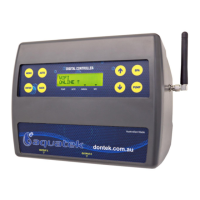
LCD
SCREEN
In
Automatic
[Pool]
mode
the
LCD
screen
displays;
the
time
of
day,
what
time
the
current
filtration
cycle
will
finish/start
at,
if
more
than
one
filtration
cycle
is
set,
then
the
start
time
of
the
next
filtration
cycle
is
displayed,
current
pool
and
roof
temperatures
or
any
faults
are
displayed,
current
status
of
the
pump
[run/inactive],
Heat
Demand
time
[if
active],
and
whether
the
WIFI
is
active
or
disabled.
In
Spa
mode
the
LCD
screen
will
display;
the
time
of
day,
SPA
MODE
on,
pool
temperature
or
sensor
fault,
Temperature
-
both
current
temperature
and
set
temperature
of
the
spa,
pump
status,
and
WIFI
status.
LCD
INDICATORS
There
are
arrow
icons
on
the
LCD
screen
that
point
to
text
on
the
label.
CONTROLLER
BUTTONS
AUTO
Pressing
the
AUTO
button
will
run
the
controller
in
automatic
pool
mode.
If
the
AUTO
button
is
pressed
while
in
the
settings
menu,
the
changed
settings
will
be
used
but
not
saved.
If
there
is
a
power
failure
the
controller
will
retrieve
the
previously
saved
settings.
On
power-up
the
controller
will
start
automatic
pool
operation.
BACK
Pressing
the
BACK
button
will
allow
you
to
go
back
to
previous
menu
options.
ENTER
Pressing
the
ENTER
button
will
turn
on
the
LCD
backlight
or,
Pressing
the
ENTER
button
will
accept
the
currently
displayed
setting
option.
MENU
After
pressing
the
MENU
button,
a
range
of
options
can
be
selected
from
and
changed.
The
selectable
options
in
the
MENU
are
as
follows:
1]
FILTER
TIMES
2]
TEMPERATURE
3]
CONTROL
4]
TIMERS
5]
LIGHTS
B]
INSTALLER
MENU
UP
&
DOWN
The
UP
&
DOWN
buttons
allow
you
to
scroll
through
different
functions
and
or
settings
in
the
menus,
as
well
as
increasing
or
decreasing
temperature
settings.
SPA
The
SPA
button
allows
you
to
toggle
between
Pool
and
Spa
modes.
Pressing
the
SPA
button
begins
the
process
of
heating
the
spa
to
the
spa
temperature
limit.
The
pool/spa
valves
will
move
to
the
spa
and
prime
the
pump
if
required.
Heating
will
occur
to
the
displayed
set
temperature.
To
return
to
automatic
pool
operations
press
the
AUTD
button
or
press
the
SPA
button
to
return
to
automatic
pool
operations.
AQUATEK
User
Manual
VI.
2
[002].docx
8

Related product manuals