EasyManua.ls Logo

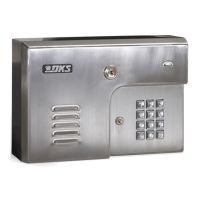
DoorKing 1812 Classic - User Manual

DoorKing 1812 Classic
47 pages
Print Icon
To Next Page IconTo Next Page
Loading...
Owner’s Manual
Model 1812 Classic
Telephone Intercom Systems
DoorKing, Inc.
120 Glasgow Avenue
Inglewood, California 90301
U.S.A.
Phone: 310-645-0023
Fax: 310-641-1586
www.doorking.com
P/N 1812-065 REV M, 3/07
Copyright 2001 DoorKing, Inc. All rights reserved.

Table of Contents

Questions and Answers

  • J
    joseph13Aug 19, 2025
    What to do if the DoorKing 1812 Classic Intercom System keypad is dead?
    • K
      kjonesAug 19, 2025
      First, check for 24 VAC input power, as the keypad might not be receiving any power. Also, verify that the keypad is correctly connected to the circuit board, ensuring that the cable on the plug points down when connected.
  • E
    Elizabeth WilliamsAug 21, 2025
    What to do if DoorKing 1812 Classic entry code will not work?
    • R
      Roberto BowmanAug 21, 2025
      Make sure you are pressing # first before entering the code. Also, the entry code might be programmed under a time zone restricted location code and the entry code time zone is enabled. Turn the entry code time zone off, reprogram the time zone boundaries, or reprogram the entry code under a momentary activation location code. Finally, check if the entry code is programmed under a time zone restricted location code and an external time zone input (terminals 6 & 9) is shorted (activated). Remove the external time zone input or reprogram the entry code under a momentary activation location code.
  • M
    Michelle SchneiderAug 23, 2025
    Why won't phones in home ring with DoorKing 1812 Classic Intercom System?
    • R
      Ryan CrossAug 23, 2025
      Several factors could be at play. First, ensure the by-pass switch isn't set to by-pass mode. Another reason could be that the 'Do Not Disturb' time zone might be active; either disable it or adjust the time zone settings. Similarly, check if the call forwarding feature or its associated time zone is enabled, and turn them off or modify the time zone boundaries. Also, check for voltage drops in the 24 VAC supply by examining the voltage at terminals 17 & 18. Lastly, disconnect the PHON OUT wires from terminals 4 & 5 and connect a test telephone to these terminals. If the test telephone rings, the issue lies with the phone out wiring; if it doesn't ring, the circuit board may be faulty.
  • V
    vesparzaAug 26, 2025
    Why is there a buzz or noise on the DoorKing Intercom System line?
    • G
      Gregory GeorgeAug 26, 2025
      Several factors can cause this issue. Check for a short to ground behind the circuit board, pinched wires near the door hinge, or a 24-volt power shorted to a conduit. Also, inspect for a phone line shorted to ground and ensure that the phone wires are twisted. Verify that all wires, including the speaker and keypad, are isolated from ground. Confirm that the cabinet is properly grounded, ensuring the case ground (terminal 3) isn't used as a low voltage common. Check for excessive voltage drop on the 24 VAC power and test the phone line with a telephone test set.
  • C
    Christopher PhamAug 28, 2025
    Why does my DoorKing 1812 Classic Intercom System emit a long tone and cancel programming?
    • L
      lori84Aug 28, 2025
      This usually happens because you are waiting too long between pushing buttons during programming. It can also occur if you forget to press * first when programming.
  • K
    Kelsey CarterAug 30, 2025
    How to fix buzz on telephone line with DoorKing 1812 Classic Intercom System?
    • M
      Michael KaufmanAug 30, 2025
      To resolve this, first remove the PHON IN and PHON OUT wires from the 1812 terminal strip, then connect the PHON IN wires to the PHON OUT wires. If the noise persists, the PHON IN or PHON OUT wires are faulty. Additionally, remove the 24 VAC wires from the terminal strip and check the house phones. If the noise disappears, the 24 VAC wires are likely grounded, and you should replace them. Lastly, inspect the internal wires, switch wires, and battery wires for any pinches or shorts.
  • N
    Nicolas JonesSep 1, 2025
    What causes a dial tone to be heard on the DoorKing 1812 speaker?
    • A
      abarnesSep 1, 2025
      This indicates that the system is not wired in series with the resident phone line. Check the PHON IN terminals (1 & 2) and the PHON OUT terminals (4 & 5) to ensure correct wiring.
  • C
    Cynthia HahnSep 3, 2025
    Why won't my DoorKing 1812 Classic Intercom System activate relays, and phones don't generate a tone?
    • D
      Dawn ReevesSep 4, 2025
      Try switching the wires on the PHON OUT terminals (4 & 5). If you are using call forwarding or preprogrammed dialing out features, also try switching the wires on the PHON IN terminals (1 & 2).
  • S
    Susan WebbSep 6, 2025
    Why won't phones in home communicate with DoorKing 1812 Classic Intercom System after ringing?
    • K
      kevin69Sep 6, 2025
      Check the telephone company demarcation (interface) device placement. The DoorKing 1812 must be wired so that the C.O. wires exiting the demarcation device are connected to the C.O. terminals on the bypass switch. Also, disconnect the PHON OUT wires and connect a test telephone to the PHON OUT terminals (4 & 5). If the DoorKing 1812 cannot communicate with the test phone, the PHON IN and PHON OUT wires may be connected backwards. Check the wiring and reconnect.
  • O
    owilliamsSep 9, 2025
    Why won't the DoorKing 1812 Classic answer when called from a remote location?
    • A
      Amy LoweSep 9, 2025
      The auto-answer feature might be turned off; turn it on. Alternatively, the number of rings to answer may be programmed too high; reprogram it to a lower number.

Summary

Section 1 - Installation & Wiring

Installation and Mounting Guidelines

General installation, mounting options (surface, flush, wall), and site basics.

Wiring Procedures and Terminal Descriptions

Instructions for telephone line, intercom, by-pass switch wiring, and terminal connections.

Section 2 - Programming

Programming Methods and Setup

Overview of programming methods (keypad, PC, phone) and PC setup.

System Configuration Parameters

Details on general, time, dial-out, and entry code programming.

Section 3 - Adjustments

Audio Settings and Master Code Configuration

Adjusting volume, feedback, and master code switch.

Section 4 - Operating Instructions

Core Operations and Feature Usage

Guest calls, call waiting, preprogrammed numbers, call forwarding, DND, entry codes.

Remote Control and Switch Inputs

Remote programming, relay activation, and switch input operations.

Section 5 - Maintenance and Troubleshooting

System Maintenance and Troubleshooting

Cleaning, diagnosing, and resolving issues like noise.

Accessories and Logging

Information on optional accessories and data logging tables.

DoorKing 1812 Classic Specifications

General IconGeneral
BrandDoorKing
Model1812 Classic
CategoryIntercom System
LanguageEnglish

Related product manuals