G424F(FE) Service Manual 283 Appendix
Faults Screen Tab
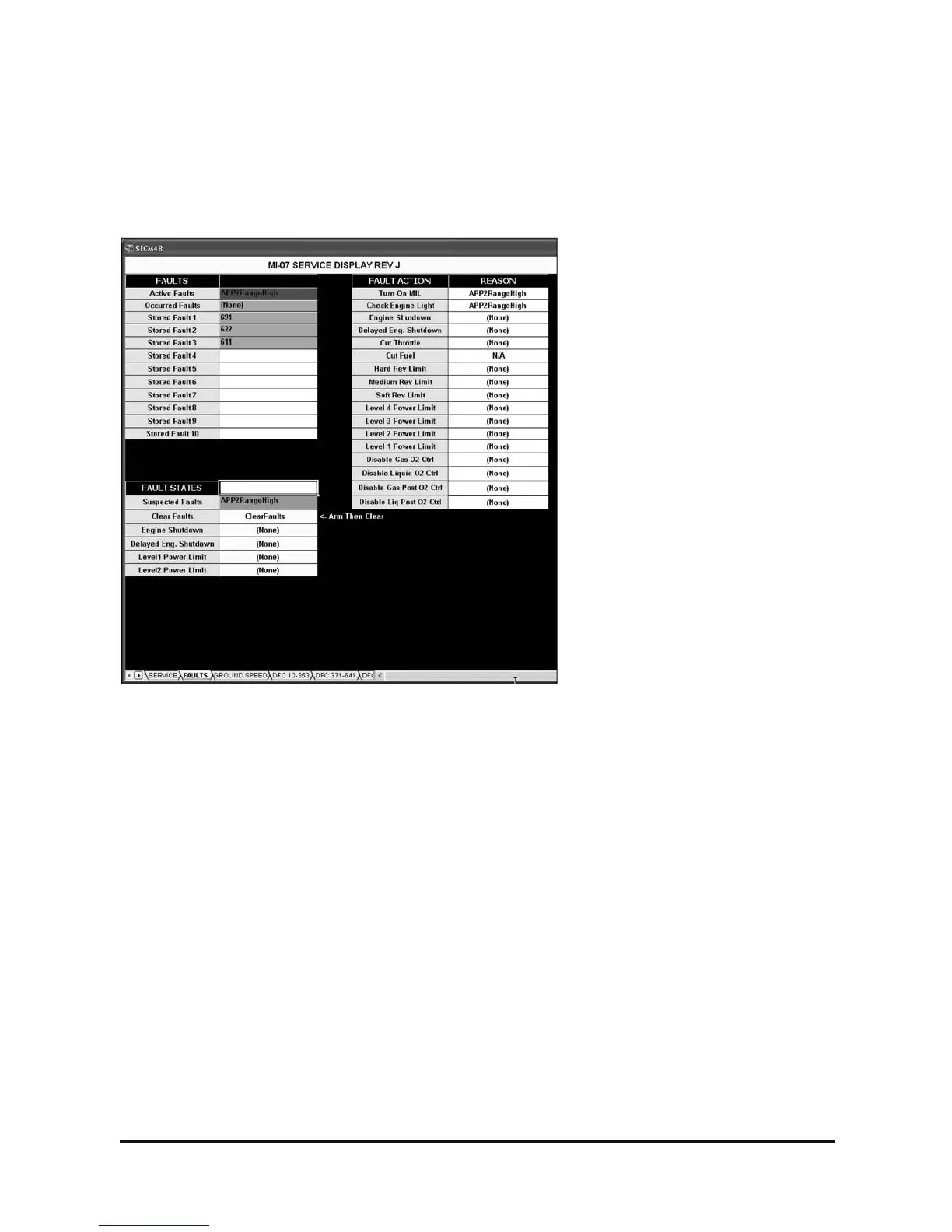
The second available screen in the service tool display is the Fault screen. All ten stored fault codes are
displayed in order of their occurrence. If a fault occurs and is stored it will not be stored again in the fault
record until the fault has been cleared. This prevents the same re-occurring fault from being saved to all the
stored records. Stored faults do not contain any type of date or time stamp to indicate when they occurred.
Figure 8. Faults Screen
Faults
Faults are displayed in the Fault category. Active faults display the description of all active faults, faults that
are actively taking place when connected to the SECM. Occurred faults displays the description of all stored
faults. The ten stored fault records are displayed by the three digit fault codes. Definitions of these fault codes
can be located on the DFC screens.
Fault States
Suspected possible faults are displayed here. (These may be redundant of the occurred fault list.) All faults
can be cleared from the Clear Faults pull down parameter. Place your mouse pointer over the Clear Fault
parameter box, then simply click the pull down arrow and select the Arm option (Figure 7). You have now
armed the clear fault function. Using your mouse click the pull down arrow again and select the ClearFaults
option. You must select another area on the screen by clicking that area with your mouse to complete the
Clear Faults function; you will then see all faults clear. Any faults that are active will immediately be stored in
the fault record. Different fault actions such as engine shutdown are also listed in this category. Any fault that
causes one of these actions will be displayed next to the action itself. Only one fault at a time will be displayed
next to the fault action.
Fault Action
A list of possible fault actions is provided. Any fault that may induce one of these actions will be displayed next
to the action.



 To Next Page