4
SafeRoute® System
2019-03
WN 059722 45532
dormakaba Product descriptionSystem manual
3.3.3 Electrical door lock STV xxx
The electric door lock locks the door and releases
the door on request. Up to four different as well as
identical door locks can be connected to a SafeRoute®
system via the DCW® bus. All dormakaba STV xxx
door locks are permitted. Door locks without DCW®
bus are integrated via the STV-A adapter.
3.3.4 Power supply unit
The power supply unit feeds the 24V DC voltage for
all SafeRoute® and DCW® components at any point
in the DCW® bus. If there is an increased demand for
power, several power supply units can be connected
(the +24V line between the power supplies must
then be disconnected). Any power supply units used
must meet the dormakaba requirements (definition
of power supplies: see Declaration of Conformity at
www.dormakaba.com).
3.3.5 DCW® bus
The DCW® bus connects the components. Power is
supplied via the DCW® bus (four-core control cable).
dormakaba recommends the following type of lead:
• For bus routes up to max. 300 m: J-Y(St)Y 2x2x0.8
3.4 Extension of the SafeRoute® system
3.4.1 Additional DCW® components
Depending on requirements, the SafeRoute®
system can be supplemented with additional DCW®
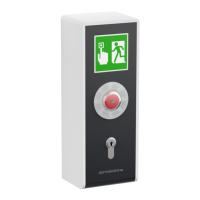
components, e.g. additional emergency button, key
switches, self-locking panic locks, etc.
List of all approved components:
The list of approved components and parts and the
declaration of conformity are available at www.
dormakaba.com.
3.4.2 Inputs and outputs on the SCU
Each SCU has inputs and outputs where alarm and
signaling systems, external access control systems
and other components can be connected or switched.
The input and output functions can be parameterized
with TMS Soft® from the Basic license.
3.4.3 RS232 interface at the SCU
(available from Basic license)
The SCU with the inserted license card can be
connected to TMS Soft® (PC computer) via the RS232
interface. The connection can also be made via an
LON or LAN network adapter.
3.5 Functional scope
The functions of a SafeRoute® system result from
the connected components and the license card
(see Chap. 12). The preconfigured functions (default
values) can be changed with TMS Soft® and the
SafeRoute® configuration software (possible from
Basic license).
The SafeRoute® system’s functional scope can be
expanded by additional components and SLI-A
application cards (from Basic license).
3.5.1 Release and unlock
The following functions are available (default values):
• Release via emergency button (with alarm trigger)
• Release in case of power failure
• Temporary unlocking
• Long-term unlocking (from Standard license)
• Permanent unlocking
• Release by an alarm system (fire, danger, smoke
detectors, sprinklers, etc.)
3.5.2 Relocking
The following functions are available (default values):
• Automatically after power failure
• Temporary unlocking: Automatically after expiry of
the set relocking time
• Long-term unlocking: Automatically after expiry of
the set relocking time
• Permanent unlocking: Automatically after closing
the door and operation via key switch
3.5.3 Monitoring
The default values are:
• Tamper monitoring
• “Door open” monitoring with two different time
ranges for pre- and main alarm (from Standard
license)
3.5.4 Visual and audible indicator
The following displays are possible:
• Operating of the emergency button
• Alarm trigger
• Activation of locking and unlocking
• Relocking failed
• Pending maintenance
• Malfunction and error reports
• Connected components


 To Next Page