17
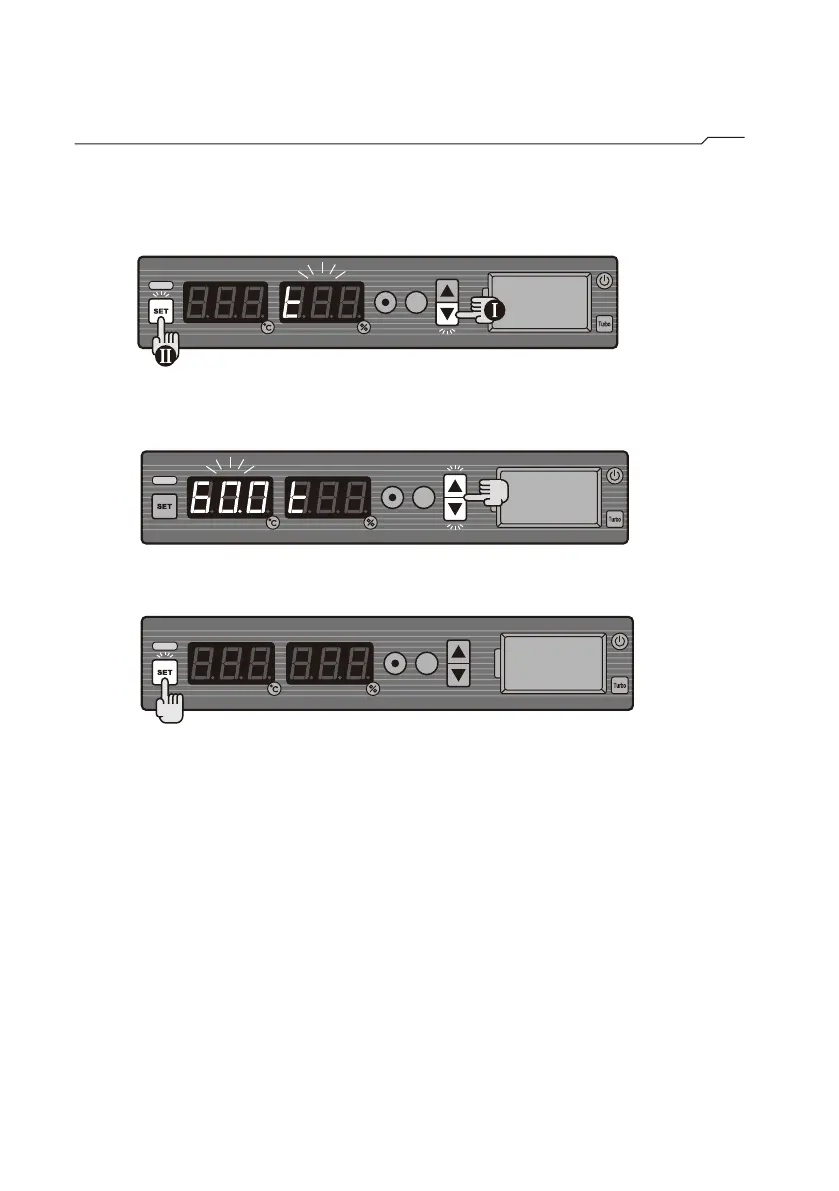
How to set temperature (T40W/T60M Only)
STEP1 Press and hold ▼, then press SET. (The humidity display will show
t, while the temperature display will flash the current
temperature setting.)
STEP2 Press ▲ or ▼ to reach the required temperature level of 60℃.
(setting range: 0~60℃)
STEP3 Press SET to store the setting.
Note:
1.Temperature control range:
T40W: >Room temperature ~40℃
T60M: >Room temperature ~60℃
2.Humidity reaches <5%RH only when the temperature reaches 40℃on T40W.
If it is lower than 40℃, the cabinet will perform higher humidity. Humidity
reaches ≦1%RH only when the temperature reaches 60℃
on T60M. If it is lower than 60℃, the cabinet will perform higher humidity.
3.If the heaters is turned off, please also disconnect power fan in order to
maintain humidity stabilized.
4.The best performance achieved at ambient condition 25℃ and <50%RH.
Lower ambient temperature may cause cabinet to take longer time
reaching desired temperature. Higher ambient humidity may cause
cabinet to take longer time reaching desired humidity.



 To Next Page