26 DR
®
TRIMMER/MOWER
™
Safety & Operating Instructions
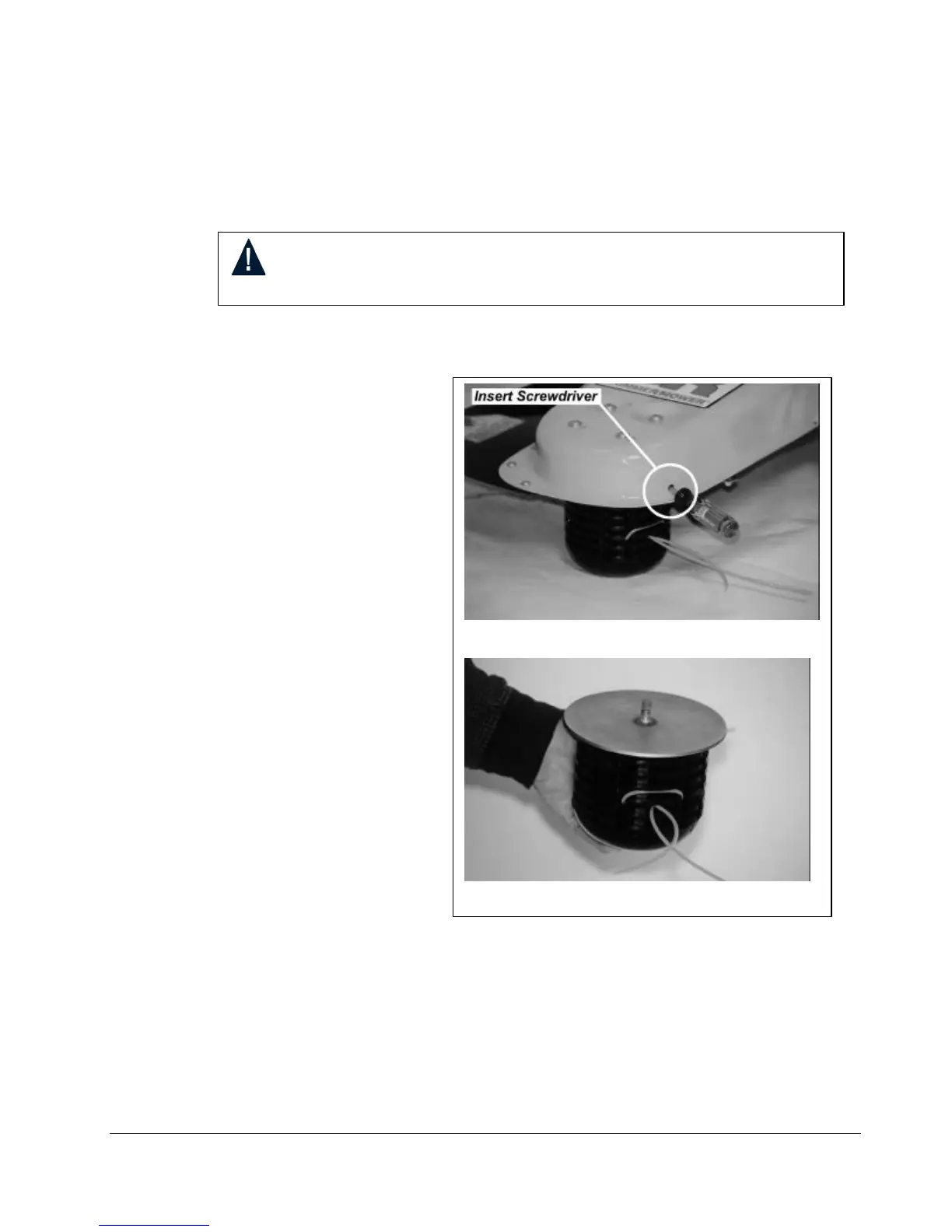
Figure 19
Removing and Reinstalling the Mow-Ball
Support
Assembly
Tools needed: You will need a #3 Phillips head screwdriver with at least a 6″ shank. or the
head locking tool that comes with your trimmer.
1. Insert the screwdriver or
head locking tool into the
hole in the frame, then
rotate the Mow-Ball
Support until the
screwdriver fits into a
second hole in the shaft,
locking it into place
(Figure 19).
2. Turn the Mow-Ball
Support assembly
counterclockwise until it
unscrews completely from
the bearing housing.
(Figure 20). Remove the
tool or screwdriver after
you’ve removed the Mow-
Ball
assembly.
Note: If the Mow-Ball
Support assembly
continues to turn, but does
not come off, check to be
sure the screwdriver is
locked into the shaft.
3. To reinstall the Mow-Ball
Support assembly, reverse
the above instructions.
WARNING! Before performing any maintenance procedure, stop the
engine and disconnect the spark plug wire.





 To Next Page