CONTACT US AT www.DRpower.com 27
Tools and Supplies Needed:
• Torque Wrench
• 3/8" socket
• Two 7/16" Wrenches
• Two 9/16" Wrenches
• Socket wrench with 9/16" Deep Socket
• Marker or Tape
• (4) Flange Nut, 3/8-24 (DR part #A0005092914)
1. To prevent accidental Starter engagement, disconnect the Battery Negative
Terminal using two 5/16" wrenches, and disconnect the Spark Plug Wire
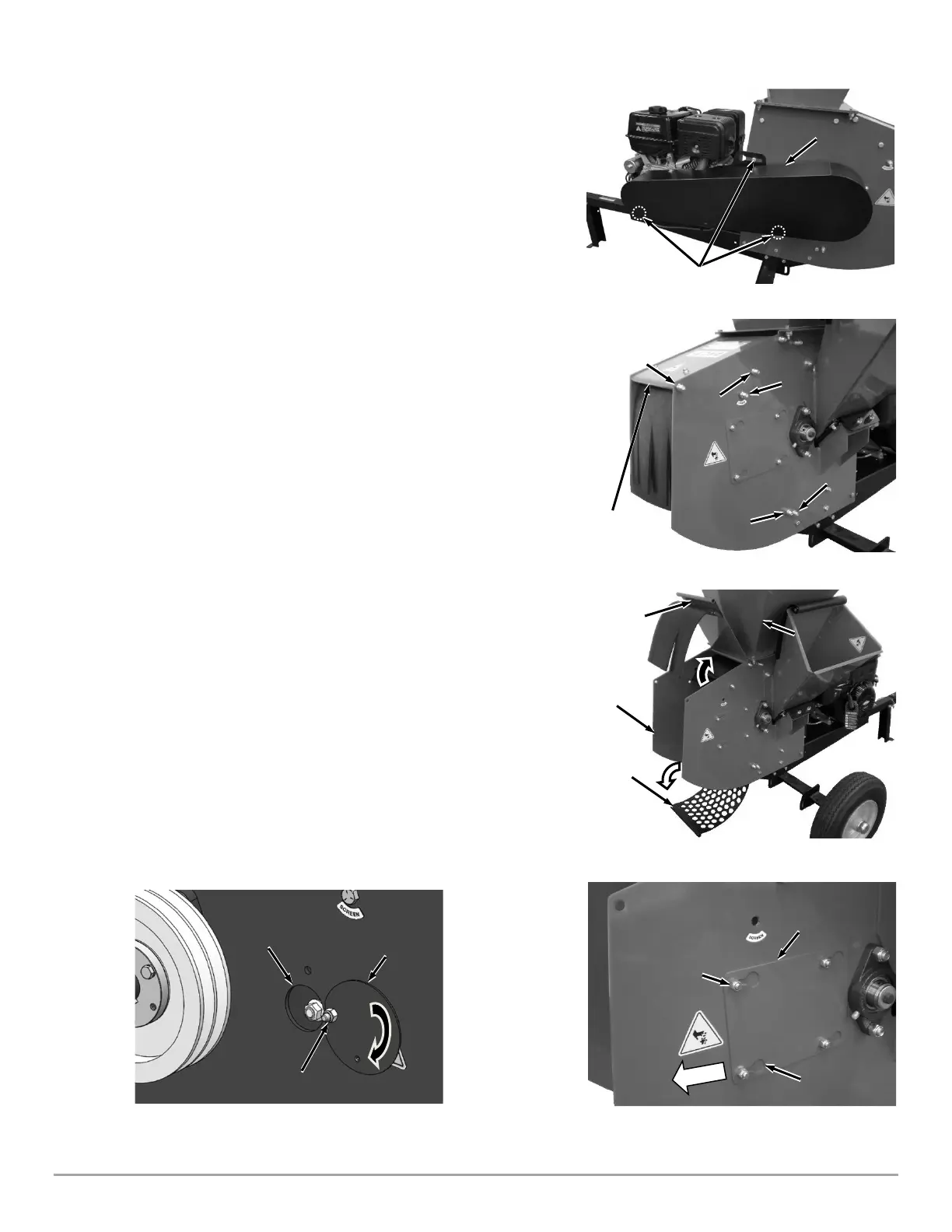
2. Remove the three Bolts supporting the Belt Guard using a 3/8" Wrench
(Figure 40). Remove the Belt Guard and set aside.
3. Remove the Bolt and Lock Nut securing the Housing Top Plate using two
9/16" Wrenches (Figure 41).
4. Remove the Upper Screen Bolt and Lock Nut using two 9/16" Wrenches.
5. Loosen (but do not remove) the Screen Pivot Bolt, Upper Scroll Bolt and
Lower Scroll Bolt using two 9/16" Wrenches.
6. Rotate the Housing Top Plate up towards the Hopper, exposing the Screen
(Figure 42).
7. Rotate the Screen down exposing the Shredder Hammer Assembly
8. Loosen the four Lock Nuts that hold the Knife Access Plate to the Chipper
Side Plate, using a 1/2" Wrench (Figure 43).
9. Slide the Knife Access Plate over to align the Lock Nuts with the large holes
in the Knife Access Plate and remove the Knife Access Plate.
10. Loosen the Lock Nut and Bolt that holds the Hammer Shaft Access Plate to
the Side Plate using two 7/16" Wrenches. Rotate the Plate upward to expose
the Access Window (Figure 44).
11. Tighten the Bolt and Lock Nut to hold the Hammer Shaft Access Plate out
of the way.


 To Next Page