EasyManua.ls Logo

DRAKE R8A - Scan Functions; SCAN MEMORY

DRAKE R8A
43 pages
Print Icon
To Next Page IconTo Next Page
To Previous Page IconTo Previous Page
Loading...
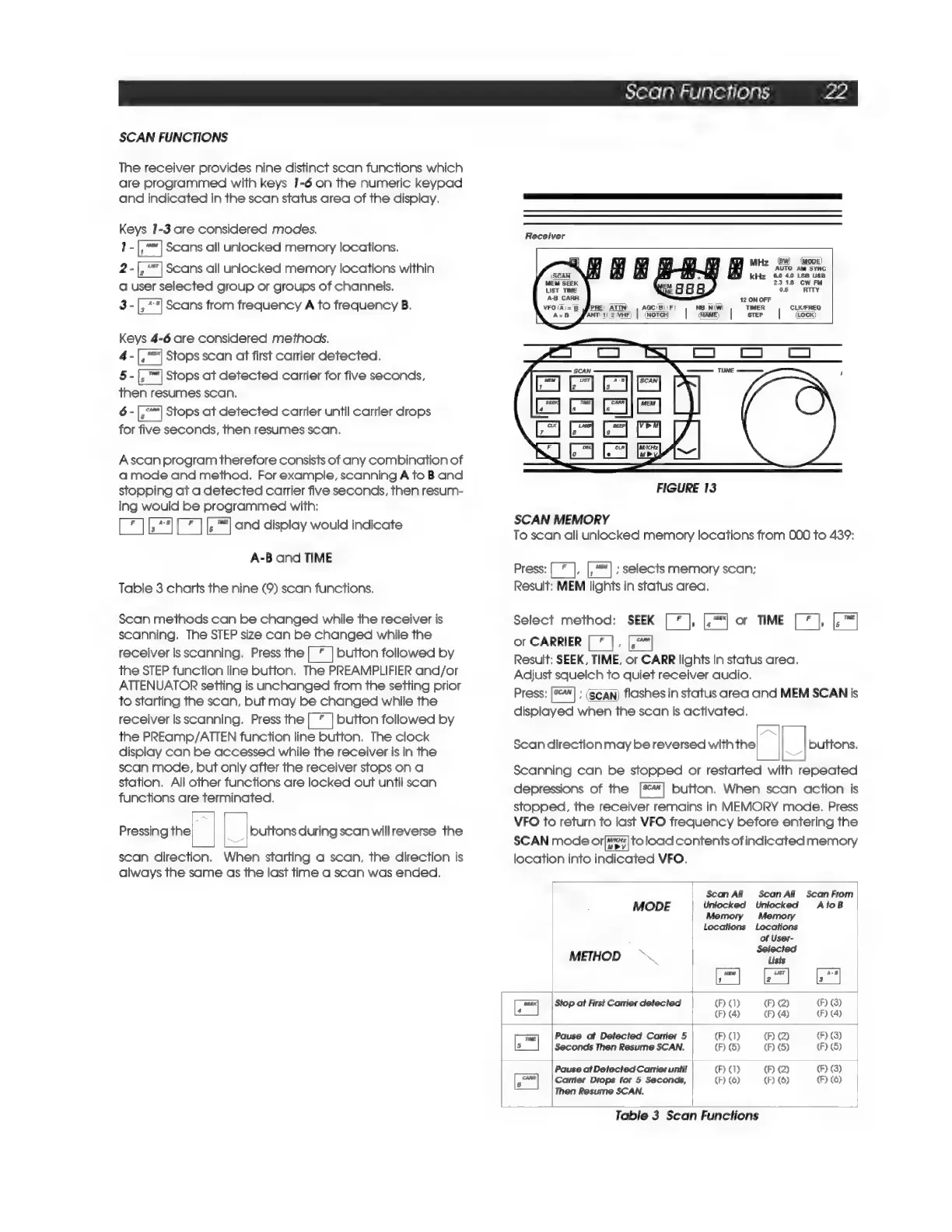
SCAN
FUNCTIONS
The
receiver
provides
nine
distinct
scan
functions
which
are
programmed
with
keys
1-6
on
the
numeric
keypad
and
indicated
in
the
scan
status
area
of
the
display.
Keys
1-3
are
considered
modes.
T-
eal
Scans
all
unlocked
memory
locations.
2-[,
"|
Scans
all
unlocked
memory
locations
within
a
user
selected
group
or
groups
of
channels.
3
-[,
**]
Scans
from
frequency
A
to
frequency
B.
Keys
4-6
are
considered
methoas.
4-
Pa
Stops
scan
at
first
carrier
detected.
§-|,™|
Stops
at
detected
carrier
for
five
seconds,
then
resumes
scan.
6
-[,°"|
Stops
at
detected
carrier
until
carrier
drops
for
five
seconds,
then
resumes
scan.
Ascan
program
therefore
consists
of
any
combination
of
a
mode
and
method.
For
example,
scanning
A
to
B
and
stopping
at
a
detected
carrier
five
seconds,
then
resum-
ing
would
be
programmed
with:
Pad
|
a
and
display
would
indicate
A-B
and
TIME
Table
3
charts
the
nine
(9)
scan
functions.
Scan
methods
can
be
changed
while
the
receiver
is
scanning.
The
STEP
size
can
be
changed
while
the
receiver
is
scanning.
Press
the|
*
|
button
followed
by
the
STEP
function
line
button.
The
PREAMPLIFIER
and/or
ATTENUATOR
setting
is
unchanged
from
the
setting
prior
to
starting
the
scan,
but
may
be
changed
while
the
receiver
Is
scanning.
Press
the
|
*
|
button
followed
by
the
PREamp/ATTEN
function
line
button.
The
clock
display
can
be
accessed
while
the
receiver
is
in
the
scan
mode,
but
only
after
the
receiver
stops
on
a
station.
All
other
functions
are
locked
out
until
scan
functions
are
terminated.
Pressing
the
|
buttons
during
scan
will
reverse
the
scan
direction.
When
starting
a
scan,
the
direction
is
always
the
same
as
the
last
time
a
scan
was
ended.
Scan
Functions
re
Receiver
(BW)
(MODE)
Miz
AUTO
AM
SYNC
kHz
60
40
LSB
USB
2318
CW
FM
os
RITY
12
ON
OFF
FIGURE
13
SCAN
MEMORY
To
scan
all
unlocked
memory
locations
from
000
to
439:
Press:
[
¥
],
;
selects
memory
scan;
Result:
MEM
lights
in
status
area.
Select
method:
SEEK
[*
],
or
TIME
[*
],
or
CARRIER
;
Result:
SEEK,
TIME,
or
CARR
lights
in
status
area.
Adjust
squelch
to
quiet
receiver
audio,
Press:
;
(Scan)
flashes
in
status
area
and
MEM
SCAN
is
displayed
when
the
scan
is
activated.
Scan
direction
may
be
reversed
with
the
\_|
buttons.
Scanning
can
be
stopped
or
restarted
with
repeated
depressions
of
the
[%]
button.
When
scan
action
is
stopped,
the
receiver
remains
in
MEMORY
mode.
Press
VFO
to
return
to
last
VFO
frequency
before
entering
the
SCAN
mode
ora]
toload
contents
of
indicated
memory
location
into
indicated
VFO,
Scan
All
ScanAll
Scan
From
MODE
Unlocked Unlocked
AtoB
Memory Memory
Locations Locations
of
User-
Selected
METHOD
Lists
Fra
Fel
A
Stop
at
First
Carrier
detected
(F)
1)
(F)
(2)
(F)
(3)
(F)
(4)
(F)
(4)
(F)
(4)
Pause
at
Detected
Carrier
5
(F)
1)
(F)
(2)
(F)
(3)
[™|
Seconds
Then
Resume
SCAN.
(F)
(S)
(F)
(5)
(F)
(S)
Pause
at
Detected
Carrier
until
(F)
1)
(F)
(2)
(F)
(3)
Peal
Carrier
Drops
for
5
Seconds,
(F)
(6)
(F)
(6)
(F)
(6)
Then
Resume
SCAN.
Table
3
Scan
Functions

Related product manuals