EasyManua.ls Logo

DRAKE R8A - SCAN MEMORY LIST BLOCK; Single list scan; Multiple LIST scan

DRAKE R8A
43 pages
Print Icon
To Next Page IconTo Next Page
To Previous Page IconTo Previous Page
Loading...
ao
Scan
Functions
cont'd.
SCAN
MEMORY
LIST
BLOCK
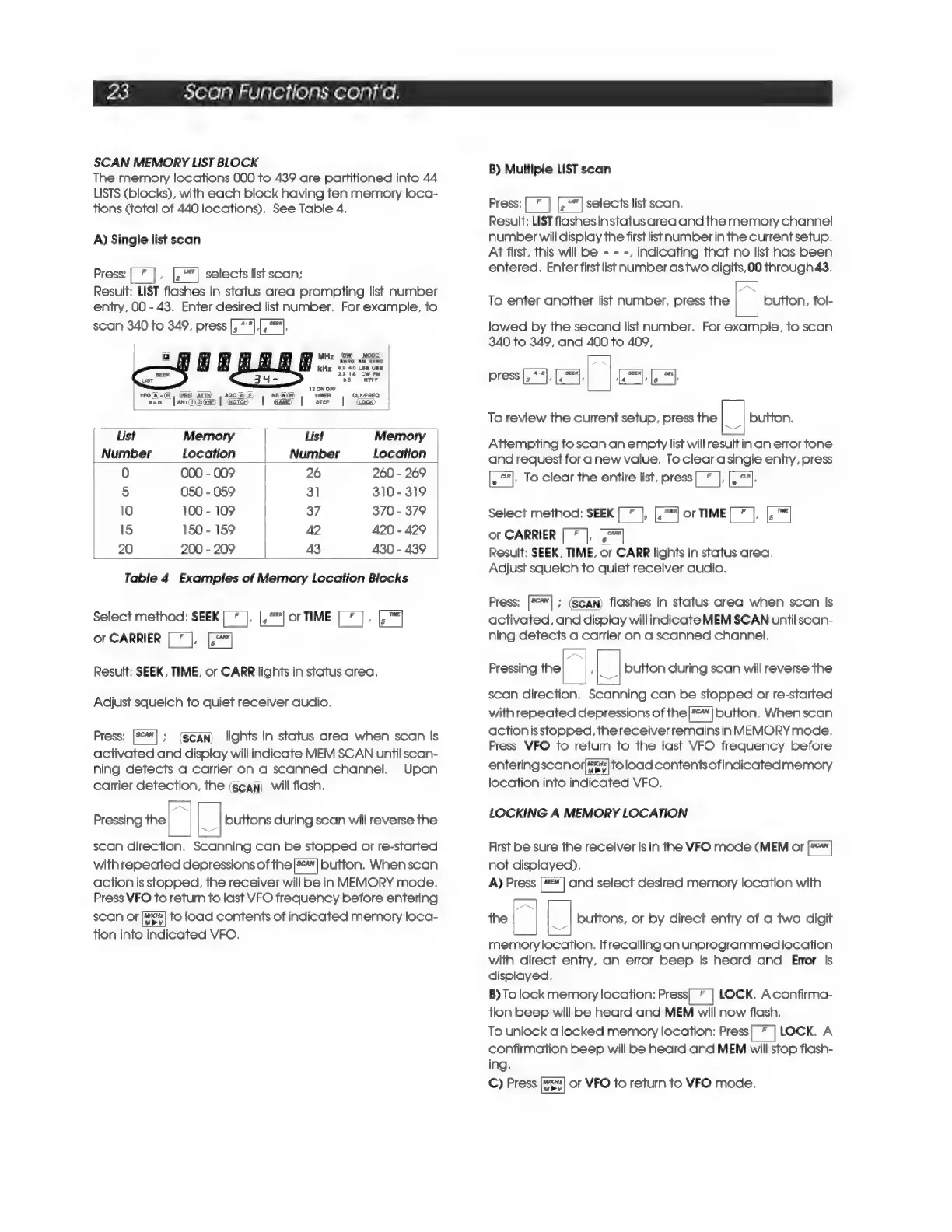
The
memory
locations
000
to
439
are
partitioned
into
44
LISTS
(blocks),
with
each
block
having
ten
memory
loca-
tions
(total
of
440
locations).
See
Table
4,
A)
Single
list
scan
Press:
[
*
],
selects
list
scan;
Result:
LIST
flashes
in
status
area
prompting
list
number
entry,
00
-
43.
Enter
desired
list
number.
For
example,
to
scan
340
to
349,
press
[,
**],[,
"4.
MHz
|5W)
(wooe)
AUTO
AM
SYNC
kHz
50
40
Ls8
use
2318
Cw
PM
St
te
ae
List
Memory
List
Memory
Number
Location
Number
Location
fe)
aad
-
009
26
260
-
269
5
050
-
059
31
310-319
10
100
-
109
37
370
-
379
15
150
-
159
42
420
-
429
20
200
-
209
43
430
-
439
Table
4
Examples
of
Memory
Location
Blocks
Select
method:
SEEK
[
*
|,
[,*"]
or
TIME
[
*
],
[-™|
or
CARRIER
[
7
],
Result:
SEEK,
TIME,
or
CARR
lights
in
status
area,
Adjust
squelch
to
quiet
receiver
audio.
Press:
[5*]
;
(scan)
lights
in
status
area
when
scan
is
activated
and
display
will
indicate
MEM
SCAN
uniil
scan-
ning
detects
a
carrier
on
a
scanned
channel.
Upon
carrier
detection,
the
(scan)
will
flash.
Pressing
the
a
_]
buttons
during
scan
will
reverse
the
scan
direction.
Scanning
can
be
stopped
or
re-started
with
repeated
depressions
of
the[»"|
button.
When
scan
action
is
stopped,
the
receiver
will
be
in
MEMORY
mode.
Press
VFO
to
return
to
last
VFO
frequency
before
entering
scan
or
to
load
contents
of
indicated
memory
loca-
tion
into
indicated
VFO.
B)
Multiple
LIST
scan
Press:
[2
"|
selects
list
scan.
Result:
LIST
flashesin
status
area
and
the
memory
channel
number
will
display
the
first
list
number
in
the
currentsetup.
At
first,
this
will
be
- -
-,
indicating
that
no
list
has
been
entered.
Enter
first
list
number
as
two
digits,00
through43.
To
enter
another
list
number,
press
the
a
button,
fol-
lowed
by
the
second
list
number.
For
example,
to
scan
340
to
349,
and
400
to
409,
To
review
the
current
setup,
press
the
|_|
button.
Attempting
to
scan
an
empty
list
will
result
in
an
error
tone
and
request
for
a
new
value.
To
clear
a
single
entry,
press
[.
°"].
To
clear
the
entire
list,
press[*
],
[.
°"].
Select
method:
SEEK
[*
],
[,""|
or
TIME[
*
],
[,
“|
or
CARRIER
re
Fecal
Result:
SEEK,
TIME,
or
CARR
lights
in
status
area.
Adjust
squelch
to
quiet
receiver
audio.
Press:
[5°¥]
;
(Scan)
flashes
in
status
area
when
scan
is
activated,
and
display
will
indicate
MEM
SCAN
until
scan-
ning
detects
a
carrier
on
a
scanned
channel.
Pressing
the
a
;
|_|
button
during
scan
will
reverse
the
scan
direction.
Scanning
can
be
stopped
or
re-started
with
repeated
depressions
of
theP*"]
button,
Whenscan
actionisstopped,
the
receiver
remains
in
MEMORY
mode.
Press
VFO
to
return
to
the
last
VFO
frequency
before
entering
scan
orf]
to
load
contentsofindicated
memory
location
into
indicated
VFO,
LOCKING
A
MEMORY
LOCATION
First
be
sure
the
receiver
is
in
the
VFO
mode
(MEM
or
[5*]
not
displayed).
A)
Press
[m=
|
and
select
desired
memory
location
with
the
a
buttons,
or
by
direct
entry
of
a
two
digit
memory
location.
Ifrecalling
an
unprogrammed
location
with
direct
entry,
an
error
beep
is
heard
and
Error
is
displayed.
B)
To
lock
memory
location:
Press
LOCK.
Aconfirma-
tion
beep
will
be
heard
and
MEM
will
now
flash.
To
unlock
a
locked
memory
location:
Press[
*
|
LOCK.
A
confirmation
beep
will
be
heard
and
MEM
will
stop
flash-
ing.
C)
Press
or
VFO
to
return
to
VFO
mode.

Related product manuals