EasyManua.ls Logo

DRAKE R8A - Scan Functions contd.; SCAN A - B; Important Notes About Scanning

DRAKE R8A
43 pages
Print Icon
To Next Page IconTo Next Page
To Previous Page IconTo Previous Page
Loading...
SCANA-B
An
A
-
B
scan
allows
continuous
tuning
of
frequencies
between
two
programmed
limits.
Table
4
charts
the
tun-
ing
step
size
and and
display
resolution
for
all
models.
If
the
selected
scan
range
includes
the
AM
broadcast
band,
the
receiver
automatically
switches
to
a
10kHzstep
size
(9
kHz
selectable)
while
in
the
AM
broadcast
band
range.
To
perform
an
A
-
Bscan,
press
[
*
],[:**]
.
Result:
A
-
B
flashes
and
the
frequency
display
changes
to
show
one
of
the
current
scan
frequency
endpoints.
To
change
this
endpoint,
enter
a
new
frequency.
To
set
the
second
endpoint,
press
the
a
a
|
button.
The
display
now
shows
the
other
frequency
endpoint.
Entera
new
frequency,
if
desired.
To
review
the
endpoints,
press
the
|
or
[|
buttons.
Select
method:
SEEK
or
TIME
or
CARRIER
Result:
SEEK,
TIME,
or
CARR
lights
in
status
area.
Select
desired
mode,
bandwidth
(BW),
antenna,
etc.
Adjust
squelch
to
quiet
receiver
audio,
Press
[5]
;
(scan)
flashes
in
status
area
when
scan
is
activated.
To
adjust
step
rate:
Press
STEP
and
step
size
will
change
as
per
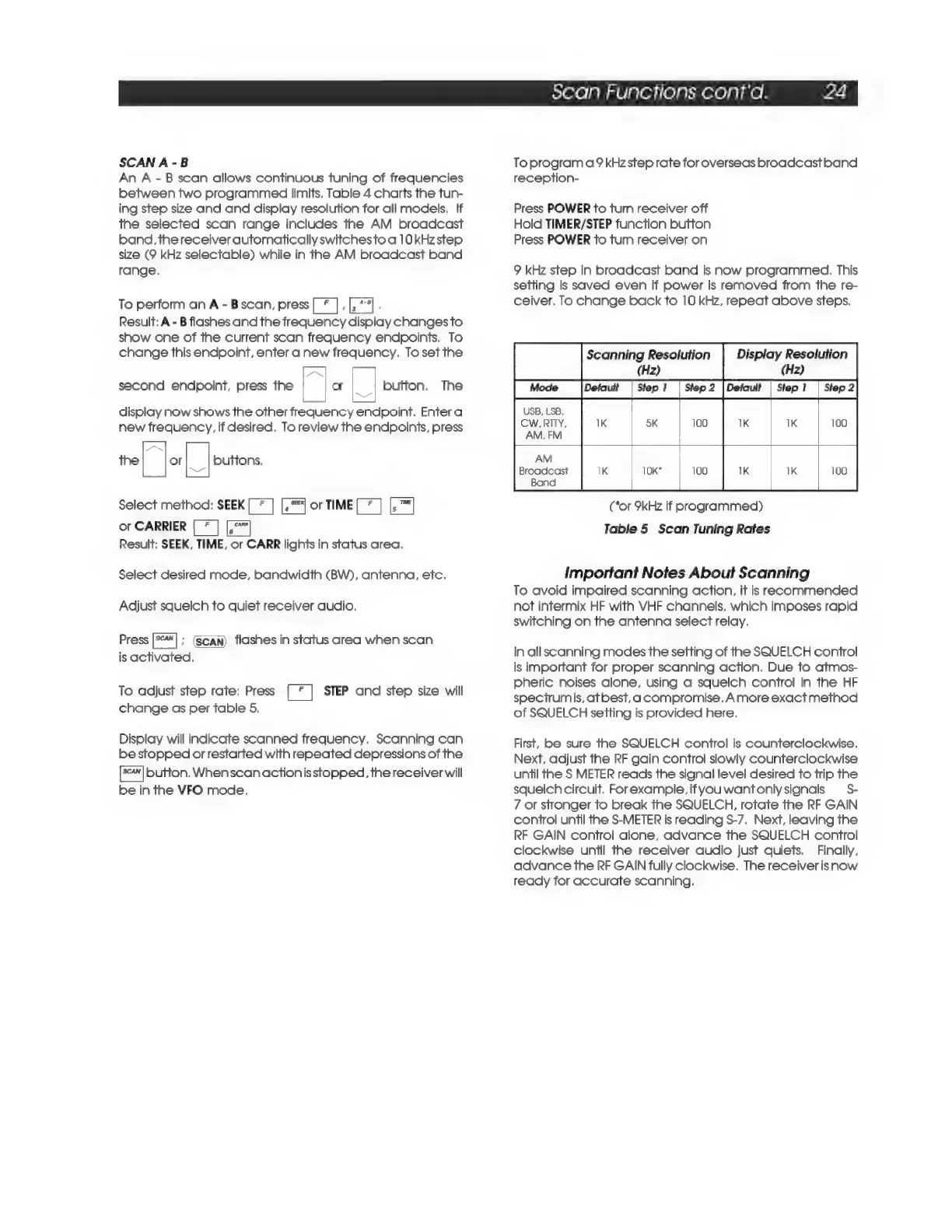
table
5,
Display
will
indicate
scanned
frequency.
Scanning
can
be
stopped
or
restarted
with
repeated
depressions
of
the
button.
Whenscanactionisstopped,
the
receiver
will
be
in
the
VFO
mode.
Scan
Functions
cont'd.
24
To
program
a9
kHzstep
rate
for
overseas
broadcast
band
reception-
Press
POWER
to
turn
receiver
off
Hold
TIMER/STEP
function
button
Press
POWER
to
turn
receiver
on
9
kHz
step
in
broadcast
band
is
now
programmed.
This
setting
is
saved
even
if
power
is
removed
from
the
re-
ceiver,
To
change
back
to
10
kHz,
repeat
above
steps,
Scanning
Resolution
Display
Resolution
(Hz)
(Hz)
|_
Mode
|Detaut
|
Step
|
Step
2
[Deka
|
step!
|
Step
2]
USB,
LSB,
CW.RITY,
AM,
FM
AM
Broadcast
Band
(Cor
9kHz
If
programmed)
Table
5
Scan
Tuning
Rates
Important
Notes
About
Scanning
To
avoid
impaired
scanning
action,
it
is
recommended
not
intermix
HF
with
VHF
channels,
which
imposes
rapid
switching
on
the
antenna
select
relay.
In
all
scanning
modes
the
setting
of
the
SQUELCH
control
is
important
for
proper
scanning
action.
Due
to
atmos-
pheric
noises
alone,
using
a
squelch
control
in
the
HF
spectrumis,
atbest,a
compromise.
Amore
exact
method
of
SQUELCH
setting
is
provided
here.
First,
be
sure
the
SQUELCH
control
is
counterclockwise.
Next,
adjust
the
RF
gain
control
slowly
counterclockwise
until
the
S
METER
reads
the
signal
level
desired
to
trip
the
squelch
circuit.
Forexample,
ifyouwantonlysignals
=
S-
7
or
stronger
to
break
the
SQUELCH,
rotate
the
RF
GAIN
control
until
the
S-METER
Is
reading
S-7.
Next,
leaving
the
RF
GAIN
control
alone,
advance
the
SQUELCH
control
clockwise
until
the
receiver
audio
just
quiets.
Finally,
advance
the
RF
GAIN
fully
clockwise.
The
receiver
is
now
ready
for
accurate
scanning.

Related product manuals