EasyManua.ls Logo

DRAKE R8A - Clock and Timer Functions; TIME DISPLAY; SETTING THE 24 HOUR CLOCKS; TIMER OPERATION

DRAKE R8A
43 pages
Print Icon
To Next Page IconTo Next Page
To Previous Page IconTo Previous Page
Loading...
25
Clock
and
Timer
Functions
DRAKE
F8A
Communications
Receiver
A-B
CARR
vFo
(A)
=(B)
TN)
AGC(B)
(F)
(ATTN)
A=B
(NOTCH
AUTO
AM
SYNC
kHz
69
40
LSB
USB
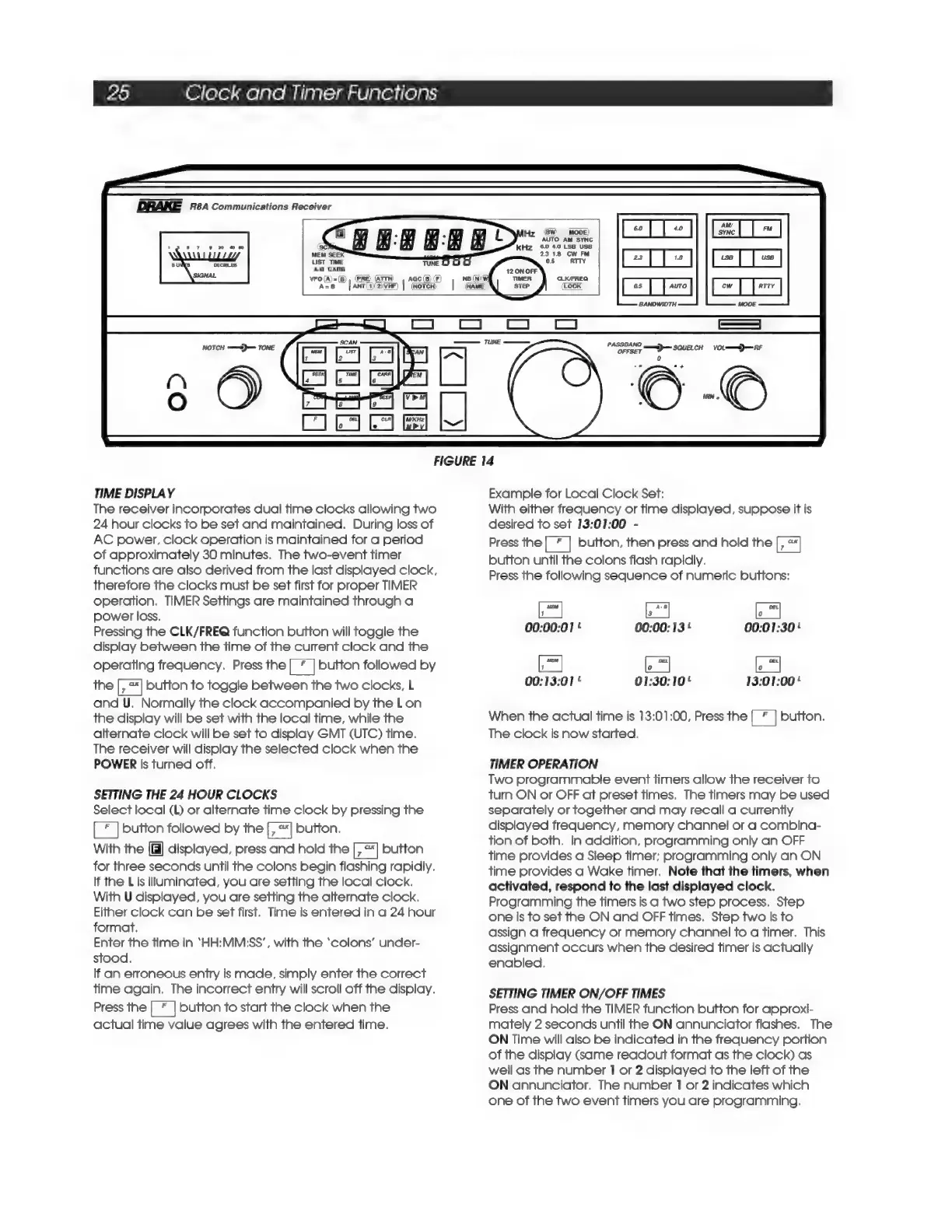
FIGURE
14
TIME
DISPLAY
The
receiver
incorporates
dual time
clocks
allowing
two
24
hour
clocks
to
be
set
and
maintained.
During
loss
of
AC
power,
clock
operation
is
maintained
for
a
period
of
approximately
30
minutes.
The
two-event
timer
functions
are
also
derived
from
the
last
displayed
clock,
therefore
the
clocks
must
be
set
first
for
proper
TIMER
operation.
TIMER
Settings
are
maintained
through
a
power
loss.
Pressing
the
CLK/FREQ
function
button
will
toggle
the
display
between
the
time
of
the
current
clock
and
the
operating
frequency.
Press
the
|
*
|
button
followed
by
the
button
to
toggle
between
the
two
clocks,
L
and
U.
Normally
the
clock
accompanied
by
the
Lon
the
display
will
be
set
with
the
local
time,
while
the
alternate
clock
will
be
set
to
display
GMT
(UTC)
time.
The
receiver
will
display
the
selected
clock
when
the
POWER
is
turned
off.
SETTING
THE
24
HOUR
CLOCKS
Select
local
(L)
or
alternate
time
clock
by
pressing
the
button
followed
by
the
button,
With
the
[fi]
displayed,
press
and
hold
the
[,™]
button
for
three
seconds
until
the
colons
begin
flashing
rapidly.
If
the
L
is
illuminated,
you
are
setting
the
local
clock.
With
U
displayed,
you
are
setting
the
alternate
clock.
Either
clock
can
be
set
first.
Time
is
entered
in
a
24
hour
format.
Enter
the
time
in
‘HH:MM:SS’,
with
the
‘colons’
under-
stood,
If
an
erroneous
entry
is
made,
simply
enter
the
correct
time
again.
The
incorrect
entry
will
scroll
off
the
display.
Press
the
button
to
start
the
clock
when
the
actual
time
value
agrees
with
the
entered
time.
Example
for
Local
Clock
Set:
With
either
frequency
or
time
displayed,
suppose
it
is
desired
to
set
13:01:00
-
Press
the
al
button,
then
press
and
hold
the
button
until
the
colons
flash
rapidly.
Press
the
following
sequence
of
numeric
buttons:
00:00:01
'
00:00:
13
'
00:01:30!
00:13:01
'
01:30:10!
13:01:00!
When
the
actual
time
is
13:01:00,
Press
the
button.
The
clock
is
now
started.
TIMER
OPERATION
Two
programmable
event
timers
allow
the
receiver
to
turn
ON
or
OFF
at
preset
times.
The
timers
may
be
used
separately
or
together
and
may
recall
a
currently
displayed
frequency,
memory
channel
or
a
combina-
tion
of
both.
In
addition,
programming
only
an
OFF
time
provides
a
Sleep
timer;
programming
only
an
ON
time
provides
a
Wake
timer.
Note
that
the
timers,
when
activated,
respond
to
the
last
displayed
clock.
Programming
the
timers
is
a
two
step
process,
Step
one
is
to
set
the
ON
and
OFF
times.
Step
two
is
to
assign
a
frequency
or
memory
channel
to
a
timer.
This
assignment
occurs
when
the
desired
timer
is
actually
enabled,
SETTING
TIMER
ON/OFF
TIMES
Press
and
hold
the
TIMER
function
button
for
approxi-
mately
2
seconds
until
the
ON
annunciator
flashes,
The
ON
Time
will
also
be
indicated
in
the
frequency
portion
of
the
display
(same
readout
format
as
the
clock)
as
well
as
the
number
1
or
2
displayed
to
the
left
of
the
ON
annunciator,
The
number
1
or
2
indicates
which
one
of
the
two
event
timers
you
are
programming.

Related product manuals