EasyManua.ls Logo

DRAKE R8A - Clock and Timer Functions contd; ENABLING;DISABLING TIMER OPERATION; TIMER CONNECTOR INTERFACE

DRAKE R8A
43 pages
Print Icon
To Next Page IconTo Next Page
To Previous Page IconTo Previous Page
Loading...
Clock
and
Timer
Functions
cont'd.
26
Press
the
desired
numeric
buttons
to
enter
a
new
ON
time.
Enter
the
time
in
‘HH:MM’
and
in
24
hour
format.
Press
the
button
followed
by
the
[,
*]
button
to
remove
the
‘On
Time’
to
use
the
timer
as
a
Sleep
timer.
For
a
Wake
timer,
program
an
'On
Time’
and
remove
the
'OFF'
time.
To
set
the
OFF
time,
Press
the
TIMER
function
button
again
to
display
OFF
time.
Press
the
desired
numeric
buttons
to
enter
a
new
OFF
time.
Enter
the
time
in
‘HH:MM’
and
in
24
hour
format.
Press
the
[
*
|
button
followed
by
the
[, "|
button
to
remove
the
OFF
time,
if
desired.
Press
the
TIMER
function
button
again
to
enter
TIMER
2
ON
time.
Press
the
TIMER
function
button
again
to
enter
TIMER
2
OFF
time.
Finally,
press
the
TIMER
function
button
to
save
the
settings
and
switch
the
display
to
normal
readout
values.
ENABLING/DISABLING
TIMER
OPERATION
Press
the
TIMER
function
button.
A'T'or'2'or'=
=
'
will
be
displayed.
After
two
seconds
with
no
entry,
the
display
reverts
back
to
frequency
or
time
readout.
Timer
‘1’
can
be
disabled/enabled
by
pressing
the
numeric
digit
on
the
keypad
while
the
timer
enable
display
is
showing.
Timer
2
can
be
disabled/enabled
by
pressing
the
numeric
digit
on
the
keypad
while
the
timer
enable
display
is
showing.
Prior
to
enabling
either
or
both
timers,
consider
one
of
two
possible
cases
for
each
timer:
eg.)
-
To
Enable
TIMER
1
1)
'=
-"is
displayed:
Press
the
[,
““]
button
to
display
1.
2)
'1
-'
is
displayed:
Press
the
[,
“|
button
twice
to
again
display
1.
Setting
a
-
for
either
timer
DISABLES
the
respective
timer.
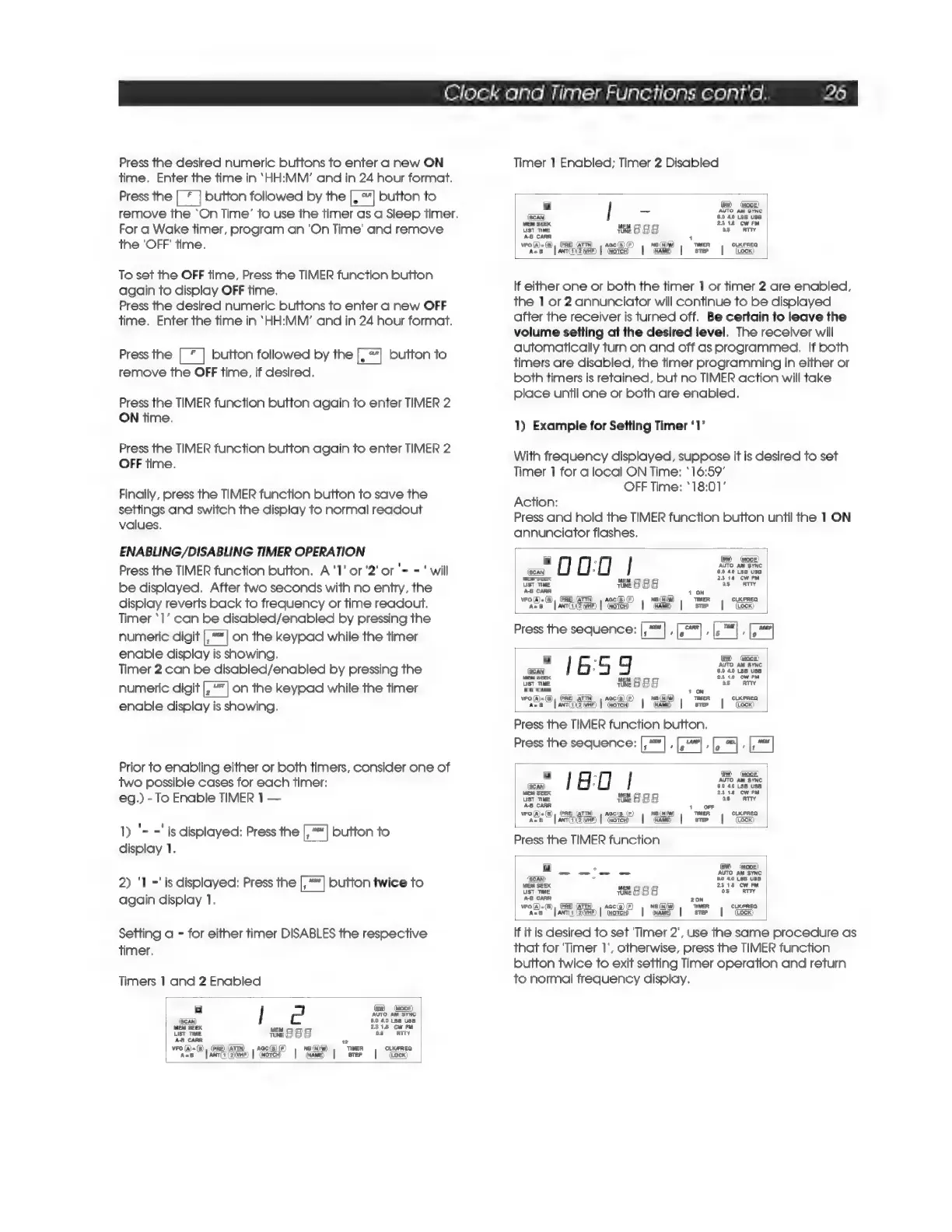
Timers
1
and
2
Enabled
a
(sw)
(#00)
AUTO
AN
SYNC
(San)
6.0
40
LSB
USE
MEM
SEEK
2318
Cw
RM
List
TIME
MESSE
08
ATTY
AB
CARR
2
VFO
(a)=(8),
(PRE)
(ATTN)
=,
AGC(S)
IF)
NB
(NW)
TIMER
CLKFREQ
acs
[antiyi2ivar)
|
(worce
=|
ame
|
step
|
ocx)
Timer
1
Enabled;
Timer
2
Disabled
a
(BW)
(mone)
_
AUTO
AM
SYNC
(SCAN)
6.0
49
L368
USE
MEM
SEEK
2318
CWwrM
UST
TIME
at
8
§
8
oS
ATTY
A-B
CARA
1
wR
GB,
(PRE)
@TTN)
|
aac(s)
TER
|
CLXUFREG
ace
fancncasin
|
“noe”
|
“wae
|
Ste
|
“Coan
If
either
one
or
both
the
timer
1
or
timer
2
are
enabled,
the
1
or
2
annunciator
will
continue
to
be
displayed
after
the
receiver
is
turned
off.
Be
certain
to
leave
the
volume
setting
at
the
desired
level.
The
receiver
will
automatically
turn
on
and
off
as
programmed.
If
both
timers
are
disabled,
the
timer
programming
in
either
or
both
timers
is
retained,
but
no
TIMER
action
will
take
place
until
one
or
both
are
enabled.
1)
Example
for
Setting
Timer
‘1’
With
frequency
displayed,
suppose
it
is
desired
to
set
Timer
1
for
a
local
ON
Time:
‘16:59’
OFF
Time:
*18:01’
Action:
Press
and
hold
the
TIMER
function
button
until
the
1
ON
annunciator
flashes.
(Scan)
MEM
SEEK
-OU:0
|
ae
AUTO
AM
SYNC
°
8.0
40
[3B
USE
‘bso
RTTY
UST
TIME
tt
8
BE
As
CARR
ee
as
Sens
a
1
ON
Mase
[amici
|
“nore
|
"naa
|
fue
|
“tec
Press
the
sequence:
;
i
:
=
1659
ae
ust
Twe
Hat
8
g 8
AB
CARR
woe
6
|
ime
SEP
|
See
|
me
|
eee
Press
the
TIMER
function
button,
Press
the
sequence:
,
Hens
Seex
ust
Te
i
it
888
wees
© |
Seca
|
some”
|
ee
|
oe
«|
“Goo
Press
the
TIMER
function
_
wo
aa
Ae
mee,
ae
ino
P
Src
(Em)
=
BO
40
LSB
USB
2318
CW
FM
ust
me
weg
8
ASG
CARR
ees
et
ce
20N
Re
ey
|
SSR
|
REE
| |
“I
If it
is
desired
to
set
Timer
2',
use
the
same
procedure
as
that
for
‘Timer
1’,
otherwise,
press
the
TIMER
function
button
twice
to
exit
setting
Timer
operation
and
return
to
normal
frequency
display.

Related product manuals