EasyManua.ls Logo

DRAKE R8A - Special Use Features and Functions; DELETE ALL MEMORY LOCATIONS

DRAKE R8A
43 pages
Print Icon
To Next Page IconTo Next Page
To Previous Page IconTo Previous Page
Loading...
Zi
Clock
and
Timer
Functions
cont'd.
It is
important
to
note
that
the
timer
is
enabled
only
when
the
timer
is
deliberately
changed
from
a
=
to
1,
or
=
to
2,
Even
if
the
1
or
2
is
already
displayed,
the
timer
is
not
enabled
unless
the
=
to
1
or
2
transition
occurs.
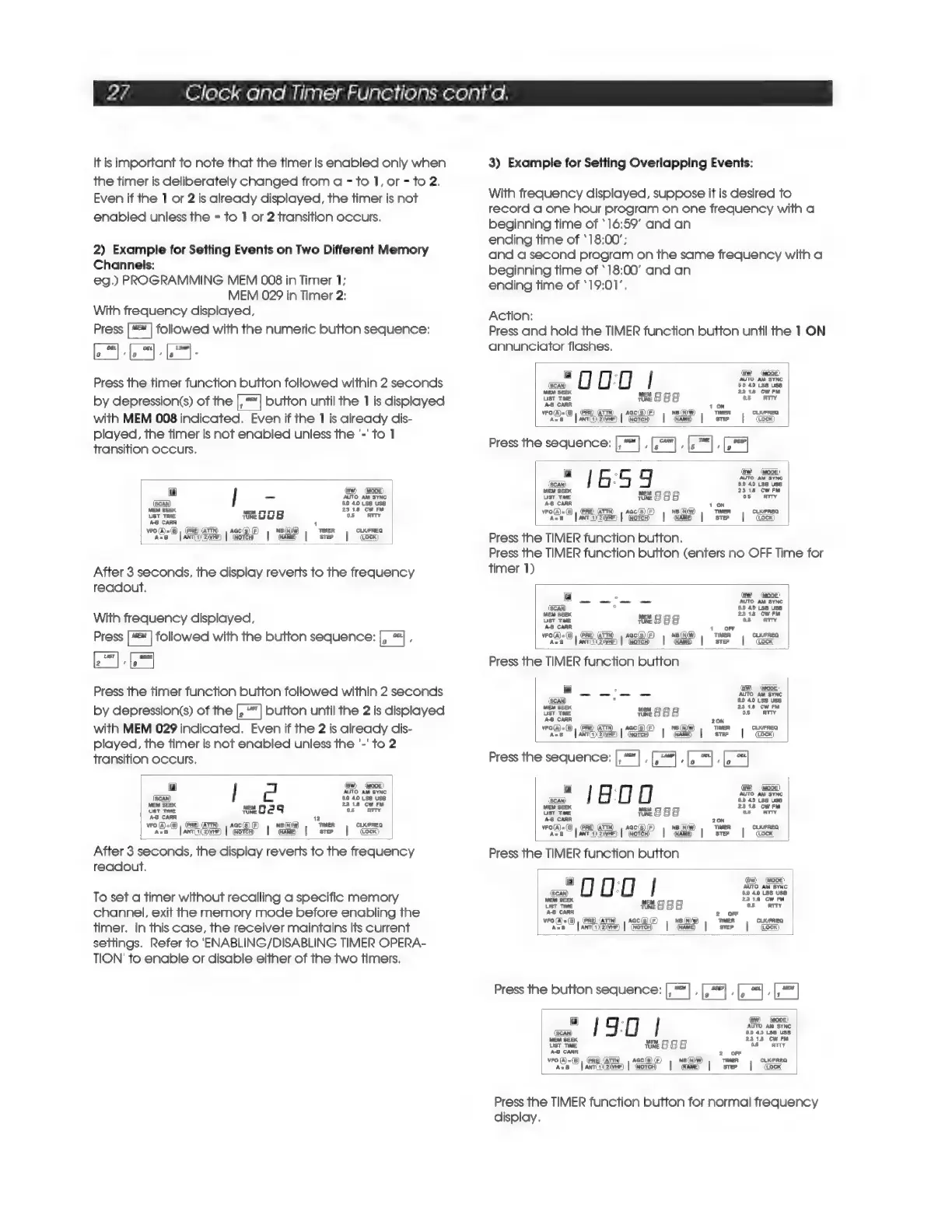
2)
Example
for
Setting
Events
on
Two
Different
Memory
Channels:
eg.)
PROGRAMMING
MEM
008
in
Timer
1;
MEM
029
in
Timer
2:
With
frequency
displayed,
Press
["™
|
followed
with
the
numeric
button
sequence:
LAMP)
‘le
.
Press
the
timer
function
button
followed
within
2
seconds
by
depression(s)
of
the
button
until
the
1
is
displayed
with
MEM
008
indicated.
Even
if
the
1
is
already
dis-
played,
the
timer
is
not
enabled
unless
the
'-'
to
1
transition
occurs.
Fy
(BW)
(@ODE)
TO
AM
SYNC
(Scan)
60
40
Ls8
USS
MEM
SEEK
2348
CWwrRM
UST
TIME
TeOo
05
=
ATTY
A-B
CARR
1
vro(A)=(8),
(PRE)
(ATTN)
|
AGC(S)
(F)
NBINW)
THER
CLKIFREQ
acs
[anrcewne)
|
inorce
=|
awe
|
ster
|
(ocx)
After
3
seconds,
the
display
reverts
to
the
frequency
readout.
With
frequency
displayed,
Press
["=™
|
followed
with
the
button
sequence:
F
‘BEEP
‘|e
Press
the
timer
function
button
followed
within
2
seconds
by
depression(s)
of
the
button
until
the
2
is
displayed
with
MEM
029
indicated.
Even
if
the
2
is
already
dis-
played,
the
timer
is
not
enabled
unless
the
'-'
to
2
transition
occurs.
ry
(SW)
00e)
AUTO
AM
SYNC
(Scan)
60
40
Ls8 USS
EM
SEEX
23.18
CW
FM
Uist
ne
te
G29
os
Arty
A-B
CARR
2
vro
[Aj=(5),
(PRE
(ATTN)
|
aac(s)(F)
NB(N}GW)
TIMER
CLKFREQ
AzB
|
ante)
2ivHe)
(Note
|
(ARE
|
sve
|
(ocx)
After
3
seconds,
the
display
reverts
to
the
frequency
readout.
To
set
a
timer
without
recalling
a
specific
memory
channel,
exit
the
memory
mode
before
enabling
the
timer.
In
this
case,
the
receiver
maintains
its
current
settings.
Refer
to
'ENABLING/DISABLING
TIMER
OPERA-
TION’
to
enable
or
disable
either
of
the
two
timers.
3)
Example
for
Setting
Overlapping
Events:
With
frequency
displayed,
suppose
it
is
desired
to
record
a
one
hour
program
on
one
frequency
with
a
beginning
time
of
*16:59’
and
an
ending
time
of
‘18:00’;
and
a
second
program
on
the
same
frequency
with
a
beginning
time
of
‘18:00’
and
an
ending
time
of
*19:01’.
Action:
Press
and
hold
the
TIMER
function
button
until
the
1
ON
annunciator
flashes.
.
ew
(one)
ae
LE
LEL
tect
ust
Tie
te
EBS
“ue
Gm
AB
CARR
pars
z
10N
=
eo
ke
ak
ae
Press
the
sequence:
, ,
,
:
aw
wane)
ce
moe
||
SR
wate
®
jannanin
|
“keee”
|
“Sa
|
tree
|
“Sa”
Press
the
TIMER
function
button.
Press
the
TIMER
function
button
(enters
no
OFF
Time
for
timer
1)
a
se
Ses
om
AUTO
AM
SYNC
(SCAN)
°
6.0
40
LS8
USS
2318
CwrRM
usr
ve
ese
os.
‘ar
AB
CARR
+
OFF
(A)
=
(5)
,
(PRE)
(ATTN)
@F)
ne
(NW)
TIMER
CLKFREQ
Mit
os
|
asc)
|
a
|
NAME)
|
ster
(ocx)
Press
the
TIMER
function
button
a
AaTO
aM
tec
(SCAN)
*
60
40.558
USS
MEM
SEEK
23148
CW
FM
UST
TIME
tune
8
8
g
a3
CARR
20N
A=),
PRO
ATW)
s,
Ga
(iw
TIMER
FREQ
wrola):
©)
=
Fam
he
))
|
ane
|
Tw
|
ou
Press
the
sequence:
|,"
, ;
;
1800
ase
et
Tine
“2888
an
Sar
AS
CARR
20N
720;9
|e
SRP
EP
|
Se
|
OS
Press
the
TIMER
function
button
“O00
|
2
(SCAN)
.
60
40
LSB
USS
WEM
SEEK
weM
2318
CW
PM
UST
TIME
Mt
ese
Bee
05
ATTY
vro(A)=(5),
(PRE)
(ATTN)
|
aGcis)
(F)
NB
(Ni)
TIMER
CLKPREQ
A=
[anrayaivee)
|
(worcd
|
(ame)
|
step
(Lock)
Press
the
button
sequence:
, ,
Fea
a
190
|
a
WEM
SEEK
.
UST
TIME
te
S88
beans
Us
AS
CARR
2
OFF
vro(A)=(5)
,
(PRE)
(ATTN,
|
AGC(B)
(F)
ne
(NW)
TIMER
CLKFREQ
Ase
[anniizivee)
|
(orcd
|
name)
|
ster
|
(Lock)
Press
the
TIMER
function
button
for
normal
frequency
display.

Related product manuals