EasyManua.ls Logo

DRAKE TR-4CW - Chapter II: Installation; Unpacking, Location, and Mounting; Mobile and Stationary Installation; Antenna, Speaker, and Accessories

DRAKE TR-4CW
42 pages
Print Icon
To Next Page IconTo Next Page
To Previous Page IconTo Previous Page
Loading...
DRAKE
CHAPTER
Il
INSTALLATION
2-1.
UNPACKING.
Carefully
remove
the
unit
from
the
shipping
carton
and
examine
it
for
evidence
of
damage.
If
any
damage
is
discovered,
immediately
notify
the
trans-
portation
company
that
delivered
the
unit.
Be
sure
to
keep
the
shipping
carton
and
packing
material
as
the
transportation
company
will
want
to
examine
them
if
there
is
a
damage
claim.
Keep
the
carton
and
packing
material
even
if
no
shipping
damage
occurs.
Having
the
original
carton
available
makes
packing
the
unit
much
easier
if
it
should
ever
be
necessary
to
store
it
or
return
it
to
the
factory
for
service.
NOTE
Fill
out
the
enclosed
registration
card
and
return
it
to
the
factory.
immediately
to
insure
registration
and
validation
of
the
warranty.
2-2.
LOCATION.
The
location
of
the
TR—4C
is
not
critical.
However,
care
should
be
taken
to
insure
that
adequate
clear-
ance
is
provided
to
insure
free
circulation
of
air
around
the
unit
and
to
allow
access
to
the
side
controls
and
connectors.
Do
not
cover
the
top
of
the
cabinet
with
books,
papers
or
other
equipment
as
overheating
may
result.
2-3.
MOBILE
INSTALLATION.
2-4.
POWER
REQUIREMENTS.
Refer
to
figure
2-2
for
rear
chassis
connector
identification.
The
TR—4C
may
be
installed
in
any
vehicle
with
a
12
volt
dc
negative
ground
system.
An
R.
L.
Drake
Model
DC—4
Power
Supply
is
required
for
a
mobile
installation.
The
recommended
location
for
the
DC—4
is
on
the
passenger
side
of
the
firewall.
Refer
to
figure
2-3
for
the
electrical
connections
required.
2-5.
MOUNTING.
Mount
the
TR—4C
in
a
con-
venient
location
below
the
dash
with
an
R.
L.
Drake
Model
MMK-—3
Mobile
Mounting
Kit.
Refer
to
figure
2-4
for
various
mounting
options.
Be
sure
to
allow
adequate
clearance
for
air
circulation
and
cable
connections.
Turn
the
TR—4C
off.
Connect
the
power
cable
between
the
TR—4C
and
the
DC—4.
Coil
up
any
excess
cable
and
tape
it
in
place
out
of
sight.
Connect
the
black
wire
from
the
power
supply
to
a
convenient
ground.
Route
the
red
wire
from
the
power
supply
through
the
firewall
and
connect
it
to
the
positive
battery
terminal
or
the
starter
solenoid.
The
fuse
holder
should
be
installed
as
close
to
the
solenoid
as
possible.
Shorten
both
of
these
wires
as
much
as
possible.
2-6.
ANTENNA.
Install
a
mobile
antenna
as
rec-
ommended
by
the
antenna
manufacturer.
Connect
a
coaxial
cable
from
the
antenna
to
the
SO—239
connector
at
the
rear
of
the
TR—4C.
2-7.
SPEAKER.
DO
NOT
connect
the
TR—4C
to
the
speaker
of
the
car
radio.
Install
a
separate
speaker
for
use
with
the
TR—4C.
The
R.
L.
Drake
Model
MC—4
Mobile
Console
is
recommended
for
this
type
of
installation.
It
includes
a
speaker
and
a
wattmeter
and
is
designed
to
mount
over
or
under
the
TR—4C.
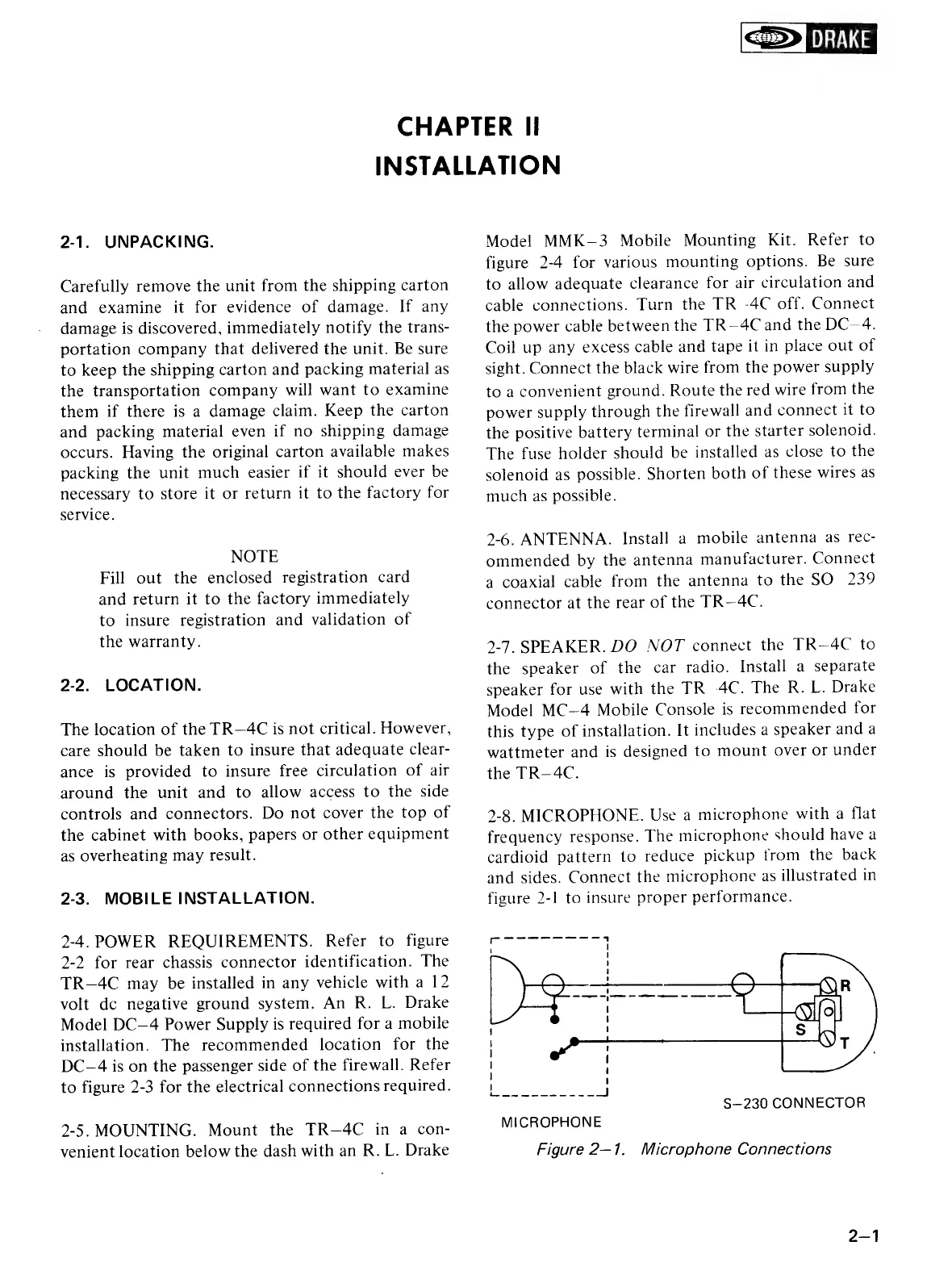
2-8.
MICROPHONE.
Use
a
microphone
with
a
flat
frequency
response.
The
microphone
should
have
a
cardioid
pattern
to
reduce
pickup
from
the
back
and
sides.
Connect
the
microphone
as
illustrated
in
figure
2-1
to
insure
proper
performance.
S—230
CONNECTOR
MICROPHONE
Figure
2—1.
Microphone
Connections

Related product manuals