11
(※)Electric buzzer is factory default setting.
Electricbuzzer
Melody1 Melody2
Silentmode Melody4 Melody3
(※)
One green lamp flashes before charging. The charger is connected to the power
supply.
One red lamp flashes during cooling down. The battery is hot. After cooling
down, charging automatically starts.
One red lamp flashes during charging. Battery level is approximately 80 to
100%.
One red lamp and one green lamp turn on during charging. Battery level is
approximately 80 to 100%.
One green lamp turns on when charging is completed. Electric buzzer or
melody.
Yellow lamp turns on for automatic maintenance. Charging time becomes longer
to prevent the battery life from being reduced.
One red lamp and one green lamp turns on alternatively to indicate that the battery is unable to
be charged. Due to the end of battery life or clogging, the battery is unable to be charged.
Yellow lamp flashes to indicate the cooling system error. The cooling fan is
malfunctioning or cooling is not sufficient.
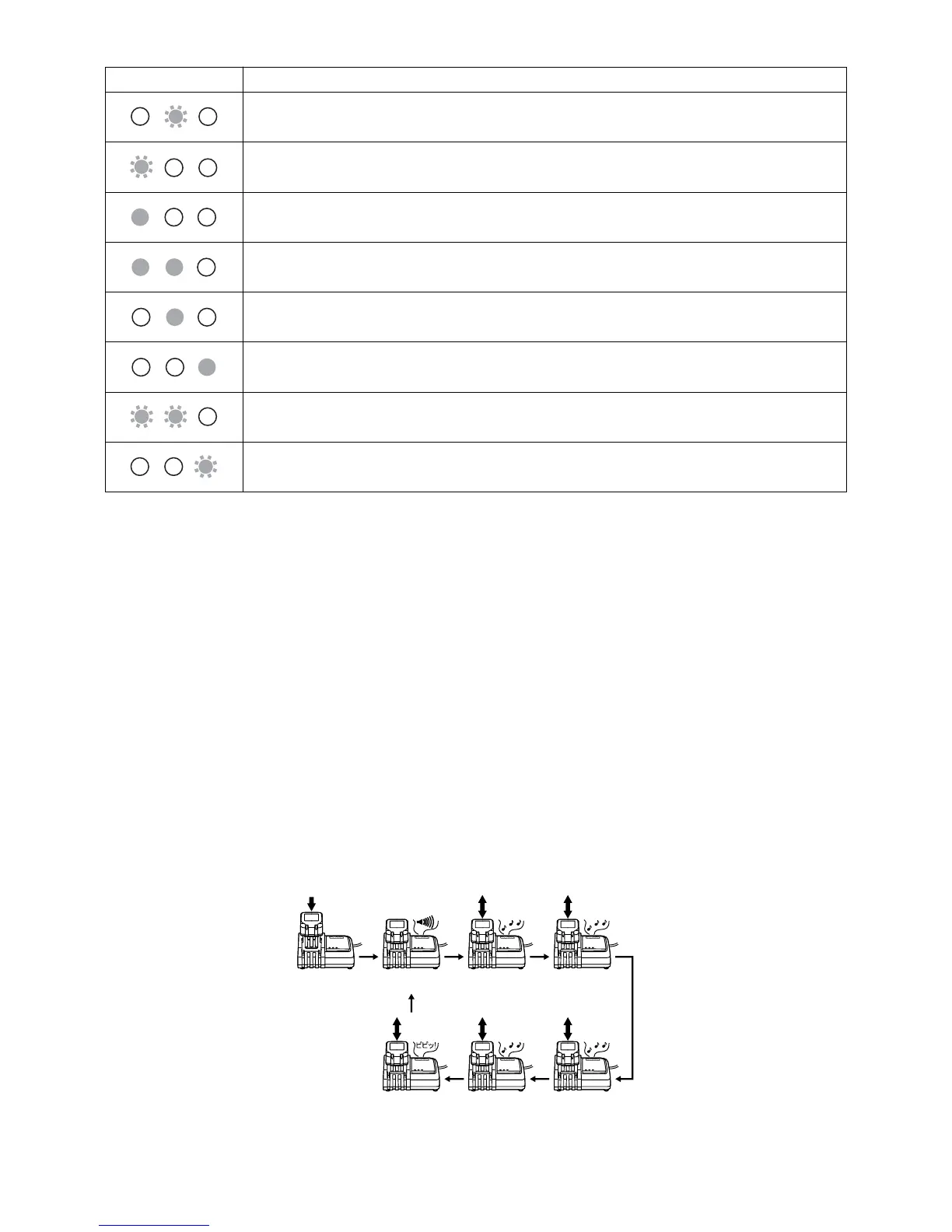
Howtoswitchthechargingcompletionmelody
1.Whenthe battery isinserted in the charger,the confirmation tone is currentlyset to charging a
completionmelodysoundsforashorttimeofperiod.
2.Reinsertthebatteryquicklyatthistimetochangetheconfirmationsoundofthechargingcompletion
melody.
3.Repeatreinsertingthebatteryquicklytochangetheconfirmationsoundofthechargingcompletion
melodyinturn.
4.Whenyouheartheconfirmationsoundofthechargingcompletionmelody,andiscorrectlysetkeep
thebatteryinsertedtostartcharging.Whenyouselectthemode,the"2shortbeep"soundwillno
longersoundwhenchargingiscompleted.(Silencemode)
5.Whenchargingiscompleted,thechargingindicationgreenlampturnson,andtheselectedcharging
completionmelody ortheelectricbuzzer sounds.Ifthesilencemodeisselected,nosoundis
generatedwhenchargingiscompleted.
6.Theselectedchargingcompletionmelodyissavedevenafterthepowerplugofthechargerispulled
out.
The indication lamp
meaning of indication
Chargingindicationlamp



 To Next Page