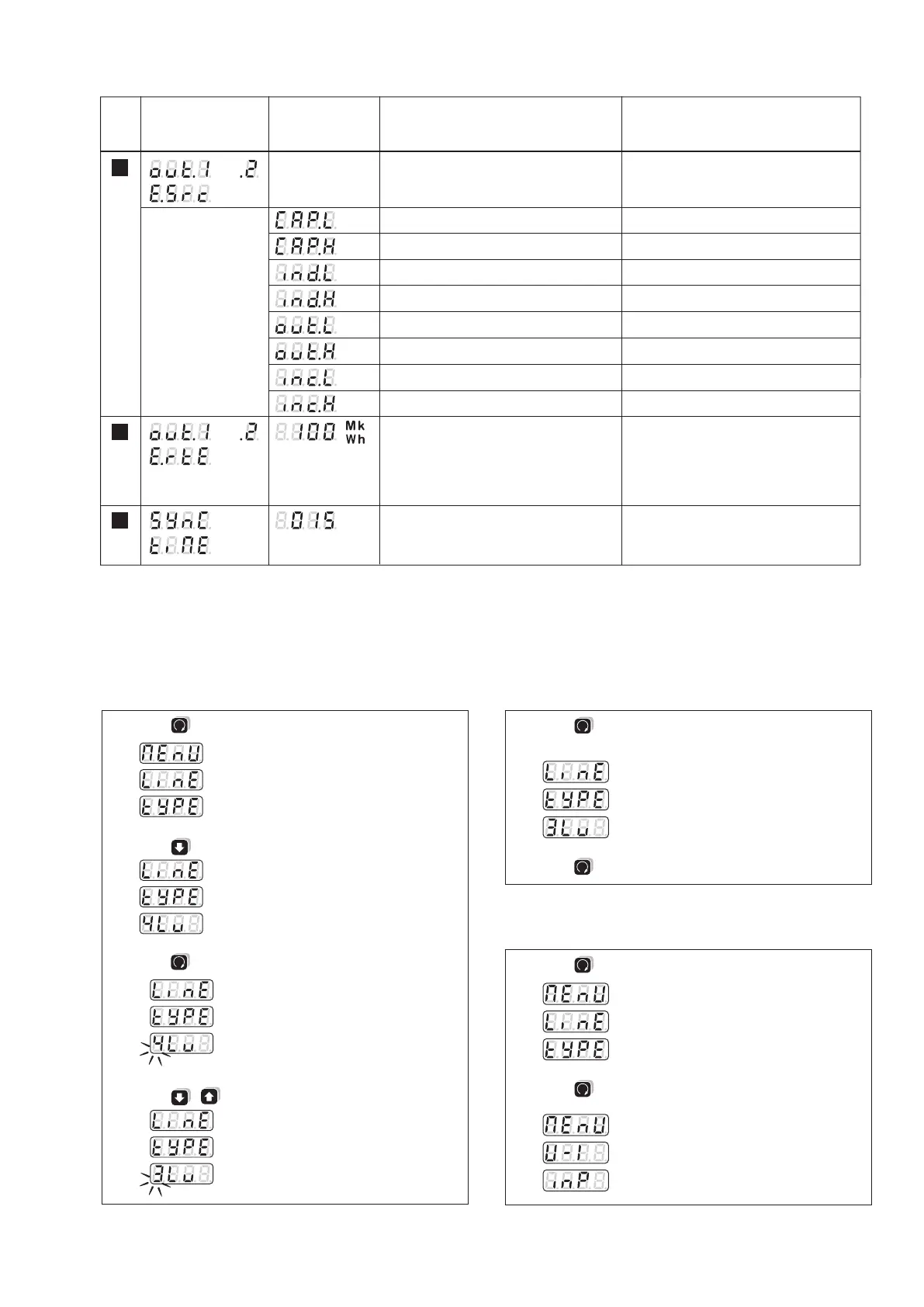
Topmost display
Middle display
No. Undermost display
(Selection,
* = default)
Meaning Hints
Source of energy meters for pulse output
/
Reactive energy capacitive, low tariff
Reactive energy capacitive, high tariff
Reactive energy inductive, low tariff
Reactive energy inductive, high tariff
Active energy outgoing, low tariff
Active energy outgoing, high tariff
Active energy incoming, low tariff
Active energy incoming, high tariff
Number of pulses per displayed energy
unit. After entering a number from 1 to
5000 you may input the scaling: Basic unit
(-), kilo (k), Mega (M) or Giga (Mk)
(energy rate)
Time interval in minutes for the
calculation of power intervals
0 = Interval controlled via the bus
*
*
(outgoing low tariff)
(outgoing high tariff)
(incoming low tariff)
(incoming high tariff)
/
*
1 to 5000 /
Wh to GWh
1 to 60 min.
For external synchronization, the value
displayed is not relevant
11
12
13
1.
2.
3.
4.
5.
6.
1.
2.



 To Next Page