Access Instructions by Draper page 4 of 4
.draperinc.com (765) 987-7999
IR Eye Input
Low Voltage
Tr igger
3-28 VDC
RS232/485
Inputs/Outputs
Receiver
Button
3 Button Wall Switch
DOWN - Black
COM - White
UP - Red
Wall Switch
Electrically Straight
Data Cable to more
LVC-IV modules*
*A maximum of six (6)
LVC-IV modules can
be linked together.
FUSE - 3.15 AMP
250 VAC 5x20mm
Dashed wiring by electrician
Low voltage wiring by others
To
110-120 VAC
Line
Red-to screen (directional)
Brown-to screen (directional)
Ye llow-to
110V-220V
AC-Hot
Black-to
110V-220V
AC-Hot
White -Common to screen & 110V-220V AC Neutral
Green/Yellow (Ground)
White (Common)
Red (Up)
Black (Down)
INTERNAL SCREEN WIRING
Green/Yellow
(Motor Ground)
L1
GND
Location of key
operated on-off
switch if furnished.
N
External LVC-IV - Single or Multiple
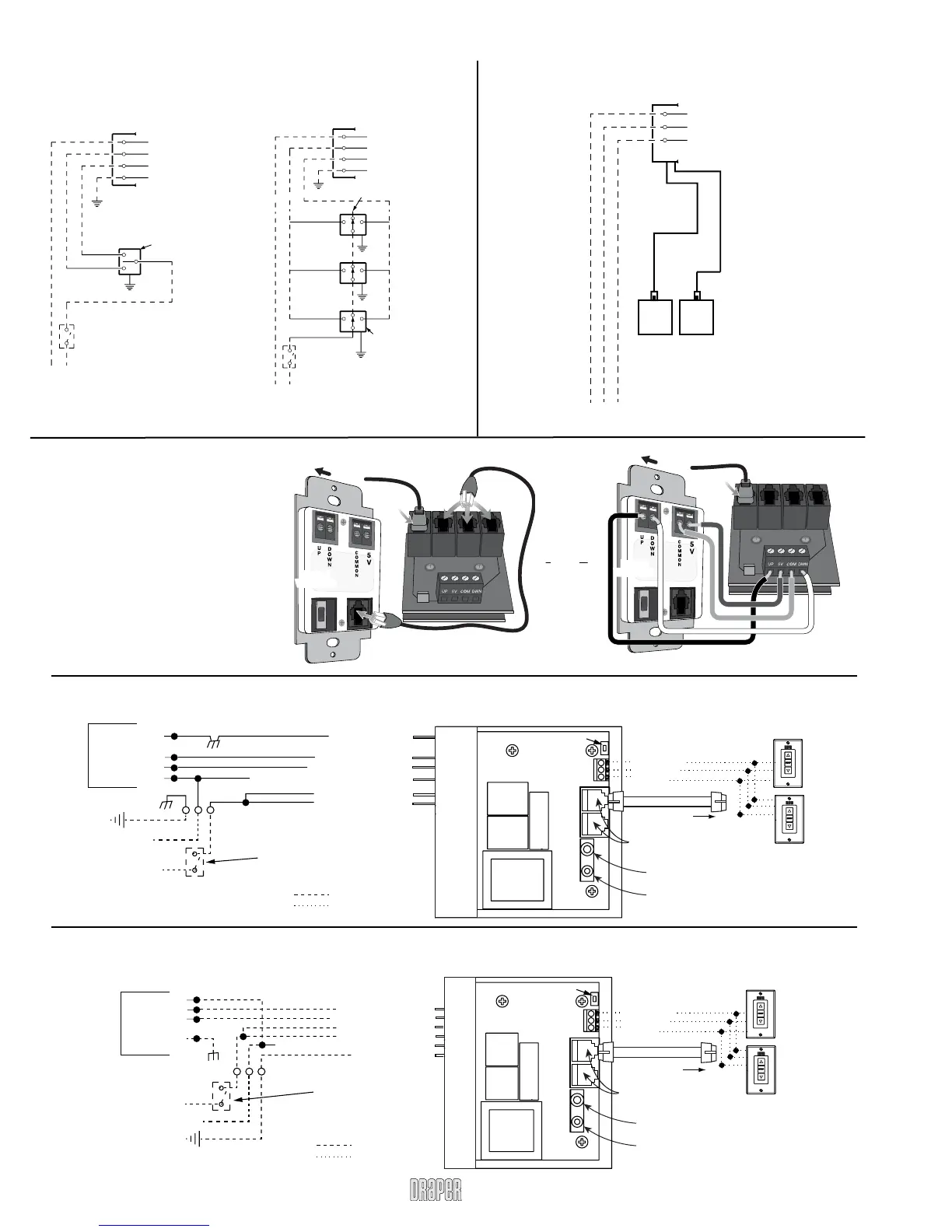
Projection Screen Wiring Diagram
TO: MOTOR LEADS
*These wiring diagrams are for Access screens with motor on audience
left (standard), and fabric unrolling from the back of the roller (standard).
Single Station Control
Internal Screen Wiring
White (Common)
Black (Down)
Red (Up)
Green (Ground)
Dashed wiring
by electrician
Control
switch
Single gang box by others
Min. 4" x 2
1
/
8
" x 1
7
/
8
" deep
Blue
Black
Red
Location of key
operated on-off
switch if furnished
To 110-120V Line
Multiple Station Control
Internal Screen Wiring
White (Common)
Black (Down)
Red (Up)
Green (Ground)
Dashed wiring
by electrician
Red
Red
Black
Blue
Blue
Cap off with wire nut and tape
Black
Red
Blue
Black
Single gang
box by others
Min. 4" x 2
1
/
8
" x 1
7
/
8
" deep.
3 shown. More or less
equally feasible.
Location of key
operated on-off
switch if furnished
To 110-120V Line
Wiring Diagrams—110-120V Motor and Quiet Motor
Please Note: Do not wire motors in parallel.
Internal LVC-IV - Single or Multiple
Projection Screen Wiring Diagram
IR Eye Input
Low Voltage
Tr igger
3-28 VDC
RS232/485
Inputs/Outputs
Receiver
Button
3 Button Wall Switch
DOWN - Black
COM - White
UP - Red
Wall Switch
Electrically Straight
Data Cable to more
LVC-IV modules*
*A maximum of six (6)
LVC-IV modules can be
linked together.
FUSE - 3.15 AMP
250 VAC 5x20mm
Dashed wiring by electrician
Low voltage wiring by others
To
110-120 VAC
Line
Green/Yellow (Ground)
White (Common)
Red (Up)
Black (Down)
INTERNAL SCREEN WIRING
Green/Yellow
(Motor Ground)
L1
GND
Location of key
operated on-off
switch if furnished.
Black-to
110V-220V
AC-Hot
Red-to screen (directional)
Brown-to screen (directional)
Yellow-to
110V-220V
AC-Hot
White -Common to screen & 110V-220V AC Neutral
N
TO: MOTOR LEADS
Single Station Control
Internal Screen Wiring
White (Common)
Black (Down)
Red (Up)
Green (Ground)
Dashed wiring
by electrician
Control
switch
Single gang box by others
Min. 4" x 2
1
/
8
" x 1
7
/
8
" deep
Blue
Black
Red
Location of key
operated on-off
switch if furnished
To 110-120V Line
Multiple Station Control
Internal Screen Wiring
White (Common)
Black (Down)
Red (Up)
Green (Ground)
Dashed wiring
by electrician
Red
Red
Black
Blue
Blue
Cap off with wire nut and tape
Black
Red
Blue
Black
Single gang
box by others
Min. 4" x 2
1
/
8
" x 1
7
/
8
" deep.
3 shown. More or less
equally feasible.
Location of key
operated on-off
switch if furnished
To 110-120V Line
Wiring Diagrams—110-120V Motor and Quiet Motor
with Internal Low Voltage Controller
Back of
Wall Switch
Back of
Wall Switch
Please Note: 5V DC must
be connected to set limits
using the wall switch.
Dry Contacts
Back of
Wall Switch
Back of
Wall Switch
MOTOR
DATA CABLE
Please Note: This Splitter/Jack
is located inside the junction
box of your Access screen.
Data Cables to
switches or
to additional motors
T
O
M
O
T
O
R
Data Cable Connection
MOTOR
DATA CABLE
T
O
M
O
T
O
R
Back of
Wall Switch
Back of
Wall Switch
Please Note: 5V DC must
be connected to set limits
using the wall switch.
Dry Contacts
Back of
Wall Switch
Back of
Wall Switch
MOTOR
DATA CABLE
OR
Please Note: This Splitter/Jack
is located inside the junction
box of your Access screen.
Data Cables to
switches or
to additional motors
T
O
M
O
T
O
R
Data Cable Connection
MOTOR
DATA CABLE
T
O
M
O
T
O
R
Back of
Wall Switch
Back of
Wall Switch
Please Note: 5V DC must
be connected to set limits
using the wall switch.
Dry Contacts
Back of
Wall Switch
Back of
Wall Switch
MOTOR
DATA CABLE
OR
Please Note: This Splitter/Jack
is located inside the junction
box of your Access screen.
Data Cables to
switches or
to additional motors
T
O
M
O
T
O
R
Data Cable Connection
MOTOR
DATA CABLE
T
O
M
O
T
O
R
Single Low Voltage Control
Internal Screen Wiring
White (Neutral)
Black
Green (Ground)
Dashed wiring
by electrician
To 110-120V Line
Multiple Low Voltage Controls
Internal Screen Wiring
White (Neutral)
Black
Green (Ground)
Dashed wiring
by electrician
To 110-120V Line
Wall Switch,
RF or IR
Receiver,
or integrated
control system
Wall Switch(es),
RF or IR
Receivers,
or integrated
control systems
Data
Cable(s)
Connecting Switch to Motor
with Internal Low Voltage Controller



 To Previous Page
 Loading...