10. Maintenance and Troubleshooting
Important: Disconnect the starter/charger from the
battery and mains power before performing any
maintenance.
10.1 General Maintenance and Storage
Other than the output overload fuse, this product
contains no parts that are serviceable by the user.
However, the product should be kept in good condition
to ensure a long working life. Maintenance should be
carried out ONLY by suitably qualied personnel
authorised by Draper Tools.
• Keep all ventilation openings and output ports clean
from dust and dirt.
• Keep the terminal clamps and contacts free from
corrosion and store them tidily with the machine.
• Clean the product regularly using a dry cloth.
CAUTION! NEVER use aggressive chemicals
to clean the product as these may damage
the product frame.
• Store the product in a clean and dry location, out of
direct sunlight and out of reach of children.
− Ensure that the terminal caps are securely
screwed onto the terminals to prevent corrosion.
− Ensure that the cables are tidy and not pinched or
kinked when stored.
− Ensure that there are no metallic objects nearby
that may fall onto the battery and connect the
terminals.
Important: Poor storage conditions may signicantly
reduce the performance capabilities and lifespan of the
product.
10.2 Replacing the Output Overload Fuses
In the event that the output current becomes too high,
the output overload fuses will blow if the excessive
current is maintained.
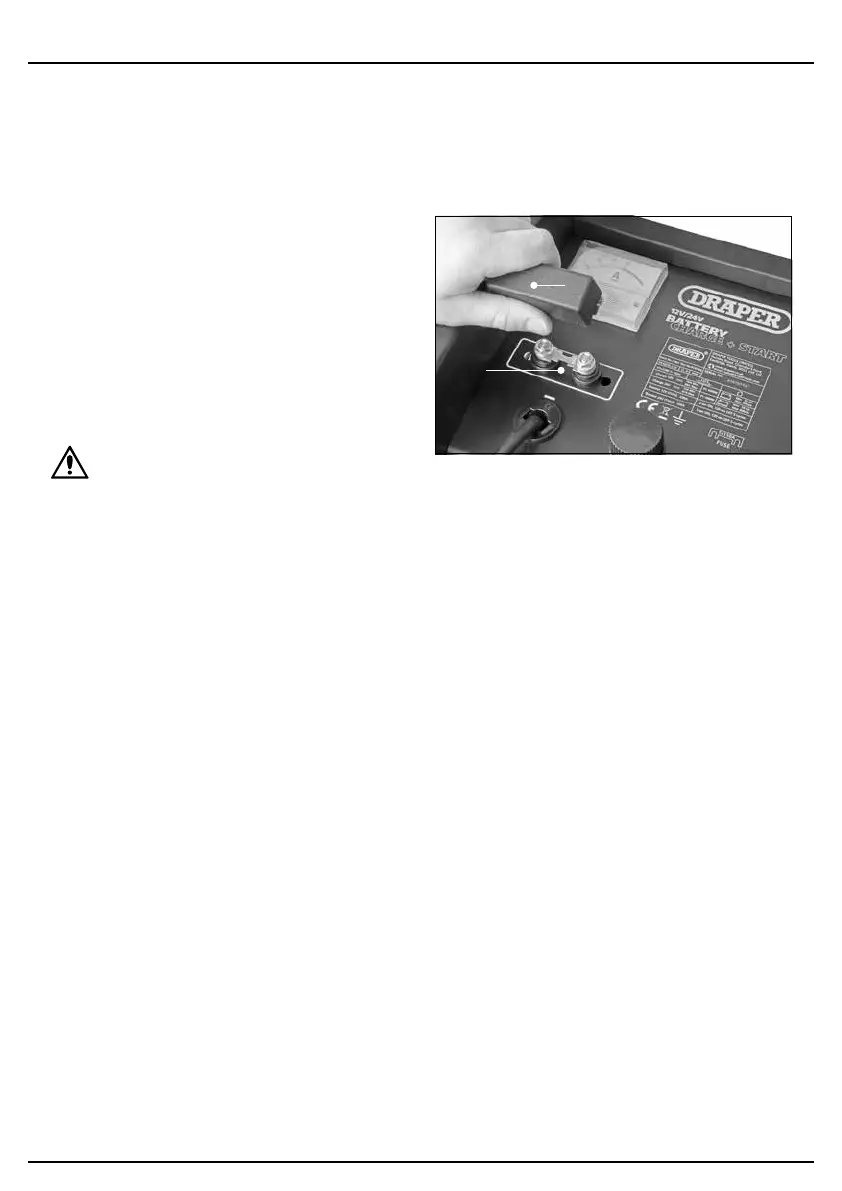
This product uses one 110A time delay fuse.
7 Fig.
(H)
(6)
To replace the output overload fuses:
1. Disconnect the machine from the battery and the
mains power supply and allow it to cool thoroughly.
2. Pinch the shorter edges of the output overload fuse
cover (6) together and pull it away from the product
interface.
3. Unscrew the fuse.
4. Screw a new identical fuse securely in its place and
replace the cover.
– 16 –


 To Next Page