NOTICE -
Delay Feature Will
Not Operate Properly Without
The Optional Current Sensor
Connected To The Lift.
KEEP DELAY IN OFF POSITION WHEN
CURRENT SENSOR IS NOT USED
Section 10 - Optional Delay Feature
1.
When the Optional Delay Feature is installed the Delay Switch must be in
the "Delay On" position for normal operation.
2.
If the Optional Delay Feature is installed and the "Show Position"
requires adjusting, then the "Delay Switch" must be switched to OFF
while adjusting the show position.
CAUTION: Be sure all switches are in OFF position before adjusting
limit switch. Always be prepared to shut lift off manually when new
adjustment is being tested. Please refer to wiring diagram.
PLEASE NOTE: If the Scissor Lift loses power, the DOWN function will not
work until you operate the lift in the UP direction using the wall switch.
This allows the lift's control encoder to recognize it's "home" location.
Section 9 - Changing the Show Position
NOTE: BOTH Wall Switch & Key Switch REQUIRED for this procedure.
PLEASE NOTE: Lift MUST be put into PROGRAMMING MODE.
Section 9.1 - Entering Programming Mode
1.
Move lift to the CLOSED
(fully up)
position.
2.
While lift is at the CLOSED position,
Press and hold Wall Switch UP + Key Switch UP for 15 Seconds
and release once the lift begins to move.
3.
The show position is now cleared and ready for a new show position to
be set.
PLEASE NOTE: At this point the Key Switch will not operate until the new
“Show Position” has been set. Also the 3-Button Wall Switch changes
into a maintain, push and hold type button, for continuous movement.
This allows for easy setting of new “Show Position”)
9.2 - Procedure for setting show position:
1.
Now that the show position has been cleared, use wall switch up and
down buttons to get lift into desired show position.
2.
While lift is at desired show position,
Press and hold Key Switch UP
until lift begins to move upward. Lift will begin a calibration cycle where
it will move upward for two seconds, stop then move down for one
second and then the Lift will return to the desired show position.
Section 9.3 - Exiting Programming Mode
1.
Move lift to the CLOSED
(fully up)
position.
2.
While lift is at the CLOSED position,
Press and hold Wall Switch UP + Key Switch DN for 15 Seconds
and release once the lift begins to move.
3.
The show position is now set.
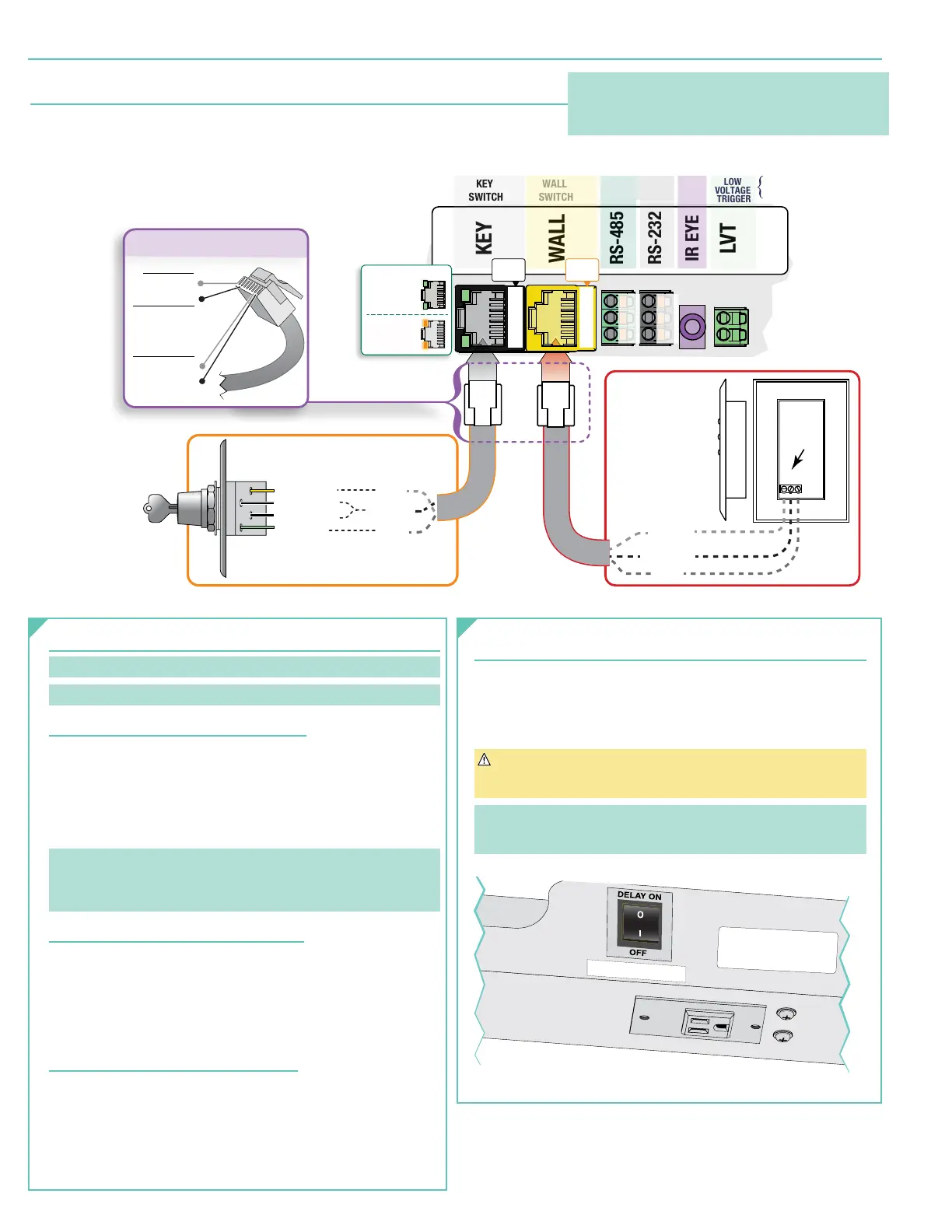
Section 8 - Connecting Controls to Data Cable Splitter Board
1.
Controls plug into the Data Cable Splitter Board
(See diagram below)
which is located
on the Top Frame on the front side of the lift, using RJ45 connectors.
2.
IR or RF Control options available.
3.
For serial control, use data cable connectors on splitter board.
PIN OUTS
1 - UP
2 - DOWN
3 - NOT USED
4 - NOT USED
5 - NOT USED
6 - NOT USED
7 - COM
8 - COM
MAKING YOUR OWN CABLES?
KEY
WALL
RS-485
RS-232
IR EYE
LVT
Red - Down
Black - Com
Black - Com
Blue - Up
Pin 2
Pin 1
Pin 7 or 8
DCU
Pin 2
Pin 1
Pin 7 or 8
LED Feedback:
Flicker GREEN
WORKING
Flicker ORANGE
ERROR
LVC-S
Show Position
SP-KSM
Key Switch Service Position
3-28 VDC
Polarity Independent
DATA CABLE SPLITTER BOARD
BACK
of
LVC-S
KEY
SWITCH
WALL
SWITCH
Serial Ports
LOW
VOLTAGE
TRIGGER
IR
A-
B+
GND
GDN
DIN
DOUT
1
2
3
4
5
6
7
8
PORT
PINS
PORT
PINS
1
2
3
4
5
6
7
8
Please Note:
Any control, including automated dry contact systems,
being connected to the wall switch input MUST send a
momentary signal.
page 6 of 8
Scissor Lift - SLX 115V


 To Next Page